

About This File
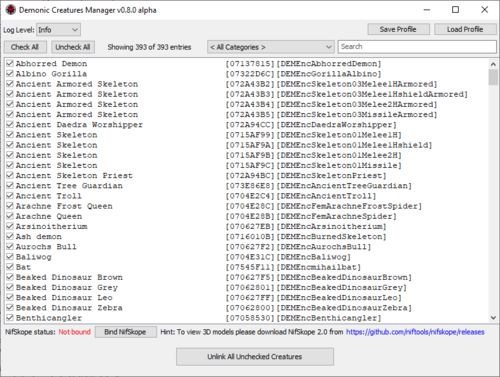
Demonic Creatures Manager, or DCM, is a xEdit Script (aka Delphi GUI app) that allows to disable the spawn of any selected creatures from Thor2000's Demonic Creatures mod. If you find some creatures too disturbing/hard/scary/non-immersive/etc, now you have a convenient way to put them into eternal metadata jail! DCM implements sophisticated algorithm that removes the records that enable creature spawn via known mechanics. Please do note that DCM is considered to be in alpha testing phase either until I get multiple confirmations from users or until Thor2000 will be so kind to confirm that I haven't miss anything.
Even though I've tried my best to ensure the DCM to be as bug-free as possible, as well as to force the algo to respect the reference chain integrity, DCM still needs to go through the testing phase. If you notice any error message, please let me know about it.
Compatibility:
- xEdit 4.0.4 / 4.1.4
- Demonic Creatures SE/LE (should be compatible with all future versions of Demonic Creatures as long as the spawning methods stay the same)
Installation:
- Install the xEdit. Make sure to run it with correct launch arguments (-SSE for SE, -TES5 for LE, -TES5VR for VR)!
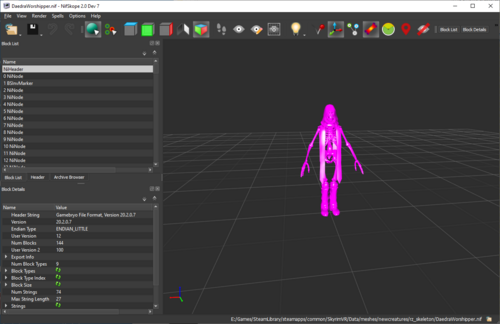
- [Optional] Install the NifSkope. If you don't want to be able to view 3D models of creatures, you can skip this step.
- Unpack and place 'DemonicCreaturesManager.pas' to the '\Edit Scripts\' directory of your xEdit installation.
How to start DCM:
- Run xEdit through Mod Manager of your choice or directly from xEdit's .exe if you don't use any Mod Manager.
- In 'Module Selection' popup window right click any file and click 'Select None'.
- Input 'dem' into the 'Filter' filed and check the checkbox of DemonicCreatures.esp.
- Press 'OK' to close the popup and wait until you see 'Background Loader: finished' in 'Messages' tab. It may take up to several minutes for the first time.
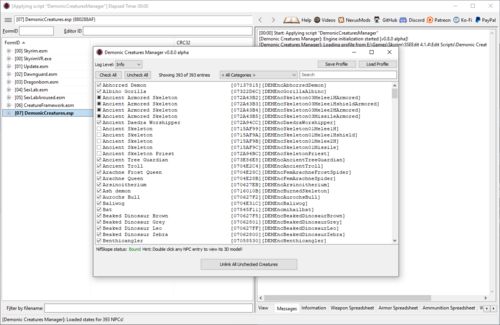
- Right click 'DemonicCreatures.esp' in the left tab and click 'Apply Script'.
- Input 'dem' into the 'Filter' filed, make sure that DemonicCreaturesManager script is selected and press 'OK'.
How to use DCM:
- [Optional] Press 'Bind NifSkope', go to the location where it was unpacked, select NifSkope.exe and press 'Open'. NifSkope status will change to 'Bound'. From this point you'll be able to double click any creature to view its (sadly untextured) 3D model.
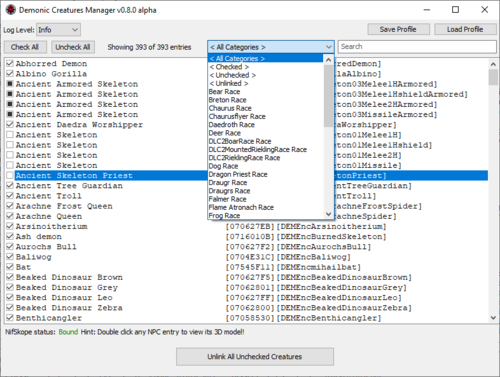
- Uncheck creatures you want to stop from spawning, feel free to use categories filter or full-text search to make navigation a little bit easier. Please do note that 'race' categories are based on the mod's metadata and may not be always accurate.
- Press 'Unlink All Unchecked Creatures' and wait until unchecked creatures become 'bricked' in the list (filled with black square). This action is global and doesn't respect the filters, but you always can double check the list of creatures that are going to be unlinked in '< Unchecked >' category!
- Close the DCM.
- [ALPHA TEST WARNING] Right click 'DemonicCreatures.esp' in the left tab and click 'Check for Errors'. Make sure xEdit says 'Errors found: 0' in the 'Messages' tab. If any errors found, please follow the Bug Reporting instruction. I strongly recommend to do this step until the DCM officially leaves testing phase.
- Close the xEdit, the 'Save changed files' window will pop up.
- To save changes check the 'Demonic Creatures.esp' and 'Backup plugins' checkboxes and then press 'OK'. To cancel changes uncheck the 'Demonic Creatures.esp' and then press 'OK'.
Hint: DCM also has a handy profile system. Path to NifSkope and states of all checkboxes will be saved on pressing the 'Unlink All Unchecked Creatures' button or closing the DCM's window and loaded on launch by default (data is stored in xEdit's '\Edit Scripts\Demonic Creatures Manager Default Profile.csv'). Also you can manually save profile to any file (including the default one) with 'Save Profile' button and load any file with 'Load Profile' button.
Reverting the changes:
The only way to restore any creature that was unlinked in the already saved DemonicCreatures.esp is to manually replace modified .esp with backup. If you previously checked the 'Backup plugins' checkbox during saving, backuped .esp's will be located in '\Data/SSEEdit Backups\' directory ('\Data\TES5Edit Backups\' or '\Data\TES5VREdit Backups\' for LE/VR versions). Also you can always use default .esp from downloaded Demonic Creatures archive.
Bug Reporting:
1. Open https://pastebin.com/ website.
2. Copy the entire contents of xEdit's 'Messages' tab to 'New Paste' text filed.
3. Open '\Edit Scripts\Demonic Creatures Manager Default Profile.csv' file with Notepad and copy its contents to 'New Paste' text filed.
4. Press 'Create New Paste' and give me the link with short description of your actions.
Algo Description:
For each selected NPC_ record:
For each reference to NPC_ record:
1) If referenced by QUST record: Replace all related ALCO records in Alias entries of QUST record's Aliases container with EncBandit01Melee1HNordM [NPC_:0001BCD8].
2) If referenced by LVLN record: Remove all related LVLO records from LVLN record's Leveled List Entries container.
If LVLN record's Leveled List Entries container became empty:
For each reference to LVLN record:
2.1) If referenced by another LVLN record: Remove all related LVLO records from its Leveled List Entries container.
If LVLN record's Leveled List Entries container became empty:
2.1.1) Recursively call #2 for LVLN record.
2.2) If referenced by NPC_ record: (it's DEMLvlEncXXX 'dummy' leveled NPC_ record for spawn mechanics)
For each reference to NPC_ record:
2.2.1) If referenced by QUST record: Replace all related ALCO records in Alias entries of QUST record's Aliases container with LvlBanditMelee1H [NPC_:0003DECB].
2.2.2) If referenced by ACHR record: Call #3 for ACHR record to remove it.
2.2.3) If no references left for NPC_ record: Remove NPC_ record.
2.3) If no references left for LVLN record: Remove LVLN record.
3) If referenced by ACHR record:
For each reference to ACHR record:
3.1) If referenced by another ACHR record: Recursively call #3 for ACHR record to remove it.
3.2) If referenced by PACK record:
For each reference to PACK record:
3.2.1) If referenced by NPC_ record: Remove all related PKID records from NPC_ record's Packages container.
3.2.2) If no references left for PACK record: Remove PACK record.
3.3) If no references left for ACHR record: Remove ACHR record.
Credits:
ElminsterAU and co (xEdit)
NifTools team (NifSkope)
Edited by SpectrumQT
What's New in Version 0.8.1 alpha
Released
* Fixed minor GUI error on clicking empty checkbox list space after selecting a category with low entries count.