


Jump to content

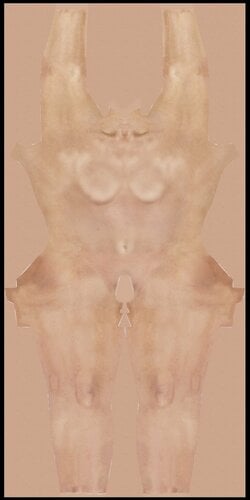
1 Screenshot

About This File

Had this in my Backup drive and uploaded to Mega. Almost 10 gigs of 4x skins 134 in total. I can't remember the original person who posted in the garden. Sorry they deserve the credit for there work putting this together. 

Found more info: I believe the original on the garden was ivansgx R9X Skins Megapack

For people using 4x mod (https://www.loverslab.com/files/file/14562-mrollyks-4x-body-mod/)for Vx don't forget to rename! you have have to put Mod_ in front to use with the 4x skin mod [Example Mod_Female_White_Body.]


What's New in Version 1.0.0   See changelog

Released

Updated a download link to a version that is already had the skin renamed for Mrollyk 4x skin Vx mod . The file is just under 5 gigs zipped.

Other Files from topcat37


User Feedback

Recommended Comments

jerom99

Posted

I think the mega link doesn't work

topcat37

Posted

11 hours ago, jerom99 said:

I think the mega link doesn't work

I just Double checked it. it is working fine on my end. Megaskin

hdiddy

Posted

Download button works other links do not.  Will run through and add what I don't have to the Universal Skin System.  Cheers!!

jerom99

Posted

sorry, I used the link, thanks!?

Kindbud70

Posted

Question: Does "mod_" have to be added in front of the individual file contents in order to get them to work? I'm still downloading the skinpack but I read somewhere (probably on KE) about doing that for the skins to show in customizer.


topcat37

Posted

Yes you have have to put Mod_ in front to use with the 4x skin mod [Example Mod_Female_White_Body.]

moonvied

Posted

Hello! I am new to modding and the TK17 community and I was just confused on how to install this on the game.

topcat37

Posted


Hello! I am new to modding and the TK17 community and I was just confused on how to install this on the game.

These go in the Mod/ActiveMod folder. Depending on which game version you use you have to name the textures so they will work with the version you have. Most people use the VX version along with the 4x mod. They need the Mod_ prefix added which is already done in the last updated download.  hope that helps.

MaxxBlack

Posted

Sorry also pretty new.  It seems to work but I noticed that when I apply the 4X skins items such as socks and stocking do not cover feet.  Am I doing something wrong?

Thank you for your help.

topcat37

Posted

Are you using the 4xMod from MrOllyks? Are using default body or moded one? Some stocking also have a foot texture.  Which game version? Do some work and some don't?

MaxxBlack

Posted

I am on VX using MrOllyks.  I have all of these skins installed and all of them just the feet are not covered by socks or the foot sections of stockings.  The rest of the body, face looks right and acts right with clothing.

Jo 12

Posted

the resolution of socks or foot sections is wrong. check the correct resolution  of an existing picture and fix that pic with paint.net or another simple paint programm where u can change resolution of jpg or png files. worth a try. normal socks have 256x256 if i remember right.

gipsydangerx

Posted

On 12/23/2020 at 10:08 AM, topcat37 said:

These go in the Mod/ActiveMod folder. Depending on which game version you use you have to name the textures so they will work with the version you have. Most people use the VX version along with the 4x mod. They need the Mod_ prefix added which is already done in the last updated download.  hope that helps.

I have placed files according to your instructions but it is not seems to be working. I have VX version. I also tried putting Mod_ prefix to female body png files.

gipsydangerx

Posted

59 minutes ago, gipsydangerx said:

I have placed files according to your instructions but it is not seems to be working. I have VX version. I also tried putting Mod_ prefix to female body png files.

I have already installed a mature skin pack which is working fine. But I am unable to use this file. Please help me.

topcat37

Posted (edited)

You installed the 4x mod? Then to use the a 4x skin it needs to be 2048x4096 and be named  mod_Female_White_Body.png  mod_Female_White_Feet.png ......... 

Chose 4x Body Face :           ollyk2.jpg.fa7c9bc907c82653c05cad11b248d6ac.jpg  The second download "file" is the one that is already renamed for 4x mod.

Edited by topcat37
kristabs2

Posted

This works with hook5? I'm using hook5 and it seems that doesn't work.

userzero10

Posted (edited)

4 hours ago, kristabs2 said:

This works with hook5? I'm using hook5 and it seems that doesn't work.


do some reading

Edited by userzero10
kristabs2

Posted

I read. But I'm new. I have hook 5. How should installl 4,x mod? And where should I get it?

And on the comments nobody mentioned hook 5,

xguntherx

Posted

Hey guys,


I downloaded 5 GB pack and body x4 mod. Women skins are worked but male not. I checked particular forlders with male skins and there are names without Mod_ prefix. I added it but skins can't still by recognized. 0 skins to choose in creator.


I changed followed files.

Mod_Male_Body.png

Mod_Male_Body_pass.txt

Mod_Male_Feet.png

Mod_Male_Feet_pass.txt

Mod_Male_Genital.png

Mod_Male_Genital_pass.txt

Mod_Male_Hand.png

Mod_Male_Hand_pass.txt

Mod_Male_Head.png

Mod_Male_Head_pass.txt


Any ideas?

blindside18

Posted

On 10/5/2021 at 1:37 AM, xguntherx said:

Hey guys,


I downloaded 5 GB pack and body x4 mod. Women skins are worked but male not. I checked particular forlders with male skins and there are names without Mod_ prefix. I added it but skins can't still by recognized. 0 skins to choose in creator.


I changed followed files.

Mod_Male_Body.png

Mod_Male_Body_pass.txt

Mod_Male_Feet.png

Mod_Male_Feet_pass.txt

Mod_Male_Genital.png

Mod_Male_Genital_pass.txt

Mod_Male_Hand.png

Mod_Male_Hand_pass.txt

Mod_Male_Head.png

Mod_Male_Head_pass.txt


Any ideas?

If using VX prefix "Mod_Male_White_" or "Mod_Male_African_"

Plasmadose

Posted

On 10/6/2021 at 5:45 PM, blindside18 said:

If using VX prefix "Mod_Male_White_" or "Mod_Male_African_"


Holy shit, thank you. Had no idea what was going on only to discover that the file names were way off. 

×
×
  • Create New...