

SLSF Reloaded - Fame Decay and Spread

Overview
SLSF Reloaded will decay fame in every location twice per day (once every 12 hours) by default, and attempt to spread fame once per day (once every 24 hours).
You can change the timers for these in the MCM, however your changed timer will not apply until the next timer stars.
When you Sleep or Wait, the mod will account for the time that has passed. IT IS HIGHLY RECOMMENDED TO NOT SPAM THE SLEEP/WAIT MENU!!!
The mod will attempt to "catch up" with itself by multiplying your Fame Decays by the number that should have happened since you last Slept or Waited.
For example, if 2 Decays should have happened while you were sleeping or waiting, it will multiply the decay changes by 2 to simulate multiple decays happening instead of actually running the entire script again.
However, Fame Spreads will not do this because that's not a reasonable solution. If you manage to get a negative "Spread Countdown", it will run the spread function every half-hour until it catches back up with itself.
Fame Decay
When a decay event happens, it will check your CURRENT fame value in that category before removing any. Then, it will remove a random amount of fame from that category based on how much fame you currently have:
-
1-24: Lose 1 to 5 per instance by default
- This is the "Very Low" tier
-
25-49: Lose 1 to 4 per instance by default
- This is the "Low" tier
-
50-74: Lose 1 to 3 per instance by default
- This is the "Medium" tier
-
75-99: Lose 1 or 2 per instance by default
- This is the "High" tier
-
100+: Lose 1 per instance by default
- This is the "Very High" tier
Decay is intentionally slower than gains by default. This is to represent how becoming “well known” in an area can be difficult to shake off. Decay is also multiplied by the “Fame Change Multiplier” settings, and regardless of any settings always decays by at least 1. You can change the maximum amount of decay for each fame tier. You can set it to any number between 1 and 20.
If you gain fame at any point during the current countdown, your decay will be "Paused" for the location you gained fame at. A "Paused" location will be skipped during the next decay cycle. This effectively means you must not gain any fame for at least 12 consecutive hours before a decay will happen. This "Pause" function prevents newly acquired fame from decaying immediately.
In the MCM, a location's "Can Decay" status will show as "TRUE" if you have fame in that location and have not gained any fame since the last decay cycle. If you gained fame during the current decay cycle, or if you don't have any fame at all in that location, the "Can Decay" status will show as "FALSE".
By default, Fame Decay notifications are disabled, but you may enable them in the MCM. Disabled notifications give a more "realistic" experience because you might not always 'know' that your fame has changed.
Fame Spread
Every 24 hours, a Spread function is performed. This function will check every location to see if fame can be spread from that location.
Fame can be spread from a location as long as one or more categories has a fame value equal to or higher than the minimum amount defined in the MCM. By default, this minimum is 30, but can be set to between 10 and 100, in steps of 10 (10, 20, 30 40, etc). The reason why it needs to be in steps of 10 is due to how fame spread is calculated.
If the spread function finds a location with one or more categories that meet the requirement, it will first decide if any fame from that location is spread at all by rolling against the location's "Spread Chance" (30% to start). This is done by randomly picking a number between 1 and 100, then seeing if that number is equal to or less than the location's Spread Chance. If it is, it will then randomly pick another location as the "Spread Target". The Spread Target is the location where the fame will spread to, which will add fame to that location's pool.
Finally, it will then grab all of the categories that meet the Spread requirement and randomly pick HOW MANY of those categories to spread (limited by your "Maximum Spread Categories" setting, with a hard maximum of 10), then randomly pick WHICH valid categories to spread. The amount of fame that is spread from each valid category is randomly chosen between 10%, 20%, 30%, 40%, and 50%, but is limited by your "Maximum Spread Percentage" setting.
EXAMPLE
If I have enough Slut, Tattoo, and Bound Fame in Whiterun that meet the spread requirement, it will first decide where to spread fame to. Let's say it picks Solitude. Next, it will randomly pick how many of my valid categories to spread (between 1 and 3) - let's say it picked 2. Next, it will choose which of my valid categories to spread. Let's say it picked the Slut and Bound categories. Now, it will randomly spread 10%, 20%, 30%, 40%, or 50% of each decided category (Slut and Bound) to add to the target location (Solitude), but let's say I have the default "Maximum Spread Percentage" setting (30%). This means only 10%, 20%, or 30% of my fame value from each category will be spread.
Lastly, let's say my fame in each decided category is 50. If it decides to spread 30% of my Slut fame, I will gain 15 Slut fame in Solitude. If it decides to spread 10% of my Bound fame, I will gain 5 Bound fame in solitude. With that, the spread function is finished and moves on to the next location and repeats the process.
Fame is NOT removed from the Fame Spread's originating location. This means if, for example, Whiterun's fame spreads to Solitude, Whiterun does not lose any fame, but Solitude does GAIN fame.
If a location can spread, and its overall spread check succeeds, it will have its odds of spreading on the next check reduced by 10% (default). However, if a location's overall spread check fails, it will have its odds of spreading on the next check increased by 10% (default). You can change these chance increases/decreases in the MCM.
If a location has no eligible fame to spread, it will be skipped by the spread function and its odds of spreading will not change.
In the MCM, a Location's "Can Spread" status will be TRUE if if at least one fame category in that location is equal to or higher than the minimum amount defined.
By default, Fame Spread notifications are disabled, but you may enable them in the MCM.
Fame Spread Restrictions
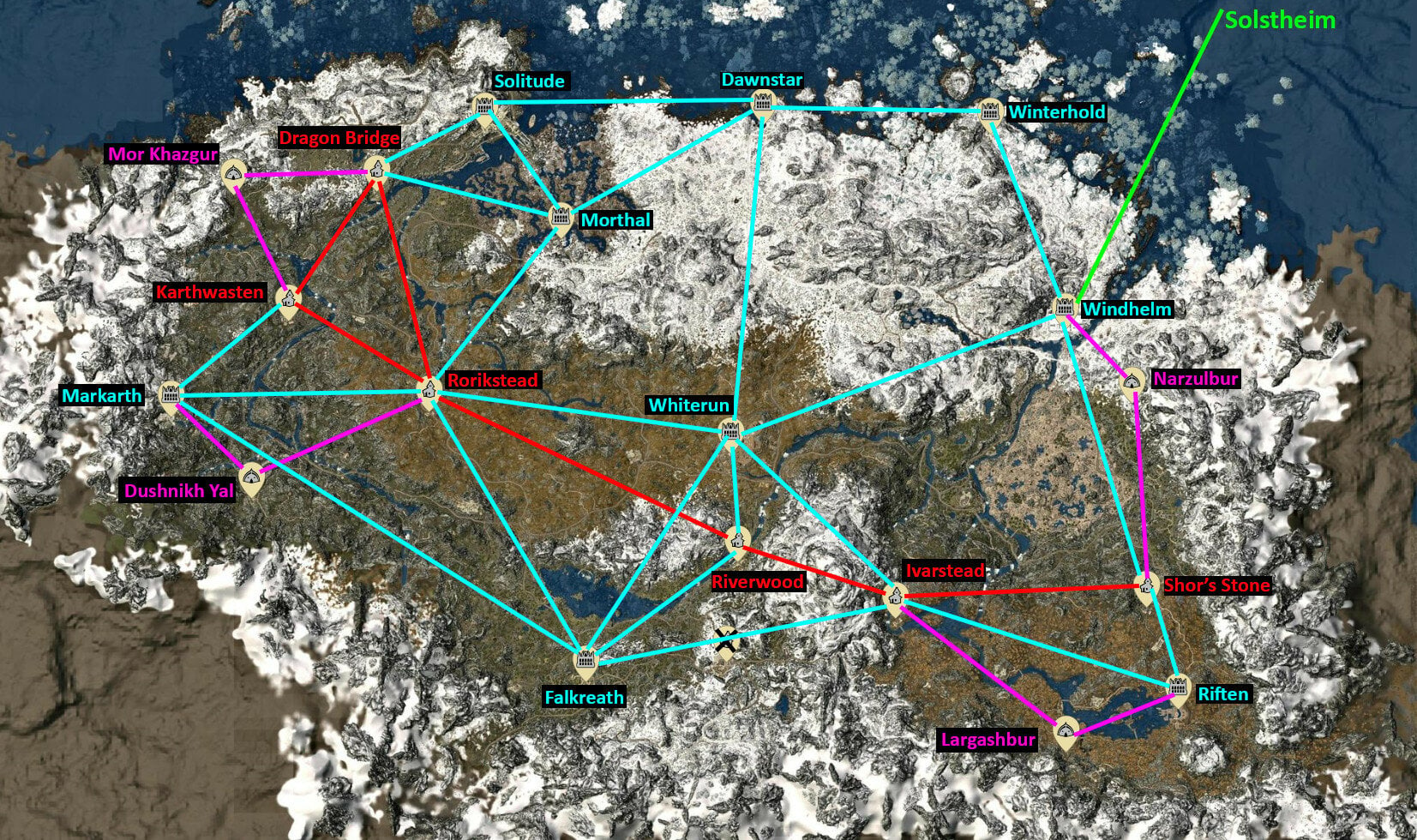
When enabled, Fame will only spread to certain other areas instead of anywhere. The map below shows what locations are "connected". Connected locations can have fame spread between them. For example, Riverwood is connected to Whiterun, Ivarstead, Falkreath, and Rorikstead. Therefore, one of those four locations will be chosen to spread fame to if a spread check succeeds (assuming there are also no Custom Locations).
Custom Locations are assigned to the Hold they're currently detected to be in. If for some reason an appropriate Hold cannot be found, it will be an 'Undefined' Custom Location. Undefined Custom Locations are connected to all other locations.
Connection Map
RED = Town to Town Connection (fame spreads from one town to another town)
TEAL = Hold Capital City Connection (fame spreads to or from a Hold Capital City, excluding Orc Strongholds)
PURPLE = Orc Stronghold Connection (fame spreads to or from an Orc Stronghold)
GREEN = Solstheim Connection
Concerning Solstheim
Windhelm is the only location in Mainland Skyrim that can spread fame to Raven Rock.
Raven Rock can spread fame to Windhelm or Skaal Village.
Skaal Village can only spread fame to Raven Rock.
Custom Locations detected as being in Solstheim connect to every other location in Solstheim.
The Connection types do not matter. They just make reading the map a little easier.
Edited by NymphoElf
0 Comments
Recommended Comments
There are no comments to display.