Jump to content
  • entries
    56
  • comments
    262
  • views
    36964

Texture transfering for cock cages


TRX_Trixter

3862 views

A little guide how to make fast textures transfering from existing texture patches for TRX addons to new UV for SOS parts on my Cock cages mod

You will need

1. Blender file for transfering textures with the base model Cages_3BA_UV_Rebuilder.7z
2. Blender addon TexTolls

How to do this


1. Open my blender file and check the UV maps. Set all as on image.
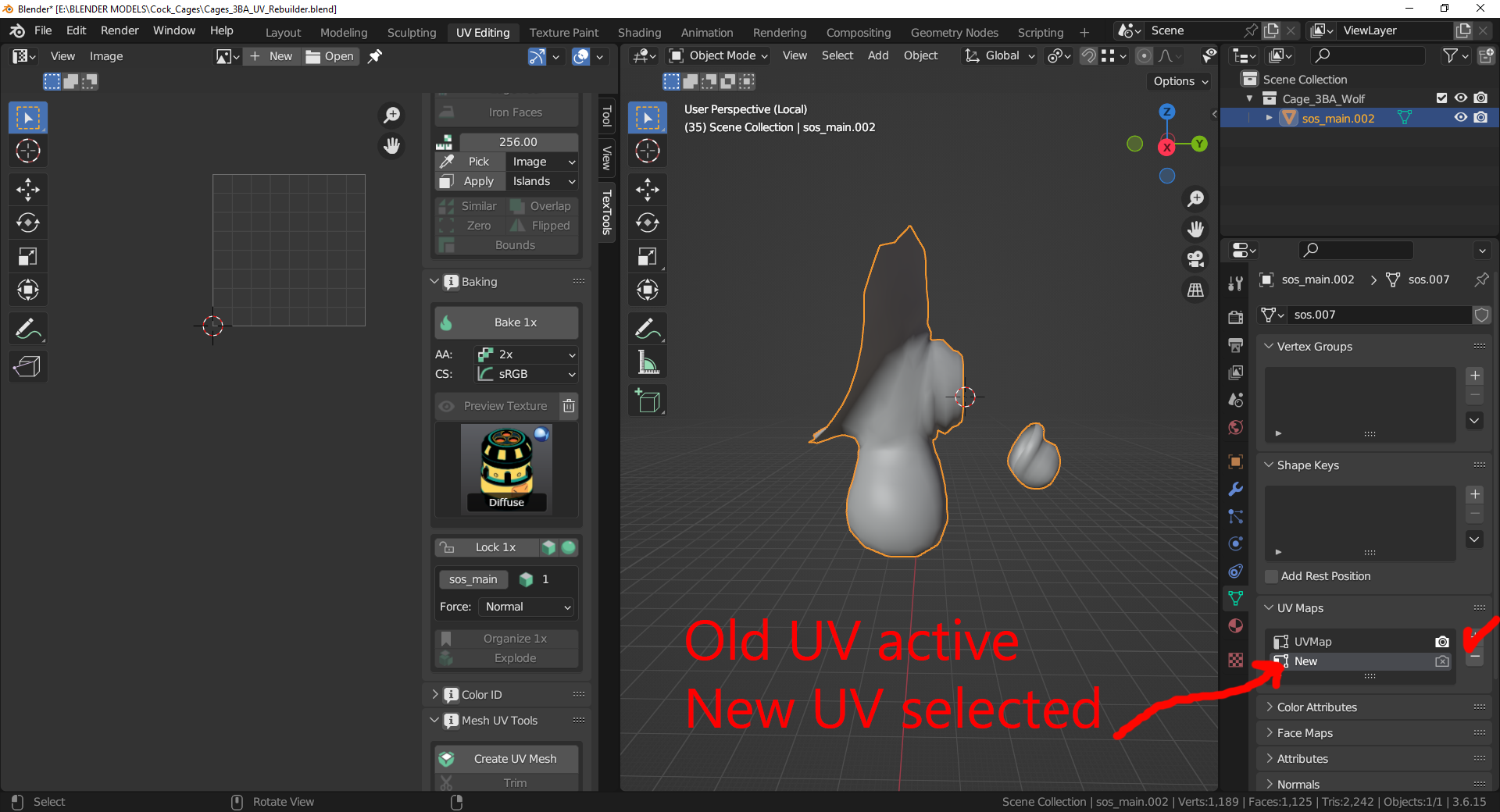
image.png.6a148a7fc4b4d15547ddeb10644c30e0.png


Old UV must have photo icon active and new UV must be selected

2. image.png.3a3bb3c06261d10a40afd68561960ba2.png
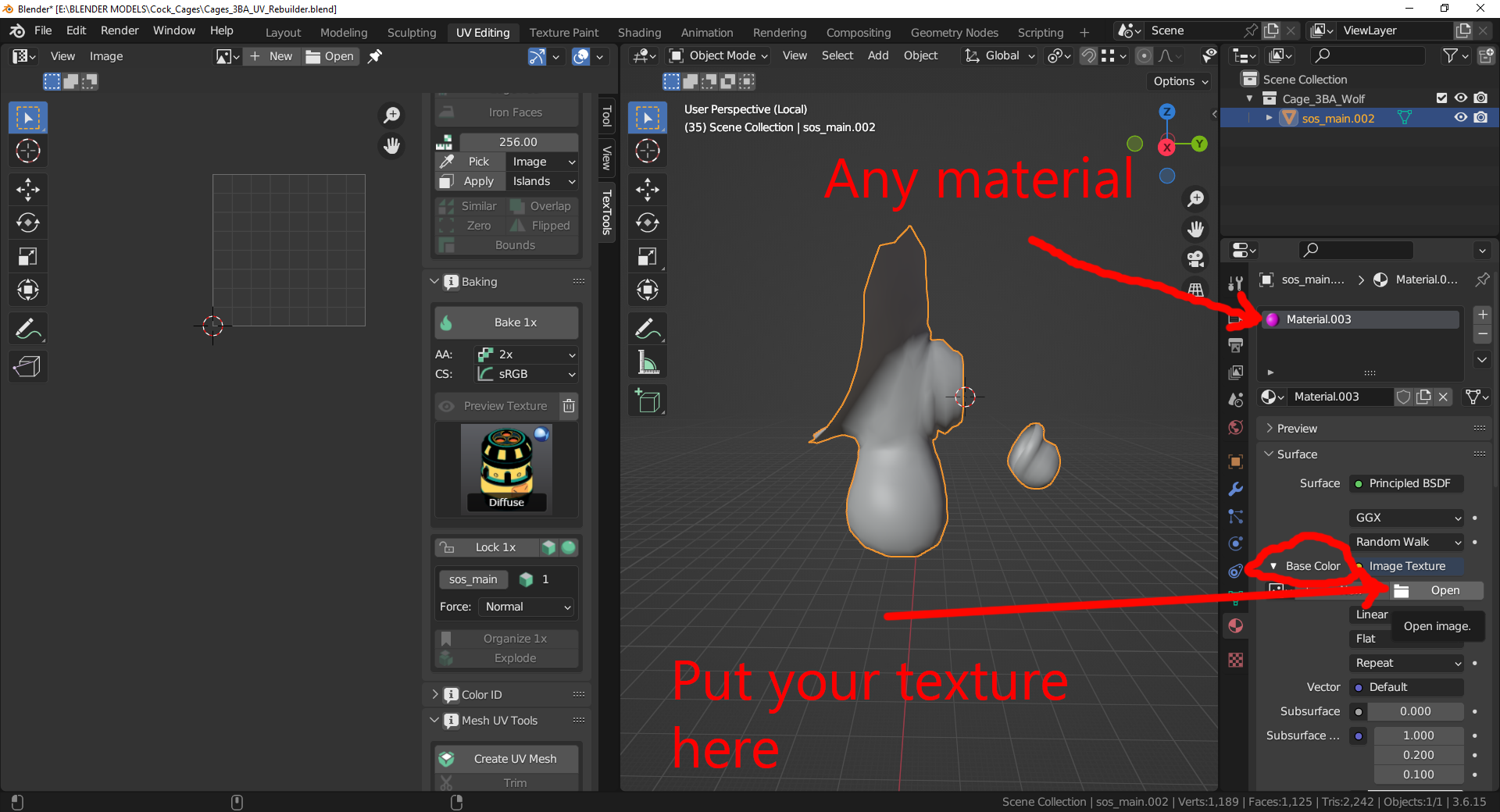
 

Add any material to mesh and put your target texture to material base color option. You will see some weird results on the mesh. Just ignore it.

3. image.png.b39582694c8e12d027123a759d9169e2.png
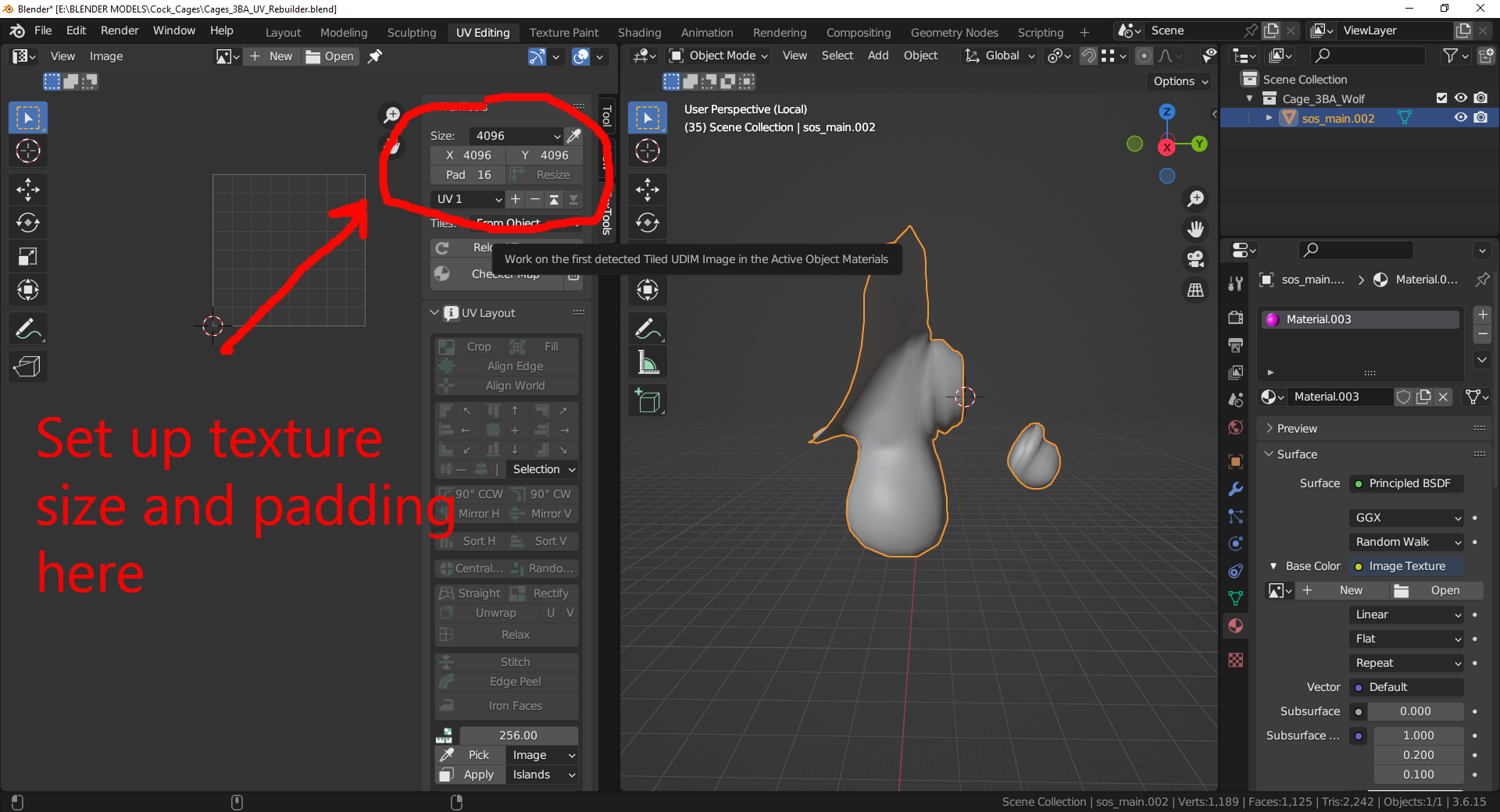
 

Open TexTools settings (by pressing N on the left window) and set up texture size and padding. Im using 4k for size and 16 for padding.


4. image.png.51b95fa3298558f2005970e6895c333b.png
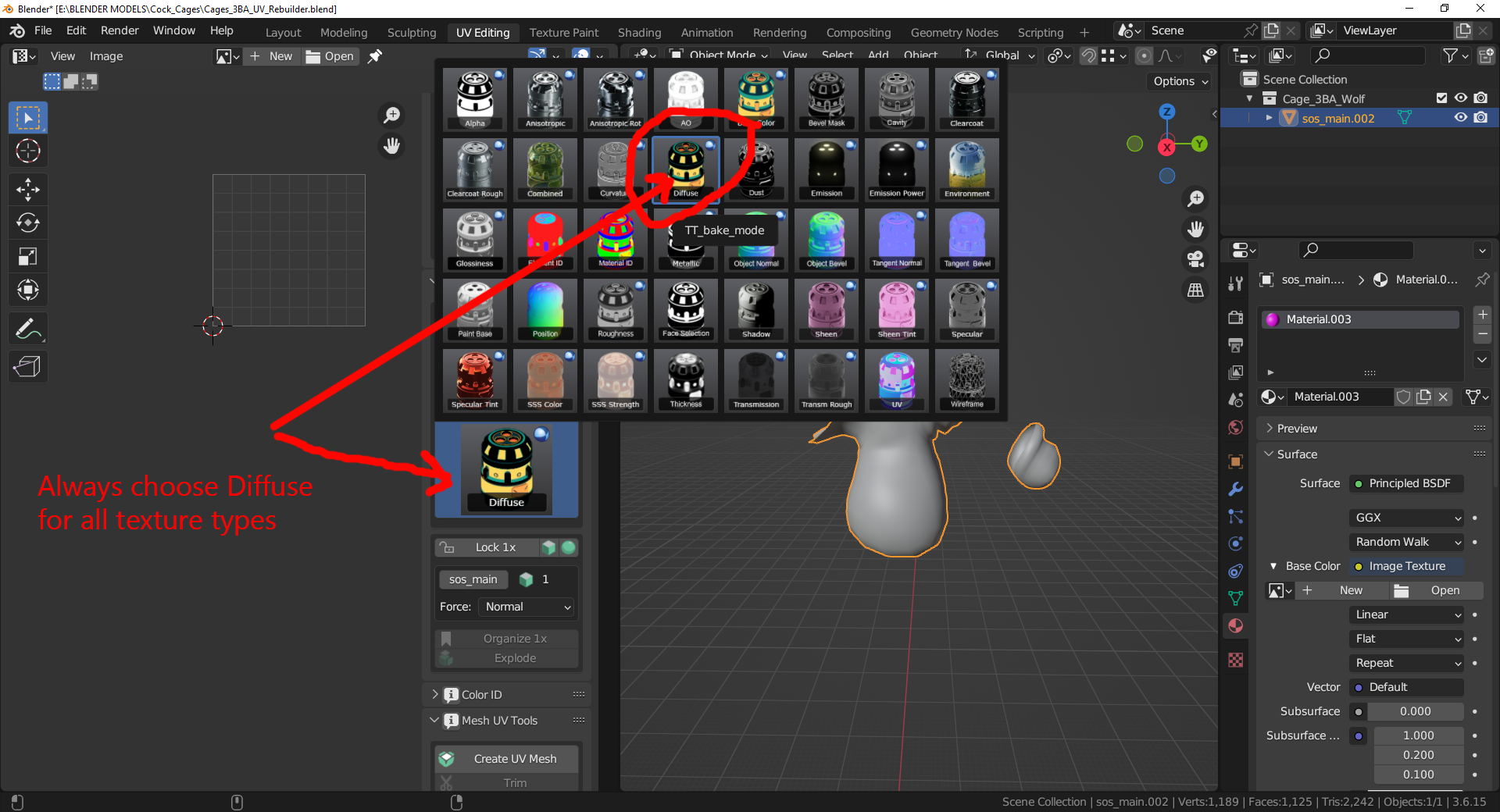
 

Set texture type for baking as Diffuse. Always Diffuse. Its does not matter what texture type you are rebaking (diffuse, normal, specular) you need to set up it as diffuse.

5. 
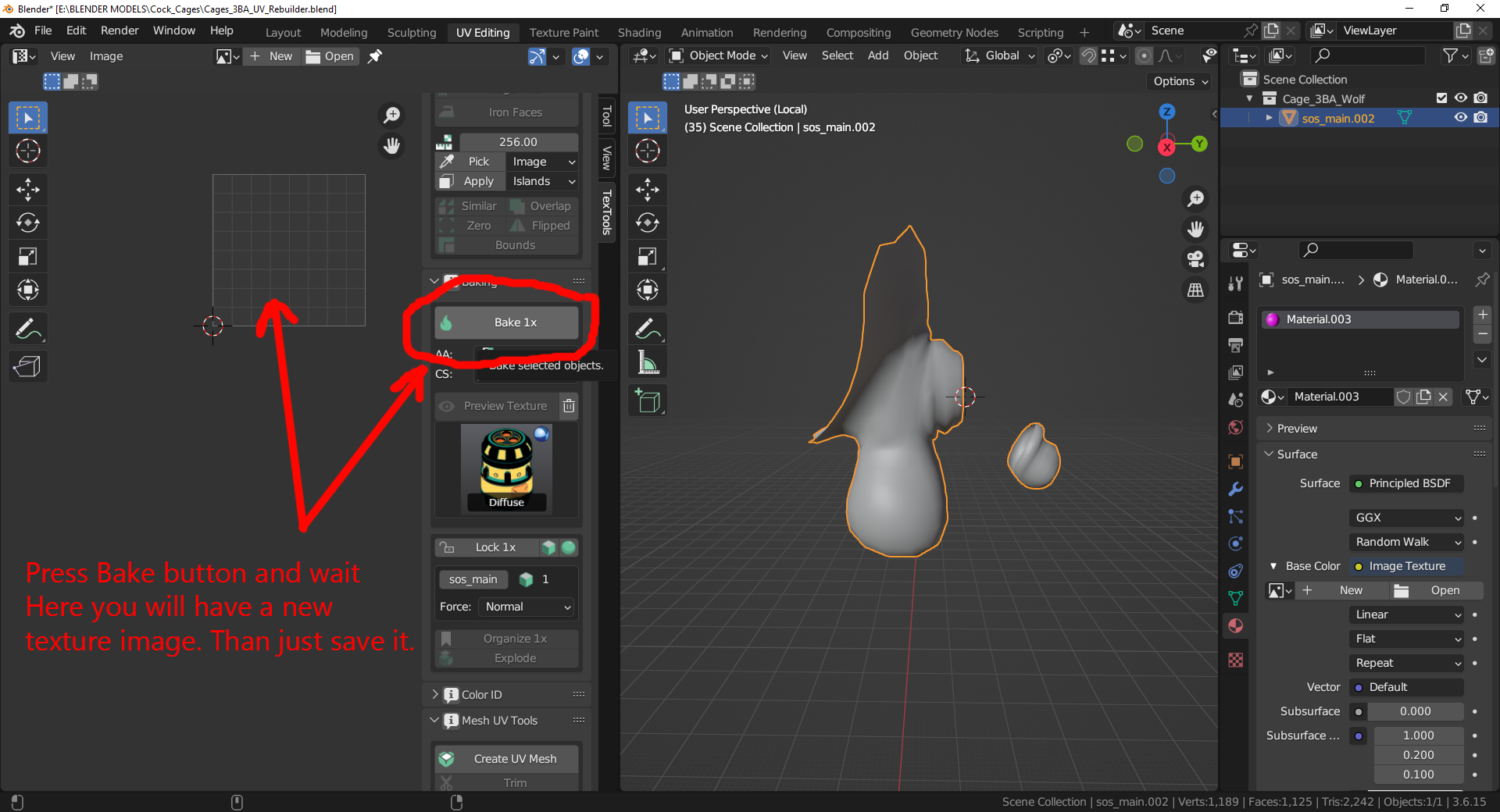
image.png.24bbf21ac39e6d84f295a077eecee373.png


Press bake button and wait. When process will be finished you will see on the left window your new texture. Save it with "Image" menu as new file.


You will need to repeat this process with all textures in model package: diffuse, normal, specular. And SK if you using it. Thats all.

17 Comments


Recommended Comments

Ar4chnid

Posted

Hi! New at working with Blender/textures/meshes etc, what will be the name of the target texture file for #2? I'm using T.N.G and Demoniac Skin Textures 1.32.


I'm assuming one of the following:
malegenitalsf_1.dds

malegenitalsf_1_msn.dds

malegenitalsf_1_s.dds

malegenitalsf_1_sk.dds


but I'm not sure which one, and the "Bake" option later on is greyed out with any of them selected.

Thanks a lot for all the work and guidance ❤️

TRX_Trixter

Posted

Hi.
1. You need to rebake all 4 textures one by one. 
2. If Bake button is greyed thed object (shlong) in right window might be not active (selected)

Ar4chnid

Posted

Ah there we go, that was the issue.
Do these new files just replace the old ones, in my case in \Vortex Staging\skyrimse\Demoniac FMS v1.32 CBBE\textures\ERF_HighPolySoS?

TRX_Trixter

Posted (edited)

No.

Cock cages mod has its own SOS mesh so you will need to replace it textures with yours.

1. Save all new files in dds format (DTX5 compression for example)
2. Now you need to replace fair skin mod files with your new textures. Look at this mod folder

Data\textures\[TRX]_Cock_Cages\Cages\SOS

You need to replace files in subfolders:
DarkElf

Default

HighElf

Orc
WoodElf

Edited by TRX_Trixter
Ar4chnid

Posted

Inspected my character with More Informative Console - turns out, the texture being used for the schlong inside the cage isn't textures\[TRX]_Cock_Cages\Cages\SOS\Default, but rather textures\[TRX] SOS Addon Male\Default.


Replaced those instead, everything seems to be working now, though I'm not sure why the wrong textures are being used.

asdiwf

Posted

How to bake SchlongZT_msn? 

TRX_Trixter

Posted

1 hour ago, asdiwf said:

How to bake SchlongZT_msn? 

For all textures type algorithm is the same.

lifc193

Posted

I'm completely new to this. So eventually I get a .png, but where is the dds? I just need to change it into dds? 

lifc193

Posted

On 10/18/2024 at 10:04 PM, TRX_Trixter said:

For all textures type algorithm is the same.

Is there a smooth balls version?

TRX_Trixter

Posted

3 hours ago, lifc193 said:

I'm completely new to this. So eventually I get a .png, but where is the dds? I just need to change it into dds? 

Yep. With Photoshop + dds plugin or Gimp2 + dds plugin.


2 hours ago, lifc193 said:

Is there a smooth balls version?

What do you mean?

Renrsir

Posted

Can you record a tutorial video? I don't know which step went wrong?
I originally wanted to make a diamond version, but it ended up like this

SOS.PNG

Sir13_

Posted

item name in body studio ?

Martin1313

Posted

TNG Change cajes textures default TRX textures(((

Kamamimo

Posted

I followed the guide, but UV seam appears strange.

0Lynk

Posted

On 11/30/2024 at 3:11 PM, Renrsir said:

Can you record a tutorial video? I don't know which step went wrong?
您能录制一个教程视频吗?我不知道哪个步骤出错了?
I originally wanted to make a diamond version, but it ended up like this
我本来想做一个钻石版,但最后是这样的

SOS.PNG

Need select UV2

fg105484

Posted

On 1/30/2025 at 8:10 PM, 0Lynk said:

Need select UV2


On 11/30/2024 at 3:11 PM, Renrsir said:

Can you record a tutorial video? I don't know which step went wrong?
I originally wanted to make a diamond version, but it ended up like this

SOS.PNG

Friend, have you finished your diamond skin version? Can you share it?

×
×
  • Create New...