

fejeena
-
Posts
10119 -
Joined
-
Last visited
-
Days Won
2





.thumb.jpg.db989b41c19c3f8f82cbfb2966225b29.jpg)

-
010090ea not giving a warning?
fejeena replied to CuriousMf's topic in Technical Support - Lovers with PK
Yes the program files x86 was shit, you moved it is good. The OBSE loop message bug happened with Windows 10 too, but much less frequently than with Windows 11. Yes the message is harmless . But why do you want a script run in a loop? There are already enough scripts running; there's no need to run unnecessary ones. And why do you want to read the message again and again? And it's cluttering the console. If you want to check anything else in the console, you'll only see those stupid error messages, but not the last used sex animation number or other things you want to know. The Lovers with PK.esm I posted is the original with 2 deleted OBSE check scripts and Quests (the script must be bound to a quest). 2 Scripts and quests that are not required by the game or the mod. More information about the script https://www.loverslab.com/topic/248865-lovers-check-error-message/#findComment-7019674 In my posts from April 9, 2025 and May 1, 2025 ------------------- an old save file can cause problems with a new installed game and Mods. But you can test it, but if errors occur, keep in mind that it might be the old save file. -------------------- -
010090ea not giving a warning?
fejeena replied to CuriousMf's topic in Technical Support - Lovers with PK
Wrong game installation ? Never in C:\ program files .... because some programs don't work then. ( Not everyone has the problem. ) Most often it's OBSE and OBSE plugins that then don't work. There have been some problems since Windows 11. In Lovers with PK are two OBSE check scripts. If you haven't installed OBSE or are using a very, very old version, ( or many people with Win11) you will get the warning message. But unfortunately, the warning repeats itself over and over again. But those two scripts aren't needed for any other function in the mod or in any other Lovers mods. It's just for the OBSE check. A warning in the README would have been enough. You can install a Lovers with PK.esm without the OBSE check scripts And for any further issues that may arise, and for the Lovers with PK.esm without OBSE check , read this https://www.loverslab.com/topic/36443-oblivion-install-gametoolsbodiesbbb-load-order-sorting-espesm-cleaning-cs-cse-body-stretching/ Again: It is important not to install the game in the C program files! And the right load order of the mods. The Lovers with PK.esm without OBSE check scripts you have to scroll down to 2. Problems during gameplay. If Lovers/LAPF tells you OBSE is not working -
Shadder's High Heels for DMRA and DMRA-GUTS / SE
fejeena replied to samhain6's topic in Downloads - Oblivion Adult & Sex Mods
Yes you can PM me. And by the way I use an old NifSkope version that can not handle Syrim and Fallout4 nif. nifskope1.0.22 Yes, very old, but it can do everything I need. --- All skin colors in all body parts must be the same. And clothing that is split in multiple nif parts should be the same in all .nif files. Like the stockings in lowerbody and foot nif. -
Creatures: the off kf files / aggressive animations are used by male AND females. Creature fucks you/NPC the DEF kf files/ animations are used by female when you fuck the animal No special animations when female fucks you. And what should such an animation look like? How is a sheep or a deer supposed to rape the player? Okay, a female brown bear could knock a player to the ground, sit on him, and ride him cowgirl-style. ------------------- Encounters: not sure if you can watch the sex or whether it's just a calculation running in the background to check if the NPCs are having sex? I never used the Mod. With Lovers Joburg and Lovers Bed you can see the NPCs having sex. With Joburg also Creatures fucks NPCs.
-
LoversEncounter checks which NPCs meet, whether they have sex, get pregnant, and have children. So, ongoing script work. Across the whole game, even when the player isn't close by. And if you have installed LoversCreatures and enabled creature sex, all creatures will be checked as well. However, I don’t know why all creatures are checked and "blinking"—and not just friendly creatures like horses, sheep, and NPC dogs. You fight wild animals, or hunters kill deer... but apparently, people do other things with animals, too. And why don't all NPCs "blink" ? They are all being checked, too. So you can get a LoversEncounter message "Rena had a baby with Bailey." But in LoversEncounter - The Dukky Version, it says that it is for LoversCreatures and LoversCreatures2.5 But I don't use LoversEncounter. A mod I'm not interested in... Just like the gossip columns in newspapers; who got pregnant by whom, had a baby, or had a miscarriage.
-
Shadder's High Heels for DMRA and DMRA-GUTS / SE
fejeena replied to samhain6's topic in Downloads - Oblivion Adult & Sex Mods
It looks okay. Maybe the seam between the feet and the leg could be reduced a bit more. Check if all color , Alpha and gloss settings in NiMaterialProperty are the same in lowerbody and feet nif.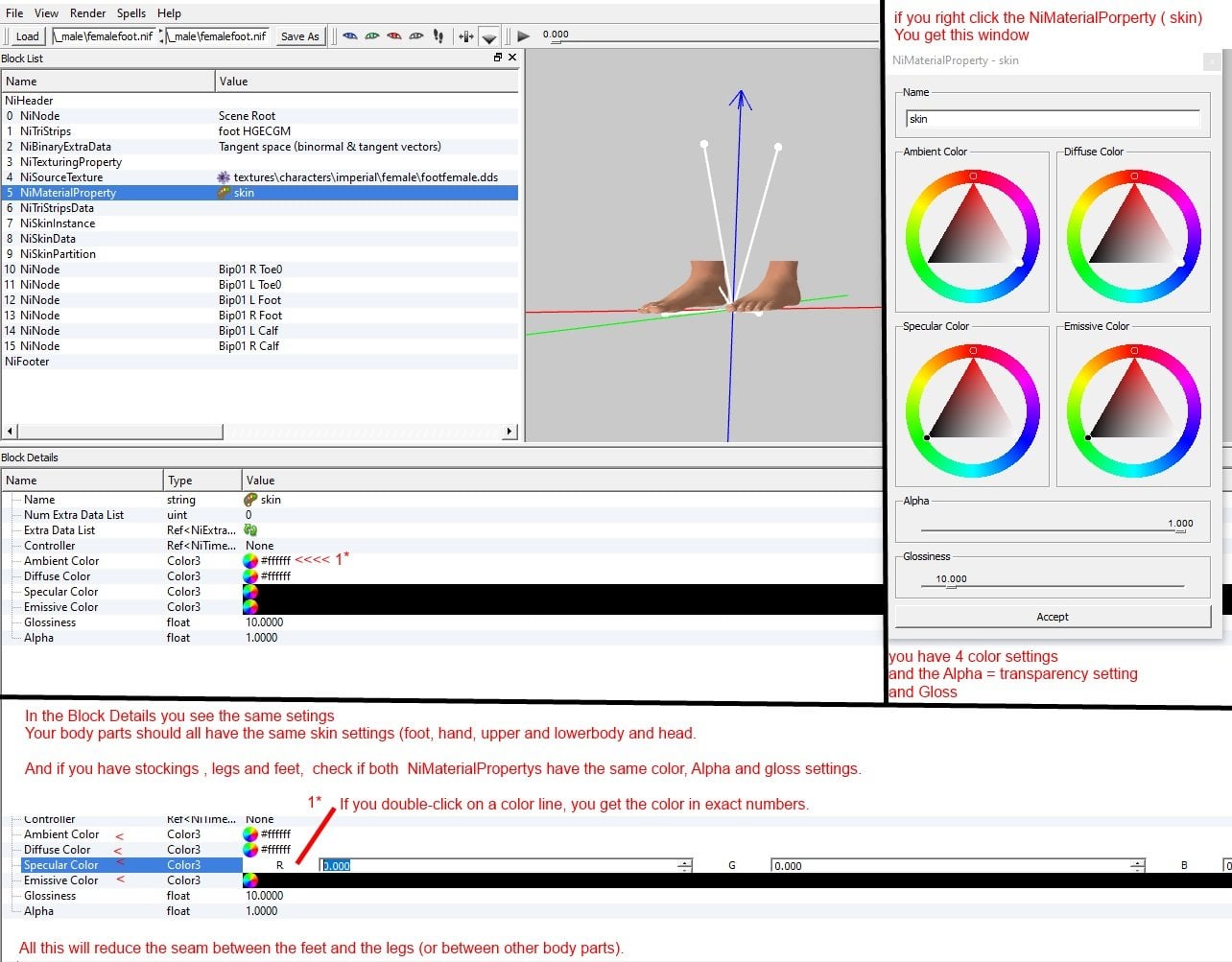
-
"Creature Rape" spell? Where? Which one? The summon creature spell from LoversCreatures? The creatures must attack to cast the sex spell. Lovers rapers: human an creatures use the same spell. In the settings you can set rape to not-hostile, then the rape spell is set to hostile. If you cast a hostile spell, the target naturally becomes angry, and guards react; animal companions (horses or those from companion mods) also naturally turn hostile because they are being attacked. And the most ceatures in game are always aggressive. The aggression seting is above 50 up to 100 and confidence is very high 90-100). A creature with low confidence will flee ( a dear with aggression 100 and confidence 0 will always flee ) If you use the not-hostile rsape spell on a Goblin (aggression 100, confidence 70) will attack you after the sex. But there is a setting for a "cool down" time after rape ( in Lovers Rapers or Lovers with PK settings ) When a creature has fucked me, I retreat to the back (out of its line of sight), and it pays no attention to me. (Sometimes in stealth mode) This setting affects all rapes from other mods. e.g. Joburg. So the creatures often simply walk away satisfied. The "cool down" time is a setting in a in-game setting spell, not in the ini file. ------------------ Many Lovers Mods have a ini file and some settings you can only do in the ini. Some ini files are only a backup of the default settings of the in-game spells.
-
Shadder's High Heels for DMRA and DMRA-GUTS / SE
fejeena replied to samhain6's topic in Downloads - Oblivion Adult & Sex Mods
I don't use high heels. What's the problem? Right nif settings for skin are always the same. Chech a working feet nif and use the same settings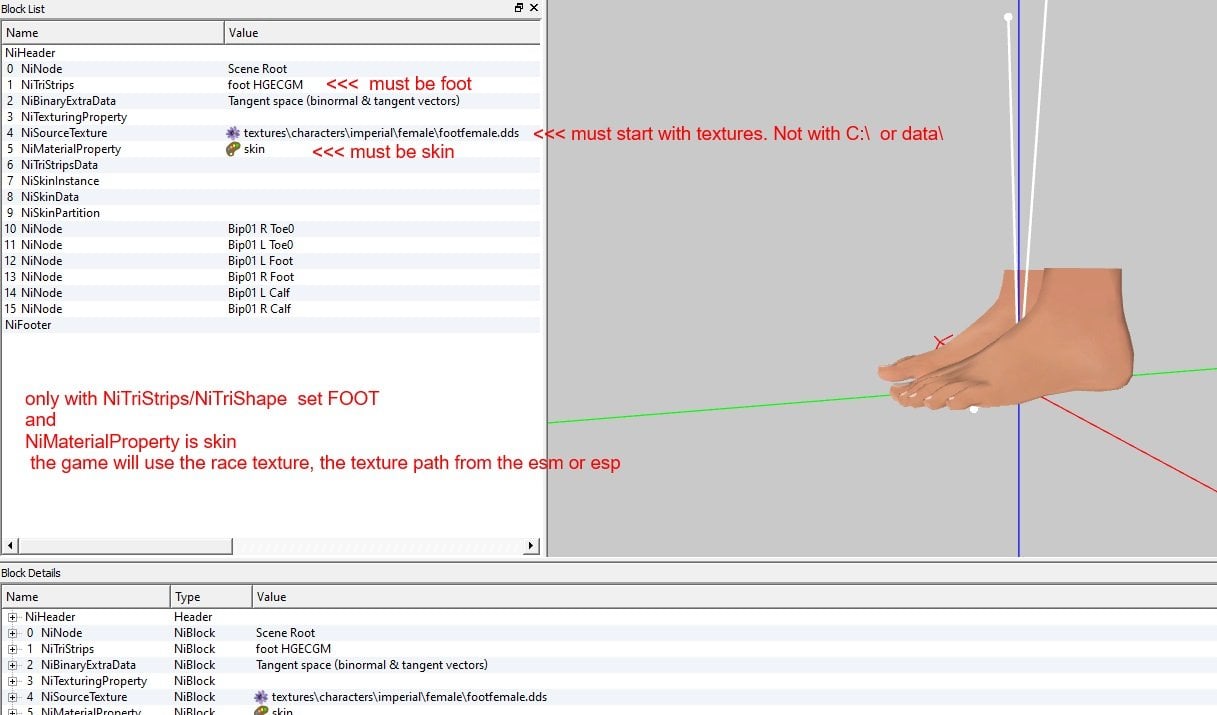
-
Why change the esp? It must be a setting problem. ( a esp you change with the constructionSet but started with OBSE or you can not save scripts with OBSE commands. And many Lovers scripts have OBSE commands ) The xLoversCreature.ini. create a copy/backup. If you do something wrong you can check the copy, or delete the xLoversCreature.ini and rename the copy to xLoversCreature.ini
-
Remember that BOSS does not know and sort all Mods, the unsorted Mods that BOSS put at the end you must sort manually. And some Lovers Mods are wrong but you have the example Load orders.
-
You can see in the ini and the creatures folders if you can fuck a creature If in a creature ani2 folder are only OFF files the creature only have male/offence animations. e.g. MountainLion 226_OffMotionx0.kf If you can fuck the creature the creature must have DEF files, female/defensive animations. e.g. Scamp 3550_DefMotionx2.kf Or in the ini MountainLion set xLoversCreatureQuest.weighted_pos to sv_Construct "mountainlion:226=100" Only one male/OFF animation. Scamp set xLoversCreatureQuest.weighted_pos to sv_Construct "scamp:231=100,3501=100,3502=100,3550=100d,3551=100d" 3 male/OFF animations 2 female/DEF animations with a d If you try to fuck a creatures without DEF animations, and the animation even starts, you'll get animation errors ( e.g. the creatures standing motionless) ----------------- set xLoversCreatureQuest.bEnableFuta to -1 not shure. Maybe set it to set xLoversCreatureQuest.bEnableFuta to 0 to disable Futa
-
Creature with cock : During Sex when the creature fucks you it can have a penis, male and female creatures. In the xLoversCreature.ini you have settings for no female in game, How many percent are female. can they use a penis= (Futa setting) ... (I don't know all the settings since I don't use LC2.5 ) What does the question refer to? " I removed it from all 2 factions and placed it in the imperial legion faction, will this affect things? " A minotaus is only in the CreatureFaction. Except for a few quest Minotaurs. (Hircine shrine, Arena) Horses only have dominance/male animations. You can not fuck a horse. And with the rape me spell it fucks you . With the rape spell you would fuck the horse it had female animations. But not all creatures in LC2.5 have female animations.
-
You really need to sort out your mods. Everything is a mess. Lovers wrong placer, DLCs not sorted. Most Mods not sorted, Just one example: kuerteeCleanUp.esp should be very early in the load order And in your OBSE log I see you have missing master files. A Mod esp is not installed after the needed master file. Have you run TES4Edit? Start it with all your active Mods, it will stop loading if there is a missing Master and tell you what is missing. Then sort your Mods right or install the master. Then run TES4Edit again until it loads all your esm and esp without error. !!!! xLCR.esp is a test esp for modders. You do not need it. Delete it. I'm sure that's mentioned in the mod's readme. Again, read the part about load order- Sort all your Mod. (Better read everything ) https://www.loverslab.com/topic/36443-oblivion-install-gametoolsbodiesbbb-load-order-sorting-espesm-cleaning-cs-cse-body-stretching/ First deactivate or uninstall all Lovers Mods. sort your Mods Test the game ! start a new game, a bug can be in a save ! Only if you have a working, sorted game install Lovers. Test the game ! start a new game, a bug can be in a save ! Animation Mods can mess up lovers animations. Also some combat mods, idle replacers, ... Deactivate such Mods and test again. And see https://www.loverslab.com/topic/12494-mods-that-are-not-compatible-with-lovers/ Still not working? Deactivate all other Mods and test the game only with Lovers. If that worky you know you have a conflicting Mod. Then you can enable 10 othe Mods and test the game until Lovers animations are messed up. The you deactive the last activated 10 Mods and activate and test one by one.
-
Really sort your Mods!!!! Not even the DLCs are right, Lovers is a mess. Install LAPF again ( and ignore the Daedra Sutra animations, it is only a backup of the LAPF animations. It does not fill the free animation numbers. ) If you have sorted your Mods start a new game! A bug can be in a save file. First get a working game without Lovers/LAPF. If it works install LAPF and ONE Lovers Mod to start sex. If sex works you can install 1-2 other Lovers Mods and test. Keep in mind that almost every Lovers mod has in-game settings, new spells, and/or an .ini file. Once you have everything set up the way you like it, install another mod. If you install 4, 5, or 6 mods at once, you won't know which mod added which new spells. And after you've installed LAPF, make sure that the LAPF skeletons aren't overwritten by any new mods! You must have the LAPF skeletons, no others works! data\meshes\characters\_male\ skeleton.nif and skeletonbeast.nif data\meshes\characters\_1stPerson\skeleton.nif Unpack mods and check them it there are skeletons, ( especially animation, clothing/armor, and race mods) About load order and problems during game (animations not working. Filling the free LAFP animations. Sex does not start ( error message, ... and more ) And even the basic installation of the game can be incorrect. Read https://www.loverslab.com/topic/36443-oblivion-install-gametoolsbodiesbbb-load-order-sorting-espesm-cleaning-cs-cse-body-stretching/
-
There is a readme in the download file. Why do you ignore it and the load order? First part right Lovers with PK.esm TamagoClub.esm HiyokoClub.esm LoversCreature.esm Now you should sort it like this LoversTamagoClub.esp LoversHiyokoClub.esp HiyokoGenetics.esp HiyokoGenerator.esp generator for humans !!! you must use the No MBP version! In the download file in folder"HiyokoGenerator(without MBP&x117)" HiyokoGeneratorBroodMother.esp the generator for creatures. Only if you want creatures children. TamagoSetBody.esp the preg body Why do you have no pregnant bodies? You don't need the Mod. You can have children without a visibly pregnant body. TamagoGuide.esp LoversMB2.esp LoversIdleAnimsPriority.esp LoversAnimObjectsPriority.esp Nothing below !!!! Why do you have 3 unsorted Mods below LoversAnimObjectsPriority.esp ? Mods that BOSS doesn't know it puts at the end. You have to sort them manually! Armor Mods to armor Mods, Quest Mods to quest mods, Tamago Mods to Tamago/Hiyoko, Lovers to Lovers, ... I would place Ring of Mara here. LoversEscapeRapeVPlayer.esp LoversRingOfMara-esp Your crash is the wrong HiyokoGenerator.esp. install the No MBP Version. ------------------------ If it keeps crashing, I can't help either, because I've never used the Master Set. I still use the original Tamago/Hiyoko Mods. About load order and sorting and problems in game https://www.loverslab.com/topic/36443-oblivion-install-gametoolsbodiesbbbmod-sorting-and-cleaningcs-cse-body-stretching/?do=findComment&comment=915257