EmhyrVarEmreis Posted March 6, 2013 Posted March 6, 2013 I downloaded a file from here: http://ryou44.blog111.fc2.com/blog-entry-90.htmlI wanted my character to look exactly like that girl.Before that, I followed this guide: http://www.loverslab.com/topic/9-xeo-updated-links/I downloaded all the files posted there, XeoSP v1.0 and XeoSP++ etc.Then I put file from that blog in textures -> xeot -> xeo5last -> orc02But ingame i have like 4 types of orcs, and none of them looks like this girl from the picture.Additionally, all orcs have weird, elfvish-like ears, and that one from the picture doesn't.What should I do to make my character look like this?http://blog-imgs-47.fc2.com/r/y/o/ryou44/oblivion_00945.jpghttp://blog-imgs-47.fc2.com/r/y/o/ryou44/oblivion_00918.jpg+This is my try to reconstruct that face, but as you see - it looks shitty and poor compared to the original one. Forgot about the haircut (i don't have that one), but the rest - does it look only a little bit similar or am I blind? Eye shape + skin and mouth colors are different. And like I said ears, of course. I want my character to look exactly the same, how to do it? And where to find that body shape, haircut and the rest? Thanks.
SpulX Posted March 6, 2013 Posted March 6, 2013 yes i am having the same problem the body of my character looks nice but the face is ruining it how do we fix that.
DeltaD36 Posted March 6, 2013 Posted March 6, 2013 I downloaded a file from here: http://ryou44.blog111.fc2.com/blog-entry-90.html I wanted my character to look exactly like that girl. Before that, I followed this guide: http://www.loverslab.com/topic/9-xeo-updated-links/ I downloaded all the files posted there, XeoSP v1.0 and XeoSP++ etc. Then I put file from that blog in textures -> xeot -> xeo5last -> orc02 But ingame i have like 4 types of orcs, and none of them looks like this girl from the picture. Additionally, all orcs have weird, elfvish-like ears, and that one from the picture doesn't. What should I do to make my character look like this? http://blog-imgs-47.fc2.com/r/y/o/ryou44/oblivion_00945.jpg http://blog-imgs-47.fc2.com/r/y/o/ryou44/oblivion_00918.jpg + This is my try to reconstruct that face, but as you see - it looks shitty and poor compared to the original one. Forgot about the haircut (i don't have that one), but the rest - does it look only a little bit similar or am I blind? Eye shape + skin and mouth colors are different. And like I said ears, of course. I want my character to look exactly the same, how to do it? And where to find that body shape, haircut and the rest? Thanks. There are perhaps many ways to explain why your Orc doesn't look like that. It could be very possible that it is a Custom converison of the Orcs of XEO. The likely reason why the skin doesn't match up could be because you either forgot to do Archive Invalidation, or that .ini tweak that turns off aging and strange skin colors. No matter what, all custom races will almost ALWAYS have a slight discoloration between face and skin. Tat .ini tweak mentioned above I believe gets rid of it. But look at your picture and than look at the picture of the girl you want her to be (NO, I'm not making an OldSpice joke!). She also has a slight skin discoloration, too. I forget what the .INI Tweak is, but someone else replying here might know. For all we know, this could be a new race entirely. The person who took said picture could have taken the Textures of the XEO Orc and put them on another race for use. You're right. The eyes are a different shape and I noticed the lips are more realistic, too. I'm going to go out on a limb and, again, assume it's a different race with the XEO Orc Textures, or custom textures for a different race with the XEO Orc Tattoo design. For the Hair, I'm pretty sure it's a wig from Appachii's Wig Mod on Nexus as I myself have recently downloaded it. They cover up the ear Mesh so that's why she has no ears in the picture you like. TL;DR VERSION: I'm assuming it is a different race with the XEO Orc texture or an edited version of it. The hair is probably not there for you because it's likely a Wig from Appachii's Wigs mod from Nexus. So I don't think that picture you like is of an XEO Orc. IMPORTANT!: If you want the body, might I suggest the 'SetBody Reloaded' mod that is hosted here on LoversLab? It has most, if not all, the best Body Mods in a simple spell that allows you to set your characters (and NPC's) bodies to many different combonations which all have BBB Support in them. I think almost everyone on LoversLab/Oblivion can agree that being limited to one BodyMod for everyone in the game is no fun.
SpulX Posted March 6, 2013 Posted March 6, 2013 well the thing i need it the skin tone fix thats all.
DeltaD36 Posted March 6, 2013 Posted March 6, 2013 well the thing i need it the skin tone fix thats all. This information should help. I did some digging and founf that .ini Tweak. But before you do it, MAKE A BACKUP OF YOUR OBLIVION.INI. Here's what I got: "There's a small Oblivion.ini tweak to improve faces. (set bFaceGenTexturing=1 to bFaceGenTexturing=0 )" - Sroro from this thread on LoversLab. If you don't know where you Oblivion.ini is, it's in your /[ComputerName]/My Documents/My Games/Oblivion/. It's the file called "Oblivion". Again, make a Copy and Paste a backup of 'Oblivion' into a new folder, in case of fuckups. Now double-click to open 'Oblivion' in Notepad and you'll have a bunch ot text in the file. Look for, or search by going to 'Edit' and selecting 'Find..." and type in 'bFaceGenTexturing' in the text box. Once you find it, set it from "bFaceGenTexturing=1" to "bFaceGenTexturing=0", and than SAVE and quit. That should help with the skin discoloration issue. It's usually recommended when having Race Mods or Texture Mods right off the bat. you should also regularly do Archive Invalidation when you add a mod that adds custom textures or over write exsisting textures.
EmhyrVarEmreis Posted March 6, 2013 Author Posted March 6, 2013 I downloaded a file from here: http://ryou44.blog111.fc2.com/blog-entry-90.html I wanted my character to look exactly like that girl. Before that, I followed this guide: http://www.loverslab.com/topic/9-xeo-updated-links/ I downloaded all the files posted there, XeoSP v1.0 and XeoSP++ etc. Then I put file from that blog in textures -> xeot -> xeo5last -> orc02 But ingame i have like 4 types of orcs, and none of them looks like this girl from the picture. Additionally, all orcs have weird, elfvish-like ears, and that one from the picture doesn't. What should I do to make my character look like this? http://blog-imgs-47.fc2.com/r/y/o/ryou44/oblivion_00945.jpg http://blog-imgs-47.fc2.com/r/y/o/ryou44/oblivion_00918.jpg + This is my try to reconstruct that face, but as you see - it looks shitty and poor compared to the original one. Forgot about the haircut (i don't have that one), but the rest - does it look only a little bit similar or am I blind? Eye shape + skin and mouth colors are different. And like I said ears, of course. I want my character to look exactly the same, how to do it? And where to find that body shape, haircut and the rest? Thanks. There are perhaps many ways to explain why your Orc doesn't look like that. It could be very possible that it is a Custom converison of the Orcs of XEO. The likely reason why the skin doesn't match up could be because you either forgot to do Archive Invalidation, or that .ini tweak that turns off aging and strange skin colors. No matter what, all custom races will almost ALWAYS have a slight discoloration between face and skin. Tat .ini tweak mentioned above I believe gets rid of it. But look at your picture and than look at the picture of the girl you want her to be (NO, I'm not making an OldSpice joke!). She also has a slight skin discoloration, too. I forget what the .INI Tweak is, but someone else replying here might know. For all we know, this could be a new race entirely. The person who took said picture could have taken the Textures of the XEO Orc and put them on another race for use. You're right. The eyes are a different shape and I noticed the lips are more realistic, too. I'm going to go out on a limb and, again, assume it's a different race with the XEO Orc Textures, or custom textures for a different race with the XEO Orc Tattoo design. For the Hair, I'm pretty sure it's a wig from Appachii's Wig Mod on Nexus as I myself have recently downloaded it. They cover up the ear Mesh so that's why she has no ears in the picture you like. TL;DR VERSION: I'm assuming it is a different race with the XEO Orc texture or an edited version of it. The hair is probably not there for you because it's likely a Wig from Appachii's Wigs mod from Nexus. So I don't think that picture you like is of an XEO Orc. IMPORTANT!: If you want the body, might I suggest the 'SetBody Reloaded' mod that is hosted here on LoversLab? It has most, if not all, the best Body Mods in a simple spell that allows you to set your characters (and NPC's) bodies to many different combonations which all have BBB Support in them. I think almost everyone on LoversLab/Oblivion can agree that being limited to one BodyMod for everyone in the game is no fun. Thanks for your reply. Yeah, I've noticed that discoloration, but that's not a problem. Next thing - hair problem solved, I also get rid of that weird ears, that's great. Hm, another part different from that orc race (which is not orc really, as you explained) is eyebrow shape, I just realized. It's a bit more, hm, seductive, let's say. And yes, her lips are much better. Lips, eyes, eyebrows, skin... that's a lot, damn. But I think nose shape is very similar, am I right? Face shape too. I tried my best. ;/ So, what would you suggest if I want to find out what race is this? I tried google searching using images posted on that blog - but no results, sadly. As for the body type - thanks again, I will try the one you posted, I hope it will work.
DeltaD36 Posted March 6, 2013 Posted March 6, 2013 Try looking through some of the races in the 'Download' section of the Oblivion/Other AdultMods section. There are many races that look pretty similar to that, so go check them out. If you want a BETTER Orc race entirly, than try Ploms Orc race found here. I believe it blows away the one you're wanting to get. This is the Orc race mod I use, and I find it much better than every other Orc mod. In all honestly, no matter how much you try, if it's a different race, it's face will always be different since it's a premade mesh most likely uses It's own face. It's kind of like using a Vanilla Dark Elf and trying to make them look like a Moonshadow Elf, which face meshs and textures are vastly superior. It just isn't possible. In the end it comes down to the races head mesh and texture quality. Personally, I try not to strive for making a character that someone else has made. :/ I'd probably be obsessed with what mods they used to make it, but I tend to always make something different that I end up liking much more than what I originally found. The Orc you are using has lower resolution of textures. And.... Now that I think about it, I think there is a High-Res Skin package that replaces the skins of most of the textures for most races of MBP++, but I doubt it covers the Orcs. I personally stayed away form the High-Res Skin packs, so I wouldn't know.
EmhyrVarEmreis Posted March 6, 2013 Author Posted March 6, 2013 Yeah, I am also creating faces on my own, but this one... eh, it just looks so perfect for me, I don't know. Maybe someone will tell me what race is this, in the meantime I will try to find it in 'download' section, like you said. Checking Ploms race too. Thanks for the help.
EmhyrVarEmreis Posted March 6, 2013 Author Posted March 6, 2013 When you wear that wig from "Appachii mod" you ears are automatically removed. Show me a photo of your character, let's see if you made it better than I did. ;D
SpulX Posted March 7, 2013 Posted March 7, 2013 well ill try .But i dont have apachii store.Goan dl it now. Edit: this is how mine looks but its all different i dont know why the face is different maybe some other races are conflicting .
Poontank Posted March 7, 2013 Posted March 7, 2013 The ini line to tweak for getting a cleaner look of the skin is bFaceGenTexturing. Not to be confused with bUseFaceGenHeads!!! It's important to mention that you need to tweak the ini file the game is actually using instead of the default ini found in the game's folder (that one is used to generate a new ini should the current one be deleted or damaged). The directory path is 'My Documents\My Games\Oblivion'. A picture to illustrate where to find the line in question (please excuse my German OS): The default setting is 1. Change it to 0 and save the file for a cleaner and smoother look of all characters' skins. I still think this is indeed an ordinary XEO race, the head mesh is very characteristic. XEO textures are by default of low resolution. This character here is also from a XEO Orc race: The ears of any race can easily be changed in the Construction Set, in the case of XEO4 however you'd need the Construction Set Extender and must launch the CS through OBSE, otherwise you cannot edit the mod's esm. And you must make sure the new ears for the edited race has egm and egt files, otherwise the race will only crash the game when you select it in the race menu.
SpulX Posted March 7, 2013 Posted March 7, 2013 i did the fix for the skins i am going to try that Construction Set Extender ill see what i can do with it .
Poontank Posted March 7, 2013 Posted March 7, 2013 When experimenting on the XEO races maybe make a backup copy of this esm before editing it. If anything goes wrong it's easier to restore the mod to its original state with this backup. Just in case you haven't got the XEO archive anymore.
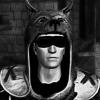
DeltaD36 Posted March 7, 2013 Posted March 7, 2013 ACTUALLY, I figured out that Plom's Orcs also comes with a reskin Xeo's Orc race. And it looks exactly like the one he's looking for! Take a look at this one I quickly made: (I didn't shape the face much) Seem familiar? Hope that solves it!
EmhyrVarEmreis Posted March 7, 2013 Author Posted March 7, 2013 Huh, great! So, what do I need to download? Only Plom's race? Amazing.

Recommended Posts
Archived
This topic is now archived and is closed to further replies.