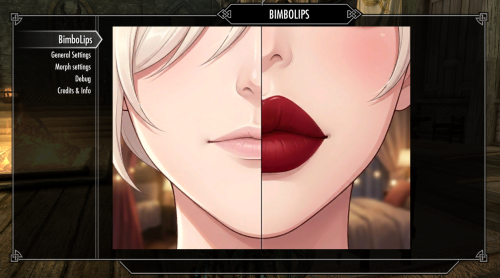
A plugin to Bimbos of Skyrim, adding (Bimbo) lip changes based on BoS progression.
Please let me know about any issues you find.
Description:
Again, this is mainly intended to be a small addon for the great Bimbos of Skyrim (get it now!) mod. Initially I planned to include it in Bimbos of Skyrim - Bimbo Skin but I was too lazy to add all the required file checks and conditions, so it ended up as its own file.
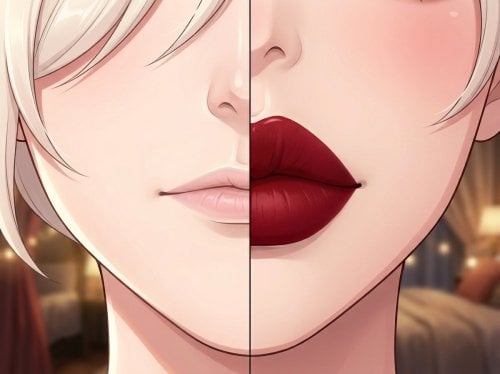
Similar to my other mod Bimbo Skin, this adds an additional change to characters and NPCs affected by the Bimbo curse from BoS. This mod is primarily intended to add a progression of "normal" to "bloated bimbo" lips as the bimbofication curse progresses. While BoS and its curse is a direct requirement, most other parts are fairly configurable. Apart from the lip morphs, it includes any other visible morph provided by High Poly Head SMP.
Strictly requires Bimbos of Skyrim to have any effect.
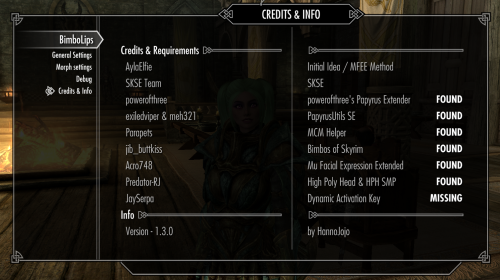
Credits for finding this out to begin with go to AylaElfie (original post), of course Acro748 for MFEE and Predator-RJ for High Poly Head SMP.
The included MFEE files were also created by AylaElfie.
HARD Requirements:
SKSE
po3's Papyrus Extender
PapyrusUtil
MCMHelper - so again... no LE support by me.
Bimbos of Skyrim
MFEE
High Poly Head & High Poly Head SMP
(OPTIONAL) DAK
The mod essentially uses the Papyrus equivalent of
mfee <category number> <morph number> <value 0~100>
with the values set in the MCM + the option to have some kind of progression.
As you can see here, the value is capped at 100. So no matter the combinations of settings you choose, if you reach a value of 100 no further changes will happen to the morphs.
Should also work for NPCs as long as they use High Poly Head (SMP).
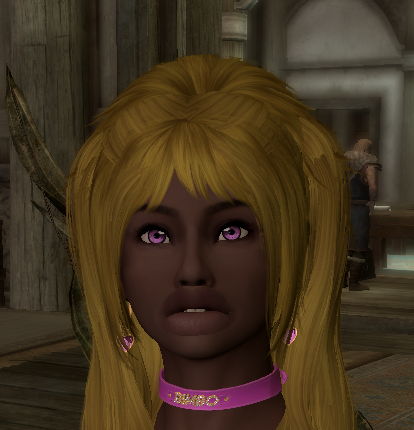
The general options
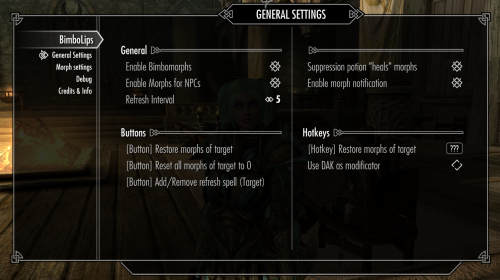
Enable Bimbomorphs - Toggles the general functionality
Enable Morphs for NPCs - Toggle the functionality for NPCs
Refresh Interval - Interval at which the MGEF added to targets will check if it has to be reapplied. A value of 0 will disable this.
Suppression potion "heals" morphs - Toggle to restore your normal morphs upon using BoS' suppression potions.
Enable morph notification - Shows a notification (upper left corner) when a change occurs (Player only)
Buttons:
Restore morphs of target - If no target it will affect the player. Simply reapplies the saved values for this target. If theres nothing saved, nothing should happen. Manual option if refresh interval is disabled.
Reset all morphs of target to 0 - If no target it will affect the player. Removes the morphs of the target and saves a value of 0.
Add/Remove refresh spell - Manually adds the Spell to refresh the effect to the target.
Hotkeys:
Restore morphs of target - See above, but as a hotkey
Use DAK as modificator - If enabled, the hotkey will require you to hold the DAK key to work.
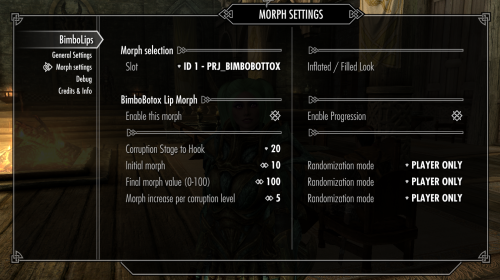
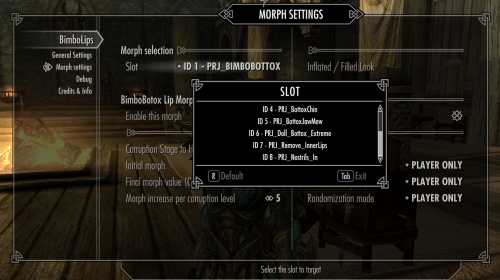
The options (changeable per morph after selecting it on Slot):
Enable this morph - Toggle the morph functionality based on BoS Corruption
Enable Progression - Toggle morph progression based on BoS Corruption
Corruption Stage to hook - The stage at which the first or full (if progression is disabled) morph should happen.
Initial morph - The initial morph value to use with progression. Can be anything between 0 and 100 but obviously there won't be any progression if it starts with 100.
Final morph (0-100) - The full morph effect. Either applied directly, or the final value.
Morph increase per corruption level - What the name says. For each corruption step it will increase by this value until the max morph value set is reached, or no corruption stages occur. Final morphvalue is always capped by the amount of corruption stages in BoS and/or the maximum morph value of 100
Examples (if everything is working as intended that is...):
Startmorph: 10
Increase: 10
Hook: Step 10
Final: 100

BoS has 16 "normal" corruption stages (unless this was changed with a recent update)
So 6 steps remain after the initial morph
=> 10 + (6*10) = 70
will be the final value although we allow it up to 100.

Startmorph: 0
Increase: 5
Hook: Step 1
Final: 30
=> 0 + 15*5 = 75 but the final effect is limited to 30

Startmorph: 30
Increase: 10
Hook: Step 9
Final: 100
=> 30 + 7*10 = 100
Randomization mode - Will randomize the values depending on setting for noone, only the player, only npcs or both.
Testing values:
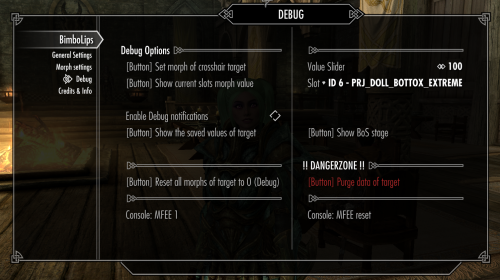
Probably the easiest way to test values prior setting them is using the MFEE console commands. For more information on the commands check the description of MFEE
Reset values:
MFEE r
MFEE reset

Change a morph value:
MFEE <category> <id> <value>
Category	id		Name
1(Misc)		0		PRJ_Bottox
1(Misc)		1		PRJ_BimboBottox
1(Misc)		2		PRJ_BimboBottox_Extreme
1(Misc)		3		PRJ_BottoxCheeks
1(Misc)		4		PRJ_BottoxChin
1(Misc)		5		PRJ_BottoxJawMew
1(Misc)		6		PRJ_Doll_Bottox_Extreme
1(Misc)		7		PRJ_Bottox_Countor
1(Misc)		8		PRJ_Nostrils_In
Known issues:
- Reloading a save before the change will show the morphed lips until the game is restarted, which I probably won't fix anytime soon.
- Certain YPS settings may cause issues with the morphs. See the spoiler for more information found by @RanmaZ
4 hours ago, RanmaZ said:im doing some testing and it seems the bug may be related to YPS?
Every time the hair refreshes the lips trigger to normal instead of bimbo.
Its VERY noticeable when toggling on "Do NiNodeUpdate after Hair update" and "Frequent Hair Check" as the lips will quickly flash big to small in a single frame.
4 hours ago, RanmaZ said:Toggling on "Revert Hair Style only when Headpart Changed" seems to keep the lip size intact.
Now im gonna test if changing hairstyle bugs the lips.
4 hours ago, RanmaZ said:Toggling on "Revert Hair Style only when Headpart Changed" seems to keep the lip size intact.
Now im gonna test if changing hairstyle bugs the lips.
Edited by HannoJojo
Added information found by @RanmaZ
What's New in Version 1.3.1
Released
Clean save should not be necessary, no changes to the structure of saved data.
Please report any (new) issues you find.
Changelog v1.3.1
- Fixed the new morphs. I added the settings, but apparently didn't hit save before compiling it.. sigh...
- Replaced InnerLips morph with new Contour morph
Changelog v1.3.0
- Fixed Tonic Suppression effect not being applied on save load (Thanks to @jackinthebox2)
-
Added the 3 new morphs in HPH SMP as options
- FuckDoll Lips
- InnerLips
- Nostril Cavity
-
Removed the individual setting pages - all morphs are now controlled on the same page by changing the morph selector on top
- Let me know if you prefer the old way, but if there are more sliders to come, the list of mod pages might get a bit long...
- As this changed quite a lot, please let me know if I missed anything.
-
Added Credits / Requirements page
- Super simple requirementcheck (checks for .esp / scriptfile)
- Does NOT check the actual versions, however some features might require a specific verison of the requirement (e.g. new sliders need the latest HPH SMP version to work)
- This requires PapyrusUtil, if this is missing the checks for other requirements will be incomplete
- MCM Helper defaults to "Found", as it is required to even display the MCM
- Removed old archives from the mod page. If you need them for any reason, let me know.
NOTICE:
I'm thankful for any feedback provided.
Reminder about updating from v1.x to v1.2.0+
You'll have to adjust the settings in the MCM again. If you're having issues make sure to replace the BimboLips.ini in
> /MCM/Settings/ <
with the one included in the archive.
Already affected targets should be fine, as nothing about the values stored per target has changed.
Previous changelog in spoiler
Changelog v1.2.5a
- Added Originalmorph to show value debug box
- Small internal change to make sure that originalmorph is only saved on first application
- Will resave the setting values for the character if any of them is -1 / not saved properly. Before I only checked for one of them.
- Fixed malformed MCM config file. Somehow I added an additional "}" in the time between my last test and zipping the files...
Changelog v1.2.4
-
T_T I just noticed that I never packed the refresh spell script into the archive, because the compiled script was put into the MO2 overwrite folder and I never moved it to the MO2 folder I'm using to pack the archive...
SORRY ABOUT THAT...
Changelog v1.2.3
- Added MCM option to add/remove the effect refresh spell
-
(Internal) normalized code for the button functions. They were achieving the same but written differently...
- Let me know if I accidentally broke a function with this. I tested them but maybe I missed something.
- Changed some translation tests.
Changelog v1.2.2
-
Fixed NPC Progression
I was only checking for the player corruption stages (20 - 30 - 40 -...) but NPCs use a different value for their stages (1-2-3-....)
Because of that the condition "start_stage == current_stage" was never fulfilled for them. -
Reorganized the Debug menu.
- Separated the buttons removing stuff (temporary and permanent) from other settings
- Removed the slot info table
- Replaced the slot slider with a menu containting the slot names. Setting is still the same, so it should still show your last selection by default
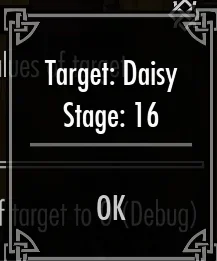
- Added a debug button to show the BoS stage of the player or target.
Changelog v1.2.1
-
Added notification toggle. Will show a small notification when the corruption event affects a morph.
- "You feel a tingle in your face and at your lips." if lip and face morphs are changed.
- "You feel a tingle at your lips." if only lip morphs are changed.
- "You feel a tingle in your face." if only the face morphs are changed.
- Fixed wrong label for general mod toggle which was using the "Enable this morph" translation
-
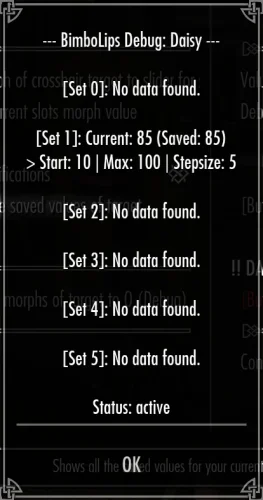
Added a debug notification toggle. Will show a messagebox whenever a change occurs (THIS INCLUDES THE REAPPLY CASES!!!)
- --- BimboLips Debug: <Targetname> ---
- [Set <morphnumber>]:
- Current: <real value> -> New: <new value>
- "Max: <saved max value> | Stepsize: < saved step size>
- Added an additional check to the MGEF so the application function is only called if a change is necessary. Probably shouldn't make a huge difference, unless you enable the debug notification which then would show every X seconds even if it didn't have to restore a value.
- Created a FOMOD mainly to link the HARD REQUIREMENTS of the mod.
Changelog v1.2.0
-
You can now enable randomization for every slider setting.
-
4 Options:
- No randomization
- Player only
- NPC only
- Both
-
slightly different behaviour per slider:
- Final Value -> 0 - 100
- Initial Value -> 0 - FinalValue
- Stepsize -> 0 - (FinalValue - InitialValue)
-
4 Options:
- Fixed typo in english translation file
- Reduced / simplified english translation file alot
-
Regrouped MCM Helper settings. Mostly relevant for the internal stuff, but this also means:
You'll have to adjust the settings in the MCM again. If you're having issues make sure to replace the BimboLips.ini in
> /MCM/Settings/ <
with the one included in the archive.
Already affected targets should be fine, as nothing about the values stored per target has changed. - Removed OnNiNodeUpdate()
- Added OnUpdate refresh including a setting slider for the interval (0 = disabled, 1 - 300 = valid values)
- Reworked the MGEF script (again, just internal stuff for better readability or sth.)
- Added Debug option to display all currently saved data for the target (or player)
NOTICE:
Again, I did not test any NPC functionality myself yet, as my "scripting/modding" setup is pretty barebones and I'd have to look up which of the installed followers would actually use HPH already.
So I'm thankful for any feedback provided to catch as many causes for resets as possible. However, if it there are too many cases, I might drop NPC support / keep it at the status quo.
Changelog v1.1.1
-
Added "restore all morphs" button & Hotkey to general section
- If DAK is installed it can be used as a modificator key for the hotkey.
- Fixed reload morph functionality for the player and other instances where I forgot to update the keynames...
-
Added unset button to general section which will remove morphs and set the saved values to 0.
- A similar button is added to the debug menu, which will only remove all changed morphs temporarily
- Added check for morphs OnNiNodeUpdate() to see if this helps with NPCs losing the morphs.
- Added option to remove ALL saved values for a target to the debug menu.
- I probably forgot something here...
NOTICE:
Again, I did not test any NPC functionality myself yet. I tried finding a follower / overhaul I could use, but the ones I have installed seem to be mostly standalone, so they don't use the installed HPH .nif but the one they're shipped with and I didn't want to waste time on trying to get those to work yet.
So I'm thankful for any feedback provided to catch as many causes for resets as possible. However, if it there are too many cases, I might drop NPC support / keep it at the status quo.
I changed quite a lot (including the names of the stored values) so it will not pick up whatever was saved in v1.0.0
Changelog v1.1.0
- Added options for the other 5 morphs - each with their individual settings.
- Settings (per morph) are saved for the target the first time the morph is affected by a BoS progression event.
- Added a spell / MGEF that will be applied to the target the first time its affected. If the target is loaded it will re-apply the morphs (this probably needs some extensions for all the cases where NPC will lose their morphs, but please test if this helps a bit already)
- Fixed persistence of morph. Upon loading a savegame (even after restarting the game) the current morph should be reapplied.
- Fixed size of the MCM splashscreen
-
Added basic debug options:
- Set morph to a specific value for the selected slot - This will also tell you if you're missing the MFEE script required for this mod
- Display the current slots morph value
- 2 Sliders for the above options (Slot & Value)
- Slotmap info as the slot slider uses the ID of the morph.
- console command reminder for the same functionality
- Added Toggle to disable NPC functionality
Translation hotfix
- Noticed I didn't update the translation of the suppresion setting and its help. It's really just the text and you could also edit yourself if needed.
NOTICE:
Again, I did not test any NPC functionality myself yet, as my "scripting/modding" setup is pretty barebones and I'd have to look up which of the installed followers would actually use HPH already.
So I'm thankful for any feedback provided to catch as many causes for resets as possible. However, if it there are too many cases, I might drop NPC support / keep it at the status quo.
Install manually or with a mod organizer of any kind.
Very simple Fomod for the requirement list.
It shouldn't do much harm, but if you value your savegame you might want to wait for some feedback in the support thread before using it.
Everyone working on any of the requirements listed.