**
DISCLAIMER ** - This is now being hosted at
https://x-change.life/modding/tools.html. All future revisions will be posted there. If you downloaded a copy of this originally DO NOT USE IT. It has bugs. Bugs that have been fixed and posted on the hosted site.
------------------------------------------------
Welcome to the **X-Change Life Unofficial Modding Tools**!
This is a suite of tools to create and customize content for the game, with six specialized tools to streamline the modding process. Each tool is accessible via the tabs across the top of the page, allowing you to work with different modding aspects and generate necessary game files with ease.
This is not a mod!!! This does not get loaded into the game. Do not put this in the mod loader.
It is a standalone file that you open in your browser.
## Playable Character
The **Playable Character** tab is designed for creating a fully fleshed-out character mod. This tool provides fields for:
- **Character Information**: Personal information like name and body measurements.
- **Descriptions**: Provide descriptions that will appear in-game, like physical appearance changes or mirror thoughts.
- **Media Locations and Counts**: Specify the location and quantity of character media.
When all fields are complete, you can generate a `.twee` file containing the character data, along with media directories structured for easy integration into the game.
## Positions
The **Positions** tab is dedicated to configuring bedroom positions related to your character. The fields allow you to define one position at a time.
1. Fill in the fields with attributes about a position, then click **Add Position** to add it to the list.
2. When finished, generate a **Positions file**.
You can also import an existing file to edit or build upon prior work.
## Outfits
The **Outfits** tab works similarly to the Positions tab, but for configuring your character’s wardrobe. Each outfit has its own fields:
1. Complete the fields to define a single outfit and click **Add Outfit**.
2. After adding all desired outfits to the list, generate an **Outfits file**.
As with Positions, you can import an existing file if you want to modify or extend a pre-existing list of outfits.
## BLACKED Expansion
The **BLACKED** tab allows you to create additional content for an existing playable character. This tool is primarily focused on media additions, so there’s no need to repeat character details or descriptions.
- Fields in this tab apply specifically to the BLACKED content, focusing on new media tagging and categorization.
Like the Playable Character tab, this tool also generates a `.twee` file.
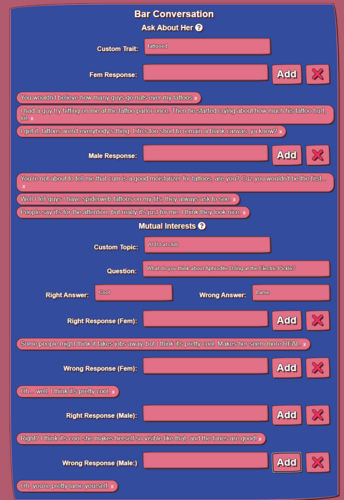
## Bar Girl
The **Bar Girl** tab is for creating a **non-playable character** (NPC) that your playable character will interact with at the bar. Fields in this tab include:
- **Character Information**: General characteristics of the NPC.
- **Personality Traits**: Select traits that influence in-game interactions.
- **Scene Descriptions**: Define scenes related to this character.
- **Bar Conversations**: Add custom Traits and Topics to converse about with your Bar Girl.
Once complete, this tab will generate a `.twee` file for the new bar girl NPC.
## Meta Maker
The **Meta Maker** tab allows for creating standalone `.meta` files, which store metadata for your mods. Each of the other tabs has a section for meta information, but this tab enables you to create or update meta data independently.
- If you need to update or create a meta file without revisiting your playable character’s mod configuration, use this tool to create a **Meta file** directly.
## Installation
To use the X-Change Life Unofficial Modding Tools:
1. Download and unzip to your machine. Go to the site and use it online!
2. Launch index.html
## Contributing
Contributions are welcome! If you have ideas or enhancements, feel free to visit the GitGud Project to open an issue or submit a pull request.
You can also submit questions/feedback on the official XCL discord (it's the best place to reach me
.)
## License
This project is licensed under the GNU General Public License v3.0.
You are free to use, modify, and distribute this project under the terms of the GPL-3.0 License. Any modifications or derivatives must also be licensed under GPL-3.0, ensuring that this tool and any improvements remain open and accessible to the community. For full details, please see the LICENSE file.


![More information about "[XCL] [0.25] CUCKED"](https://static.loverslab.com/screenshots/monthly_2026_09/2026-08-10-13-10-22_00001_.thumb.png.c8fdc7145980e40868f7d9061d980ef7.png)
![More information about "[XCL] [0.25] Visit a Girl"](https://static.loverslab.com/screenshots/monthly_2026_08/logo.thumb.jpg.9b32b568ea5491b6ad61fb6d79f076e6.jpg)
![More information about "[XCL] [0.23.6] Bar Girl - Val Steele"](https://static.loverslab.com/screenshots/monthly_2026_02/bar_icon.thumb.jpg.5e9d43b7fead3e74274694a2bcacf831.jpg)
![More information about "[XCL][0.23] Val Steele - Playable Character + BLACKED"](https://static.loverslab.com/screenshots/monthly_2025_11/promo.thumb.jpg.f327871ddbed5cf3a51f81a3dc943e2f.jpg)
![More information about "[XCL] [0.25] PURPLED"](https://static.loverslab.com/screenshots/monthly_2025_08/purpled.thumb.jpg.f775be4d79b8780a7feeeddbb58976f9.jpg)
![More information about "[XCL][OBSOLETE] Morning Makeover"](https://static.loverslab.com/screenshots/monthly_2025_06/MMImage.thumb.png.b9428a9ecc06420f18257307ce2c12fa.png)
![More information about "[XCL] [0.23] LittleBlonde - UPDATED & BLACKED"](https://static.loverslab.com/screenshots/monthly_2025_07/littleblonde.thumb.jpg.47bc4ef5e3cdb6aec1da72c9f43ea59a.jpg)
![More information about "[XCL] [OBSOLETE] The Bitch Box"](https://static.loverslab.com/screenshots/monthly_2025_04/empty.thumb.jpg.506a45d4098bfa924b2d1e91616f50e3.jpg)
![More information about "[XCL] [0.21.7] Bar Girl - Skylar Vox"](https://static.loverslab.com/screenshots/monthly_2025_04/portrait_happy.thumb.jpg.f458d9c8c0d113448d9ee2c1ec21bde1.jpg)
![More information about "[XCL] [0.23] Skylar Vox - Playable Character + (BLACKED)"](https://static.loverslab.com/screenshots/monthly_2025_04/skylarvox.thumb.jpg.88f8607814ace35df93d0a2681e76a1b.jpg)
![More information about "[XCL] [0.22] Bar Girl - Isabelle Deltore"](https://static.loverslab.com/screenshots/monthly_2025_03/bar_icon.thumb.jpg.af3f41a92d1e7ec54716d473bfe99735.jpg)
![More information about "[XCL] [0.22] Bar Girl - Aubrey Black"](https://static.loverslab.com/screenshots/monthly_2025_03/bar_icon.thumb.jpg.24c7ce4d177d6f27556a72dce91d8e3f.jpg)
![More information about "[XCL] [0.21.5] Minigame Skill Roll Rebalance"](https://static.loverslab.com/screenshots/monthly_2025_02/ss1.thumb.png.b540d3d9295e8db45059c0add7f57b56.png)
![More information about "[XCL] [0.25.2] BLACKED"](https://static.loverslab.com/screenshots/monthly_2024_09/banner.thumb.jpg.43cdd277ea30eea7d6e5bce4de5fce17.jpg)