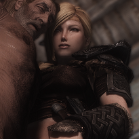
Pwishy Posted May 5, 2016 Posted May 5, 2016 Hey fellas, Been wanting to ask this for ages to anyone who is ENB savvy, I used to use Aeon ENB with no problems, but a while back when I had return to use it, I get this problem: I've attached my modlist as well. Things to note: 1. I'm trying this on a CLEAN REINSTALL of Skyrim. 2. Not a Skyrim.ini nor SkyrimPref.ini problem, as I've tried Vanilla inis as well. I am puzzled Can anyone give me some pointers on possible issues? LoadOrder_Skyrim_2016-05-05T23-14-05.txt
Mister X Posted May 5, 2016 Posted May 5, 2016 Vanilla .inis are NOT compatible with ENB, you DO need to alter vanilla .ini files to get ENB to run properly. If you are not that experienced with altering the ini files, use one preset of Project ini and tick "ENB Mode" in the "General" tab, this should suffice. Another problem just could be the wrong choice of your body texture. Check if there is an ENB option somewhere in its Download section or its fomod, and try it with those activated. For me it looks like this. If you use an ENB variant of a body texture, try to deactivate it (as absurd as it sounds), some ENBs don't use the technique where the texture patch is needed for.
Pwishy Posted May 7, 2016 Author Posted May 7, 2016 Vanilla .inis are NOT compatible with ENB, you DO need to alter vanilla .ini files to get ENB to run properly. If you are not that experienced with altering the ini files, use one preset of Project ini and tick "ENB Mode" in the "General" tab, this should suffice. Another problem just could be the wrong choice of your body texture. Check if there is an ENB option somewhere in its Download section or its fomod, and try it with those activated. For me it looks like this. If you use an ENB variant of a body texture, try to deactivate it (as absurd as it sounds), some ENBs don't use the technique where the texture patch is needed for. Hello. Yeah, I'm aware of that first bit Reason I tested Vanilla INIs was just to check if there was any difference which wouldve suggested that that could be a problem. I suspected it was a body texture problem, so instead of installing stuff one by one, I decided to try a vanilla Data folder... which had the same problem: I've also given that ProjectINI thingy a go, but same problem :/ Could it be a graphics card problem? Since it's not an INI problem nor a texutre problem. D:
Mister X Posted May 7, 2016 Posted May 7, 2016 For me it looks like a weird lighting issue, is it? I've had a similar issue, there my body subsurface textures were incomptaible with my ENB preset. Some body textures ENable subsurface scattering, some DISable it. That's important, because some ENBs need it ENabled, and other deactivated the related maechanics, so there it should be DISabled. Try to fully remove your ENB from your Skyrim folder and check if the issue is gone then. If yes, I'd say it's definitely related to the wrong subsurface texture choice. So try to reinstall your body textures and look for a subsurface choice and ENable it, normally in vanilla it's disabled. So choose ENB Subsurface Textures or enable Subsurface Scattering.

Recommended Posts
Archived
This topic is now archived and is closed to further replies.