
Search the Community
Showing results for tags 'kinky world'.
Found 16 results
-
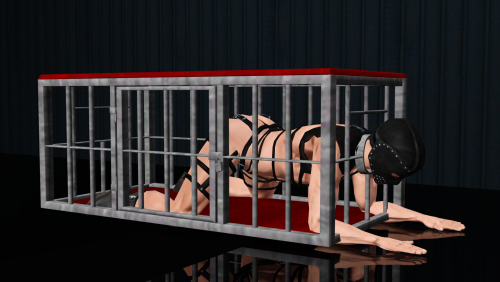
 View File Hellraiser: Revival BDSM Cage (KW Compatible Stockade Alternative) This is the cage I converted from Hellraiser: Revival, but as a functional stockade object compatible with KW. It has been resized from the coffee table version to fit a sim (or two, depending on the animation). This does not replace the stockade object. It simply exists as an alternative object that has the same functions. Polycount: 2.2k, texture size is 1k, it is the same price as the original stockade (500 simoleons) and can be found in Miscellaneous Hobbies. Credit to Saber Interactive for mesh and textures, and to whoever made the stockade furniture. 😅 Disclaimer: This was mostly made with the base stockade interaction in mind. Therefore, it isn't particularly compatible with all kinky animations. A few of them look fine, but most of them end up clipping through the cage severely. lol Keep that in mind. Enjoy! 🖤 Submitter Chrissy90 Submitted 10/07/26 Category The Sims 3 Requirements Kinky World or Passion and the Stockade Furniture (this is included in ONIKI_Objects.package with KW, not sure about Passion).
 -
33 downloads
This is the cage I converted from Hellraiser: Revival, but as a functional stockade object compatible with KW. It has been resized from the coffee table version to fit a sim (or two, depending on the animation). This does not replace the stockade object. It simply exists as an alternative object that has the same functions. Polycount: 2.2k, texture size is 1k, it is the same price as the original stockade (500 simoleons) and can be found in Miscellaneous Hobbies. Credit to Saber Interactive for mesh and textures, and to whoever made the stockade furniture. 😅 Disclaimer: This was mostly made with the base stockade interaction in mind. Therefore, it isn't particularly compatible with all kinky animations. A few of them look fine, but most of them end up clipping through the cage severely. lol Keep that in mind. Enjoy! 🖤 -
30 downloads
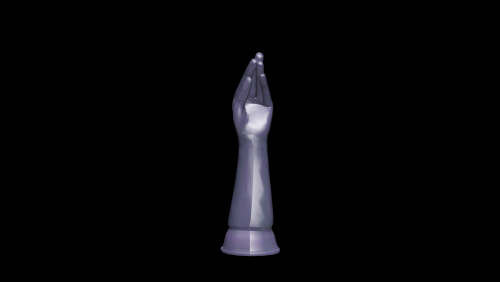
Another floor dildo for your simmies to play with. This time, I didn't make it from scratch but, rather, I cut a dude sim's hand off and then added the bottom. So, hey, shoutout EA for the base. 😆 Compatible with Kinky World [Katie's Expansion] or any other version that has my floor dildos/floor dildo script in it. 5.2k poly (the subsurf addiction continues), recolorable. All of my dildos can be found in hobbies & skills for like 100 ish. Sorry I only have one picture this time, I got lazy. 🙈 But I promise it works with all currently available animations. There is a small bug that sometimes makes the Kinky interactions not show up when my custom dildos are first placed down. If you experience this, sell and repurchase the dildo a few times until the interaction shows up. Enjoy! Yes, yes maybe some day I should make fun alternatives for the other toys. Maybe I will! 🤭 -
View File Mr. Fister Dildo (KW Compatible) Another floor dildo for your simmies to play with. This time, I didn't make it from scratch but, rather, I cut a dude sim's hand off and then added the bottom. So, hey, shoutout EA for the base. 😆 Compatible with Kinky World [Katie's Expansion] or any other version that has my floor dildos/floor dildo script in it. 5.2k poly (the subsurf addiction continues), recolorable. All of my dildos can be found in hobbies & skills for like 100 ish. Sorry I only have one picture this time, I got lazy. 🙈 But I promise it works with all currently available animations. There is a small bug that sometimes makes the Kinky interactions not show up when my custom dildos are first placed down. If you experience this, sell and repurchase the dildo a few times until the interaction shows up. Enjoy! Yes, yes maybe some day I should make fun alternatives for the other toys. Maybe I will! 🤭 Submitter Chrissy90 Submitted 10/07/26 Category The Sims 3 Requirements Kinky World [Katie's Expansion] or any other Kinky World that has my base floor dildos.
-
 Disclaimer: This is interesting mostly for the KW code maintainers or anyone who wants more granular control over student assignment and has an idea on how to decompile and recompile DLLs and .package files. SchoolLocation.cs — Disable automatic nightly student assignment Purpose This modification disables KW's automatic nightly student reassignment at 23:00. The existing immediate student assignment when High School is enabled (happens when High School is enabled via settings or when a save game is loaded with High School already enabled) is intentionally retained. Resulting behavior Enabling High School still calls SchoolLocation.AssignStudents() once immediately. This takes place when the High School is either enabled in the settings, OR when the game starts/is loaded with High School already enabled. So, once per save start, KW will still auto assign all available teens as students. I did not want to interfere with that. It simply results in the requirement to manually check the registered student list once after each game start. The recurring 23:00 AddAlarmDay() registration is removed. Disabling High School continues to remove the existing assignment alarm and perform the normal school cleanup. No replacement alarm is added. The system will not automatically assign any students to the KW High School during a game sessions lifetime (until game restart/load, aka KW initialization). Leaving the initial AssignStudents intact gives you a good base line to check for new eligible students each play session, without having to manually dig through demographics. You simply wait a bit after KW has initialized and then check the registered students at your school. Unassign any newly added ones you do not want. That's it. The other way around appeared to be less reliable. The change therefore affects only the recurring automatic assignment. 1. SchoolLocation.PostLoadFixup() Remove the nightly alarm registration In PostLoadFixup(), the EnableHighSchool block originally registered the recurring assignment alarm: if (Main.Settings.EnableHighSchool) { AlarmManager global = AlarmManager.Global; float hourOfDay = 23f; DaysOfTheWeek daysToTrigger = DaysOfTheWeek.All; AlarmTimerCallback func; if ((func = SchoolLocation.<>O.<0>__AssignStudents) == null) { func = (SchoolLocation.<>O.<0>__AssignStudents = new AlarmTimerCallback(SchoolLocation.AssignStudents)); } SchoolLocation.__alarmAssign = global.AddAlarmDay( hourOfDay, daysToTrigger, func, "SchoolLocationAssignStudents", AlarmType.NeverPersisted, null); } Remove that entire alarm-registration block, leaving the EnableHighSchool condition empty if no other code is added there: if (Main.Settings.EnableHighSchool) { } The important point is that this removes only the alarm registration. It does not remove AssignStudents() itself. 2. SchoolLocation.EnableHighSchool(bool enable) There is a second, independent registration of the same nightly alarm. This occurs after the immediate assignment: if (enable) { if (Main.Settings.EnableHighSchoolAutoManagement) SchoolLocation.StartTasks(); else SchoolLocation.StopTasks(); KWPromSituation.Startup(); SchoolLocation.AssignStudents(); SchoolLocation.__alarmAssign = AlarmManager.Global.AddAlarmDay( 23f, DaysOfTheWeek.All, SchoolLocation.<>O.<0>__AssignStudents ?? (SchoolLocation.<>O.<0>__AssignStudents = new AlarmTimerCallback(SchoolLocation.AssignStudents)), "SchoolLocationAssignStudents", AlarmType.NeverPersisted, null); } The AddAlarmDay() registration must be removed, but the preceding AssignStudents() call must remain. Result: if (enable) { if (Main.Settings.EnableHighSchoolAutoManagement) SchoolLocation.StartTasks(); else SchoolLocation.StopTasks(); KWPromSituation.Startup(); SchoolLocation.AssignStudents(); } The rest of the enable == false branch remains unchanged, including: AlarmManager.Global.RemoveAlarm(SchoolLocation.__alarmAssign); and the subsequent KW promotion shutdown and school clearing. Why both locations must be changed There are two independent registrations of SchoolLocation.AssignStudents() as a daily 23:00 alarm. Removing only the registration in PostLoadFixup() is insufficient because EnableHighSchool(true) independently creates the same alarm. Both alarms are declared non persistent, but are seemingly recreated independently on game load. The runtime test confirmed this distinction: Only removing the first alarm assignment resulted in students still being automatically added at 23:00 after load of a save game with High School already enabled, which made removal of the second instance necessary. After load of the save game the High School enable path still performed its immediate AssignStudents() call, as intended. Two students were subsequently manually removed from the student list. The two manually removed students were not reassigned at 23:00. Therefore the recurring nightly assignment has successfully been disabled while the immediate assignment behavior remains intact. I am currently working on turning the alarm creation into a togglable settings item. This remains a pretty bruteforce workaround for the time being.
 -
36 downloads
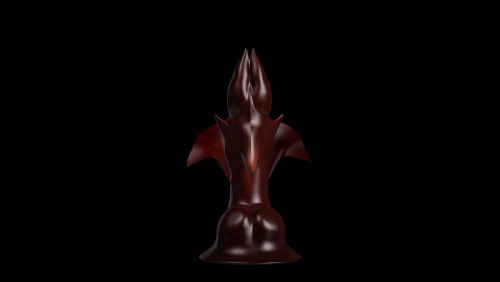
I wanted to make a vampire dildo for Halloween...and instead of gee, I dunno, Dracula or something, I based it off of the sexiest vampire ever...Count Chocula? 🤔 Like my others, this is compatible with Kinky World [Katie's Expansion] and any other version that has the floor dildo script in it. There is a small bug that sometimes makes the Kinky interactions not show up when my custom dildos are first placed down. If you experience this, sell and repurchase the dildo a few times until the interaction shows up. This dildo is 10.2k (sorry, the devil made me do it), 1k textures, 1 stenciled preset and 1 recolorable preset. Made by me in Blender...for better or for worse. And to think, some mothers end up with daughters who are olympic gold medalists...mine ended up with one who spends far too long sculpting dicks in Blender. 😆 I don't have a TOU and I will never have a TOU. Just treat Count Chocula well. Give him snackies. Enjoy! 🖤 -
View File Count Cockula Dildo (KW Compatible) I wanted to make a vampire dildo for Halloween...and instead of gee, I dunno, Dracula or something, I based it off of the sexiest vampire ever...Count Chocula? 🤔 Like my others, this is compatible with Kinky World [Katie's Expansion] and any other version that has the floor dildo script in it. There is a small bug that sometimes makes the Kinky interactions not show up when my custom dildos are first placed down. If you experience this, sell and repurchase the dildo a few times until the interaction shows up. This dildo is 10.2k (sorry, the devil made me do it), 1k textures, 1 stenciled preset and 1 recolorable preset. Made by me in Blender...for better or for worse. And to think, some mothers end up with daughters who are olympic gold medalists...mine ended up with one who spends far too long sculpting dicks in Blender. 😆 I don't have a TOU and I will never have a TOU. Just treat Count Chocula well. Give him snackies. Enjoy! 🖤 Submitter Chrissy90 Submitted 10/02/26 Category The Sims 3 Requirements Kinky World [Katie's Expansion] or any other Kinky World that has my base floor dildos.
-
52 downloads
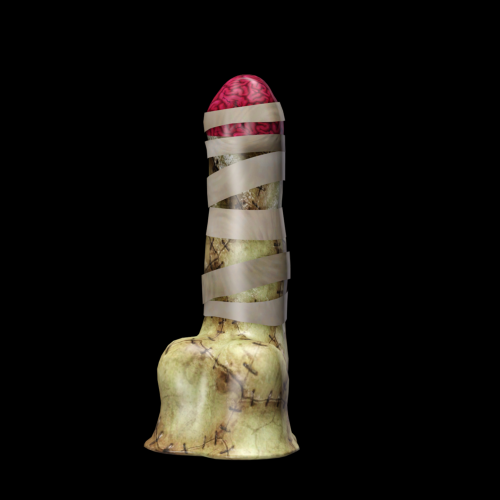
🧡🖤Happy October! 🖤🧡 Everyone agrees that Halloween is the best holiday and, therefore, October is the best month, right? Well, I wanted to start October right...by making a Halloween themed dildo, of course! Just like everyone will be doing, I'm sure. 😆 This is a Zombie Mummy Dildo! Yes, it is both a zombie and a mummy...they kinda are the same if you think about it. 🤔 It is compatible with Kinky World [Katie's Expansion] and all other versions of Kinky World that have my base floor dildo and the floor dildo script. There is a small bug that sometimes makes the Kinky interactions not show up when my custom dildos are first placed down. If you experience this, sell and repurchase the dildo a few times until the interaction shows up. This dildo is 4.3k poly, 1k textures, and it has 1 stenciled preset and 1 recolorable preset. Made by me in Blender. As always, I have no TOU. Do whatever you want with it. You can find it in hobbies & skills with all the other dildos. Enjoy! -
View File Zombie Mummy Dildo (KW Compatible) 🧡🖤Happy October! 🖤🧡 Everyone agrees that Halloween is the best holiday and, therefore, October is the best month, right? Well, I wanted to start October right...by making a Halloween themed dildo, of course! Just like everyone will be doing, I'm sure. 😆 This is a Zombie Mummy Dildo! Yes, it is both a zombie and a mummy...they kinda are the same if you think about it. 🤔 It is compatible with Kinky World [Katie's Expansion] and all other versions of Kinky World that have my base floor dildo and the floor dildo script. There is a small bug that sometimes makes the Kinky interactions not show up when my custom dildos are first placed down. If you experience this, sell and repurchase the dildo a few times until the interaction shows up. This dildo is 4.3k poly, 1k textures, and it has 1 stenciled preset and 1 recolorable preset. Made by me in Blender. As always, I have no TOU. Do whatever you want with it. You can find it in hobbies & skills with all the other dildos. Enjoy! Submitter Chrissy90 Submitted 10/01/26 Category The Sims 3 Requirements Kinky World [Katie's Expansion] or any other Kinky World that has my base floor dildos.
-
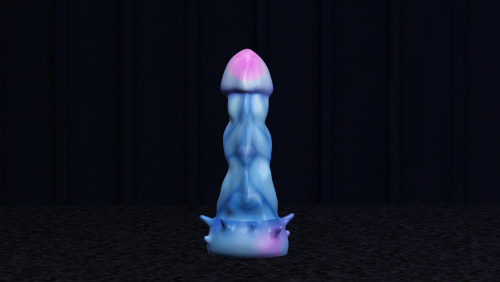
View File Nomura Jellyfish Dildo (KW Compatible) Something that isn't a Hellraiser conversion to break up the monotony. This is a floor suction dildo created for Kinky World. It was made for Katie's version but will work with any version of Kinky World that includes the floor dildo script and animations. Aren't sure if your version does? You'll have to ask whoever is in charge of that version. Polycount is 7.7k (Sorry I'm working on my sub surf modifier addiction, I promise), 1k textures. 1 stenciled preset and 1 recolorable preset. Modeled by me in ye olde Blender. I feel obligated on things I make myself to discuss a TOU, but I don't have one so... I'll just say, if your heart desires, you can do whatever you'd like with this. Convert it TS4, 3D print it and make a sculpture... Point is, you should feel free to modify this and do whatever you'd like with it. I don't care. I 3D model dildos for the love of the game. 👍 Enjoy! Note: If the kinky interactions aren't showing up for you, trying selling and re-buying the dildo a few times until they do. Submitter Chrissy90 Submitted 09/24/26 Category The Sims 3 Requirements Kinky World [Katie's Expansion] or any other Kinky World that has my base floor dildos.
-
104 downloads
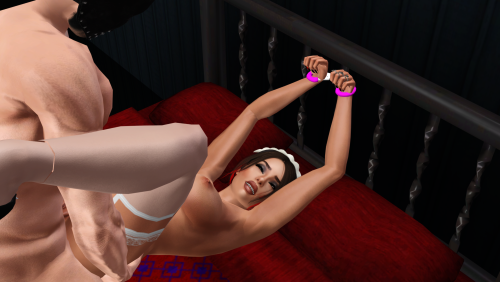
These are the cuffs I converted from Hellraiser: Revival as a default replacement for Asser_Handcuffs used in MaryJane's animations for KW and Passion. This file will not do anything if you don't have Asser_Handcuffs.package in your mods folder. Download MaryJane's animations for KW/Passion and Objects.rar from here, if you don't have them already. Make sure Asser_Handcuffs.package are in your Mods/Packages folder, then place Chrissy90_Hellraiser_CuffReplacement.package into your Mods/Overrides folder. These just replace the texture and model of the handcuffs, so they will still function with KW and Passion. Unfortunately, they cannot be recolored. Enjoy! -
View File Hellraiser Default Replacement Cuffs These are the cuffs I converted from Hellraiser: Revival as a default replacement for Asser_Handcuffs used in MaryJane's animations for KW and Passion. This file will not do anything if you don't have Asser_Handcuffs.package in your mods folder. Download MaryJane's animations for KW/Passion and Objects.rar from here, if you don't have them already (Note: The cuffs are included in ONIKI_Objects.packages if you use Kinky World). Make sure Asser_Handcuffs.package are in your Mods/Packages folder, then place Chrissy90_Hellraiser_CuffReplacement.package into your Mods/Overrides folder. These just replace the texture and model of the handcuffs, so they will still function with KW and Passion. Unfortunately, they cannot be recolored. Enjoy! Submitter Chrissy90 Submitted 09/25/26 Category The Sims 3 Requirements Asser_Handcuffs (from MaryJane's thread) MaryJane's Animations for KW & Passion (Recommended)
-
115 downloads
Something that isn't a Hellraiser conversion to break up the monotony. This is a floor suction dildo created for Kinky World. It was made for Katie's version but will work with any version of Kinky World that includes the floor dildo script and animations. Aren't sure if your version does? You'll have to ask whoever is in charge of that version. Polycount is 7.7k (Sorry I'm working on my sub surf modifier addiction, I promise), 1k textures. 1 stenciled preset and 1 recolorable preset. Modeled by me in ye olde Blender. I feel obligated on things I make myself to discuss a TOU, but I don't have one so... I'll just say, if your heart desires, you can do whatever you'd like with this. Convert it TS4, 3D print it and make a sculpture... Point is, you should feel free to modify this and do whatever you'd like with it. I don't care. I 3D model dildos for the love of the game. 👍 Enjoy! -

112 downloads
Phew. 😮💨 Only Leviathan knows why I decided my next upload would be a huge collection of 18 objects...Perhaps I'm a glutton for punishment. 😈 Either way, it is done! This set includes: 15 Pieces of BDSM and Kink Related Decor: Ball Gag (3k poly) Hanging Cage (9.8k poly w/ Hanging Cage Chain) Hanging Cage Chain (9.8k poly w/ Hanging Cage) Gagged Skull (8.7k poly) Gimp Mask (5.8k poly) Eye Mask (1.8k poly) Chain Whip (15.6k poly ❗) Leather Whip (5.6k poly) Spreader Bar (8.3k poly) Vibrator 01 (1.5k poly) Leather Strapon (1.6k poly) Butt Plug 01 (550 poly) Butt Plug 02 (845 poly) Collar (6.9k poly) Cuffs (3.2k poly) 1 Piece of BDSM Furniture: Cage Coffee Table (2.2k poly) 2 KW Compatible Vibrators: Vibrator 02 (747 poly) Vibrator 03 (968 poly) All textures were dropped to 1k and all items were decimated as much as possible without destroying them. Credit for all meshes and textures goes to Saber Interactive. I made minimal edits to a few of them and made a new head hole for the cage. So I guess also like 0.3% credit to me. 😆 Some of them are recolorable and some aren't. There are 18 of them and I literally can't remember which ones I made recolorable and which I didn't. lol Sorry. But, you know, you'll figure it out. I believe in you. Many of these (looking at you, Chain Whip), are very high poly. Because of that, I don't recommend you place tons of them around your world. How many your game can handle will be up to your computer specs. Just be mindful of your usage of the high poly objects. 👍 The two vibrators should be compatible with all versions of KW, as they make use of the dildo script. However, they will not work for all dildo animations! Since Oniki's original dildo is double sided and these aren't, they are really only suitable for animations that use the correct side. I know for a fact they work with Oniki's couch dildo animation, for the rest there is a high chance they won't look right. You have been warned. Don't come to me about how your sim is putting the battery side up her hooha. 😆That's her problem! lmao Sims can technically fit in the coffee table cage, but it is a tad small. Since it is technically a coffee table, it works with all Kinky World coffee table animations and can have small decorative items placed on top of it. If you want to put things inside, you can use granthes' One More Slot Please! and the Move Objects cheat. Speaking of Move Objects, you'll also need that cheat to place the Hanging Cage under the Hanging Cage Chain. Pretty much everything can be found under Miscellaneous Decor, except the coffee table which can be found in...well, coffee tables, and the KW compatible vibrators which can be found in Hobbies & Skills. If you don't have it already, I recommend LazyDuchess's Catalog Search Mod to make finding everything easier. And, yes, I do plan on making some of these accessories your sims can wear. 😉 Enjoy! 🖤 -
View File Hellraiser: Revival BDSM Decor and Furniture and Toys, Oh My! Phew. 😮💨 Only Leviathan knows why I decided my next upload would be a huge collection of 18 objects...Perhaps I'm a glutton for punishment. 😈 Either way, it is done! This set includes: 15 Pieces of BDSM and Kink Related Decor: Ball Gag (3k poly) Hanging Cage (9.8k poly w/ Hanging Cage Chain) Hanging Cage Chain (9.8k poly w/ Hanging Cage) Gagged Skull (8.7k poly) Gimp Mask (5.8k poly) Eye Mask (1.8k poly) Chain Whip (15.6k poly ❗) Leather Whip (5.6k poly) Spreader Bar (8.3k poly) Vibrator 01 (1.5k poly) Leather Strapon (1.6k poly) Butt Plug 01 (550 poly) Butt Plug 02 (845 poly) Collar (6.9k poly) Cuffs (3.2k poly) 1 Piece of BDSM Furniture: Cage Coffee Table (2.2k poly) 2 KW Compatible Vibrators: Vibrator 02 (747 poly) Vibrator 03 (968 poly) All textures were dropped to 1k and all items were decimated as much as possible without destroying them. Credit for all meshes and textures goes to Saber Interactive. I made minimal edits to a few of them and made a new head hole for the cage. So I guess also like 0.3% credit to me. 😆 Some of them are recolorable and some aren't. There are 18 of them and I literally can't remember which ones I made recolorable and which I didn't. lol Sorry. But, you know, you'll figure it out. I believe in you. Many of these (looking at you, Chain Whip), are very high poly. Because of that, I don't recommend you place tons of them around your world. How many your game can handle will be up to your computer specs. Just be mindful of your usage of the high poly objects. 👍 The two vibrators should be compatible with all versions of KW, as they make use of the dildo script. However, they will not work for all dildo animations! Since Oniki's original dildo is double sided and these aren't, they are really only suitable for animations that use the correct side. I know for a fact they work with Oniki's couch dildo animation, for the rest there is a high chance they won't look right. You have been warned. Don't come to me about how your sim is putting the battery side up her hooha. 😆That's her problem! lmao Sims can technically fit in the coffee table cage, but it is a tad small. Since it is technically a coffee table, it works with all Kinky World coffee table animations and can have small decorative items placed on top of it. If you want to put things inside, you can use granthes' One More Slot Please! and the Move Objects cheat. Speaking of Move Objects, you'll also need that cheat to place the Hanging Cage under the Hanging Cage Chain. Pretty much everything can be found under Miscellaneous Decor, except the coffee table which can be found in...well, coffee tables, and the KW compatible vibrators which can be found in Hobbies & Skills. If you don't have it already, I recommend LazyDuchess's Catalog Search Mod to make finding everything easier. And, yes, I do plan on making some of these accessories your sims can wear. 😉 Enjoy! 🖤 Submitter Chrissy90 Submitted 09/21/26 Category The Sims 3 Requirements
-
View File [Sims3][WIP] L666's Sex Animations for Kinky World WARNING: MATURE 18+ L666's ANIMATIONS FOR KINKY WORLD final version: animations for Kinky World Mod / Passion Mod New Update S.19 Essential: http://www.loverslab.com/topic/43249-sims3wip-kinkyworld-v026-updated-24-dec-2015/ Sets: Bondage sets: Stockade BDSM Furniture http://www.sexysims....ad.php?t=175302 Bondage Frame http://www.sexysims....ad.php?t=174813 Cars: Audi http://www.thesimsresource.com/downloads/details/category/sims3-objects-furnishing-vehicles-cars/title/2009-audi-tt-roadster/id/946156/ Bwan Speedster http://www.thesimsresource.com/downloads/details/category/sims3-objects-furnishing-vehicles-cars/title/bwan-speedster-yl-w-o/id/954256/ Recommended: Morphing Nipples - [The Sims 3] GECK.O's - NATURAL BREAST NUDE TOP (Breast Fix + 3D Morphing Nipple (WIP)) Displace Maps - [The Sims 3] GECK.O's - DETAILED VAGINA & BUTTS (Default Replacement) Displace Maps and Skins - [The Sims 3] GECK.O's - SKIN COMPLETE SET (Texture, BumpMap, Shine, Eyes (WIP)) Morphing Penis - http://cmarnyc.blogs...18975f2e60ef8eb Other Skins - http://navetsea.blogspot.com.br/ Not Recommended: Additionnal CAS sliders How to Install in Kinky World: Unzip my packages inside in your mods folder; Inside game click in Kinky World >>> Settings >>> Animations >>> Position lists write the name: FINAL VERSION Patreon: https://www.patreon.com/l666 Last Updates and objects available: Submitter L666 Submitted 02/14/2016 Category The Sims 3 Requires Kinky World
