Item Vault
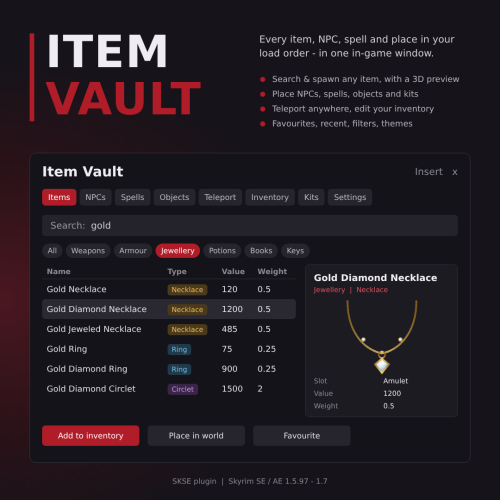
Every item, NPC, spell and place in your load order - in one in-game window
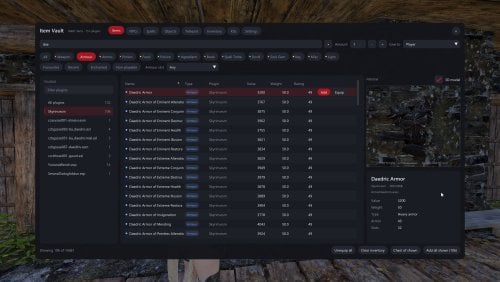
Item Vault is a fast, modern in-game browser for Skyrim. Press Insert and a window opens over the game: search everything in your load order, see a 3D preview, and add, spawn, place, learn or travel with one click. No console commands, no form IDs to look up, no menus to dig through. It works with every mod you have installed, including their items, NPCs, spells and places.
Requirements
* SKSE64 for your game version - https://www.nexusmods.com/skyrimspecialedition/mods/30379
* Address Library for SKSE Plugins - https://www.nexusmods.com/skyrimspecialedition/mods/32444
* Optional: powerofthree's Tweaks to show editor IDs - https://www.nexusmods.com/skyrimspecialedition/mods/51073
Supported game versions: 1.5.97, 1.6.x (including GOG) and 1.7.x - one DLL for all of them.
No plugin (.esp), so it takes no load order slot. Safe to add to or remove from an existing save.
Features
Items
* Search every weapon, armour, ammo, potion, food, poison, ingredient, book, spell tome, scroll, soul gem, key, light and misc item, colour-coded by type.
* Filter by type and by plugin; hide plugins you never want to see; extra columns (value, weight, damage/armour, editor ID, form ID).
* 3D preview of the selected item beside the window, with an info card.
* Add any amount, add and equip, drop on the ground, or put a whole selection in a chest. Multi-select works everywhere.
* Read any book or note straight from the list.
* Favourites and recently used items, kept between sessions.
* Copy a form ID or editor ID with one click.
NPCs
* Search every NPC with filters and a details panel.
* Spawn a copy in front of you, summon the real one to you, or go to where they are.
* Bring, kill or resurrect NPCs you've placed.
Spells
* Every spell, power and shout, colour-coded by school.
* Learn or forget with one click (shouts learn all their words).
Objects
* Place furniture, statics, containers and other objects in front of you, facing you. Undo the last one placed.
Teleport
* Search every interior and exterior location, including mod-added ones, and go there.
* Favourite places and recently visited places.
Inventory
* See and edit your own inventory: equip, unequip, remove or clear.
Kits
* Save sets of items (or everything you're wearing) as a kit and add the whole kit at once, with an option to equip it straight away. Copy and delete kits.
Settings (in game, Settings page)
* Six colour themes (Crimson, Ocean, Forest, Amethyst, Amber, Steel), window opacity, compact rows, full-screen mode.
* Change the open key by pressing it; optional keyboard navigation.
* Pause the game while the window is open (on by default).
* Text size and mouse speed in the .ini (Data/SKSE/Plugins/ItemVault.ini).
Controls
Opening and closing
* Insert opens and closes the window. Change it on the Settings page (click the key box, then press the new key) or in Data/SKSE/Plugins/ItemVault.ini (iMenuKey).
* Esc closes the window.
Searching
* Ctrl + F jumps to the search box from anywhere in the window.
* Delete at the end of a search works like Backspace.
Lists (Items, NPCs, Spells, Objects, Teleport, Inventory)
* Click a row to select it - its buttons (Add, Spawn, Learn, Place, Go...) appear on the right of the row.
* Double-click a row to add the item (Items), place the object (Objects) or go there (Teleport).
* Right-click a row for its menu: favourite, copy form ID / editor ID, hide plugin and more.
* Ctrl + click adds or removes single items from your selection (Items page).
* Shift + click selects a whole range (Items page).
* Ctrl + A selects everything currently shown (Items page, when you're not typing).
* Click a column header to sort by it; right-click a header to show or hide columns.
3D preview
* Drag to turn the model, mouse wheel to zoom, double-click to reset the view.
Keyboard navigation (optional - turn it on in Settings)
* Arrow keys move around, Tab moves between fields, Enter presses the highlighted button.
While the window is open, your keys and mouse go to the window only, so typing never sets off other mods' hotkeys.
Compatibility
* Works with any load order - it reads everything the game has loaded.
* No scripts, no plugin, nothing saved into your save game.
* Uses its own window drawn over the game, so it doesn't conflict with SkyUI or other menu mods.
Installation
* Install with your mod manager (Vortex or MO2) like any other mod, or copy the SKSE folder into your Skyrim Data folder.
* Updating: your favourites, recent lists and kits are kept in their own file. Installing over an older version resets ItemVault.ini (open key, pause, text size) to the defaults.
Credits and licences
* Built with the MIT-licensed CommonLibSSE NG fork (QTR-Modding/CommonLibVR-MIT), Dear ImGui by Omar Cornut (MIT), spdlog, {fmt}, DirectXTK / DirectXMath (MIT) and rapidcsv (BSD). Full notices are in THIRD-PARTY-NOTICES.txt in the download.
* This mod contains no GPL-licensed code.
- Dear ImGui by Omar Cornut, including the ProggyClean font by Tristan Grimmer. MIT License.
- spdlog by Gabi Melman and contributors. MIT License.
- {fmt} by Victor Zverovich and contributors. MIT License.
- DirectXTK / DirectXMath by Microsoft. MIT License.
- rapidcsv by Kristofer Berggren. BSD 3-Clause License.
- Full licence notices are in THIRD-PARTY-NOTICES.txt in the download.
- This mod contains no GPL-licensed code.