

About This File
Overview
A route, gallery, and walkthrough helper for the PC version of Being a DIK. Original script only. This download does not include the game, does not include scene scripts, and does not include the official walkthrough pages.
Seasons 1–2 and Season 3 are separate folders. The installer sets up every copy it finds. Tested on Ren'Py 7.4.10.
The choice guide still uses F8. Pocket money still uses F9. This one uses F10. All three can stay installed.
What it does
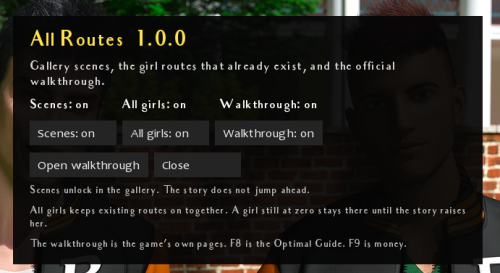
Press F10. Three rows start on.
- Scenes fills the gallery. The story does not jump ahead. Turn the row off and the gallery returns to the scenes this install had before the hack first set them.
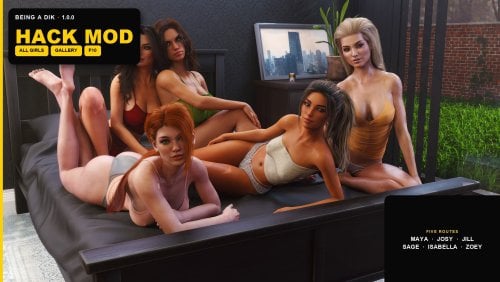
- All girls keeps every girl route the current episode has already created. Maya and Josy, Jill, Sage, Isabella, and Zoey stay available together, and the alone route stays off. A choice written as if/else still plays one branch. Later checks can see the others.
- A girl whose relationship is already above zero is held at 22 until the story goes higher. A girl still at zero stays at zero until the story raises her.
- Walkthrough opens the game's own walkthrough. While that screen is open, the page lock that skips the scene section is held open. The save still records the original install value. Season 3 opens its own guide. Seasons 1–2 open season 1 before episode 5 and season 2 after that.
- DIK score, Chick score, the breakup check, mansion money, and pocket money are left alone.
Install
1. Close the game.
2. Unzip the folder.
3. Double-click Install-All-Routes.bat.
4. If it cannot find the game, drag the folder that contains BeingADIK.exe onto the installer.
5. Wait for SUCCESS.
6. Start the game and press F10.
Remove
Close the game. Press F10 and turn Scenes, All girls, and Walkthrough off first if you want the previous gallery, route, and guide flag back. Then delete game\badik_routes.rpy and game\badik_routes.rpyc.
Changelog
1.0.0
- First release. Gallery scenes, all main-girl routes, and the game's own walkthrough. Backup stays next to BeingADIK.exe, outside the game folder.
![More information about "[The Sims 4] BlackBoxMods — Intent Guard v1.2.3 — Public script (18+)"](https://static.loverslab.com/screenshots/monthly_2026_09/create-a-premium-patreon-cover-banner-fo_-Ss0oXGlVki-M1wWOSlFhA__BL0K2nnSN-u4tApMvXDCg.thumb.png.29ec26ef9b797d3d220f629bf24b26b0.png)
![More information about "[The Sims 4] BlackBoxMods — Blackmail & Leverage v1.4.5 — Secrets, demands, exposure, NPC follow-through"](https://static.loverslab.com/screenshots/monthly_2026_09/create-a-premium-promotional-poster-for-_77LnaOBoXpWLDcxZFg7BSA_agH3_ffOTlOIpKyOHh8MMQ.thumb.png.a0acae5783f1cc473b67339ea0751b8c.png)
![More information about "[TS4] BlackBox Warm Lens — Photoreal Body Overlays (Public & Exclusive, WickedWhims Compatible)"](https://static.loverslab.com/screenshots/monthly_2026_09/premium-key-art-for-a-luxury-cosmetic-sk_tg7MDHvyUeyhlJjoHSfRRg_TUXHL7pGStOBOFJPYyrfWw_cover_2k.thumb.png.859c02508bb7013037aca5c385110e19.png)
![More information about "The House — Phone Gambling App [YA+] [Script]"](https://static.loverslab.com/screenshots/monthly_2026_09/00_ICON_SOURCE.thumb.jpg.7b25956de00d061d7a1bf5653622a9ff.jpg)
![More information about "[SCRIPT] BlackBox Mods — Inspired Heat (WickedWhims, 18+)"](https://static.loverslab.com/screenshots/monthly_2026_09/high-level-description-a-premium-patreon_Peqt1IpbXeShCmszxT363w_qNwS5fMRSVKjtkMjc5V7xw_cover_hd.thumb.png.68fafe3e09ead7b5cf90b6a36a747d24.png)