
About This File
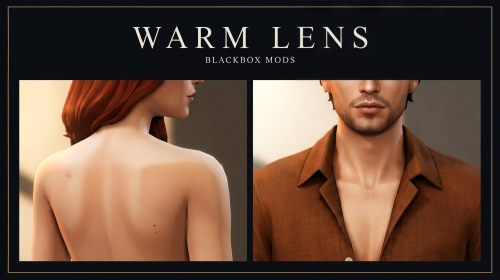
If nude Sims still look as though they undressed under CAS lighting, this overlay suite is the correction. Warm Lens is a stacked body-detail system: nude grade, tan lines, beauty marks, dew, oil, sweat, veins, and stretch marks — built as real CAS parts, not a default skin swap.
Creator: https://www.patreon.com/BlackboxMods/
Game: The Sims 4 (Base Game CAS)
Type: Body skin overlays / CAS parts
Adult: Yes
WickedWhims: Optional, supported on selected bottoms
Public (2.4 MB)
AF/AM Nude Grade (top + bottom) · AF Triangle Tan (top + bottom) · AF/AM Beauty Marks (top)
Exclusive (4.6 MB)
AF Thong Tan, Strapless Tan, Micro Tan (top + bottom) · AF Glass Dew and Afterglow (top + bottom) · AF Studio Oil, Set Sweat, Vein Map (tops) · AF Stretch Marks (bottom) · AM Studio Oil (top + bottom) · AM Set Sweat (top)
In-game behavior
Overlays do not replace the skintone. Existing skin, sliders, and HQ setup remain. Equip a Warm Lens top and/or bottom in CAS and mix freely. In everyday play the parts behave like other skin details. With WickedWhims, registered bottoms stay tagged as female or male body parts during undress instead of dropping to a generic nude.
Why it stands apart
- Three exclusive tan-line cuts plus a public triangle, not a single bikini stamp.
- Atmosphere maps (dew, afterglow, oil, sweat) that respond to light.
- Combinatorial tops and bottoms rather than locked presets.
- Designed male parts.
- Efficient RLE2 overlays and custom thumbnails. Exclusive remains under 5 MB.
-
No script required for the beauty content.
Compatibility
Base Game. Works with photoreal skins, HQ, lighting mods, and Reshade. Standard TS4 body UVs; extreme custom UVs can shift tan lines. Does not override townie defaults. Public and Exclusive use unique part IDs and can be combined; they currently share one WickedWhims snippet and some thumbnails.
Install
Place the .package file(s) in Documents\Electronic Arts\The Sims 4\Mods. Do not unpack the package. Enable Custom Content. Enable Script Mods only if WickedWhims is present. Restart, open CAS, and apply top and bottom independently.
Permissions: Do not reupload, paywall, or claim as original work. Recolors only with written permission.
CTA: Install Public and put Nude Grade plus Triangle Tan on one household. If the grade is the intended look, add Exclusive and build the remainder of the tan-line and atmosphere library.
![More information about "[The Sims 4] BlackBoxMods — Intent Guard v1.2.3 — Public script (18+)"](https://static.loverslab.com/screenshots/monthly_2026_09/create-a-premium-patreon-cover-banner-fo_-Ss0oXGlVki-M1wWOSlFhA__BL0K2nnSN-u4tApMvXDCg.thumb.png.29ec26ef9b797d3d220f629bf24b26b0.png)
![More information about "[The Sims 4] BlackBoxMods — Blackmail & Leverage v1.4.5 — Secrets, demands, exposure, NPC follow-through"](https://static.loverslab.com/screenshots/monthly_2026_09/create-a-premium-promotional-poster-for-_77LnaOBoXpWLDcxZFg7BSA_agH3_ffOTlOIpKyOHh8MMQ.thumb.png.a0acae5783f1cc473b67339ea0751b8c.png)
![More information about "The House — Phone Gambling App [YA+] [Script]"](https://static.loverslab.com/screenshots/monthly_2026_09/00_ICON_SOURCE.thumb.jpg.7b25956de00d061d7a1bf5653622a9ff.jpg)
![More information about "[SCRIPT] BlackBox Mods — Inspired Heat (WickedWhims, 18+)"](https://static.loverslab.com/screenshots/monthly_2026_09/high-level-description-a-premium-patreon_Peqt1IpbXeShCmszxT363w_qNwS5fMRSVKjtkMjc5V7xw_cover_hd.thumb.png.68fafe3e09ead7b5cf90b6a36a747d24.png)