
About This File
Panic Meter:
A Fallout 4 immersion mod that tracks how shaken your character is during and after combat. Panic rises in fights, lingers afterward, and can affect aim, stamina, body language, sleep, and how you recover.
REQUIREMENTS:
- Fallout 4
- F4SE (for gun accuracy penalties)
- Mod Configuration Menu (MCM)
WHAT IT DOES:
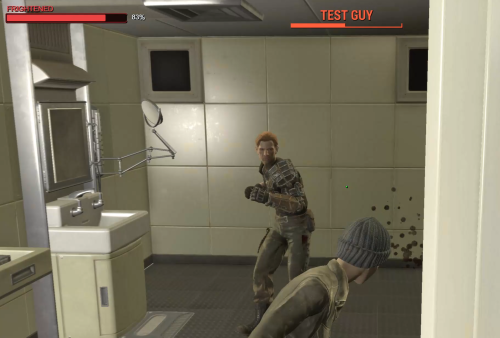
While you are in combat, a hidden Panic value (0-100%) slowly climbs. Endurance slows how fast it rises. Getting hit spikes panic immediately, and the lower your health, the faster both combat gain and hit spikes climb (up to about 2x near death by default). When combat ends, panic decays very slowly (about 1% every 10 seconds by default). Agility helps recovery a bit. Once panic has reached 10%, normal recovery and calming items will not drop it below that "uneasy floor." Only a full night of sleep can clear that baseline tension. This keeps a low, constant edge of nervousness until you actually rest well. The on-screen meter appears only when panic is above 0% (and only if the HUD is enabled in MCM).
HOW PANIC AFFECTS YOU:
Effects ramp with the meter. Defaults:
- Perception / accuracy start fading early as panic rises
- AP drain and speed penalties kick in at higher tiers
- Overlay / HUD flash effects start at 80%+
- Camera / controller shake only at 100%
- At 50%+: nervous 3rd-person stance (captive-style body language)
- Flavor notification lines as panic climbs (optional)
At 80%+ insomnia: trying to sleep may only give a restless 1-hour nap
instead of a full rest.
HOW TO LOWER PANIC:
- Leave combat and wait (slow natural recovery)
- Drink alcohol
- Use Mentats or Calmex
- Eat certain comfort foods (e.g. Noodle Cup, Fancy Lads, Cram, etc.)
- Sleep - full sleep helps most and can break the 10% uneasy floor
- MCM Debug: Reset Panic Meter to 0
HOW TO USE:
1. Install with your mod manager (MO2 / Vortex) so PanicMeter.esp, Scripts,
Interface, and MCM folders load.
2. Make sure F4SE and MCM are installed and running.
3. Start or load a game. The quest starts automatically.
4. Open the Pause menu -> Mod Config -> Panic Meter to tune settings.
Suggested first look in MCM:
- General: enable mod, flavor lines, show/hide HUD
- Rate: how fast panic rises / falls
- Effects: toggles and intensity for debuffs, overlay, shake
- Sleep & Calm: insomnia, uneasy floor, item calm amounts
- Nervous: 3rd-person stance / fidget options
- Debug: add +25 panic for testing, reset to 0, restore defaults
MCM QUICK REFERENCE (DEFAULTS):
Enable Panic Meter On
Show Panic Meter HUD On
Combat gain ~0.85% / sec (scaled by Endurance + low health)
Hit spike ~2.5% per hit (less if blocked; more if power attack)
Near-death multiplier up to 2.0x at critical health
Recovery ~0.10% / sec (~1% per 10 sec)
Uneasy floor 10% (full sleep can go below)
Overlay / flash 80%+
Aim shake 100% only
Nervous stance 50%+
NOTES:
- Disabling the mod in MCM stops new effects and hides the HUD, but keeps
your current panic value until you reset it.
- Overlay visuals need a spell / ImageSpace assigned on the quest in the
Creation Kit (properties PanicOverlaySpell / PanicOverlayISM). Without
those filled, gameplay effects still work; the flash overlay simply will
not appear.
- Optional fidget idles also need Idle forms assigned on the quest in CK.
The nervous stance works without that.
- Gun accuracy changes use F4SE InstanceData. Without F4SE, other systems
still function.
CONFLICTS:
- Lewd Talks: Whichever one takes priority will override the other.
TROUBLESHOOTING:
- Meter missing after load: reload once, or add panic via MCM Debug.
The HUD reinjects on load; it stays hidden at 0% panic.
- Settings look wrong after an update: MCM -> Debug ->
"Reset All Settings to Defaults".
- No accuracy effect: confirm F4SE is launching Fallout 4.
Edited by Wolfe6900