
Jump to content

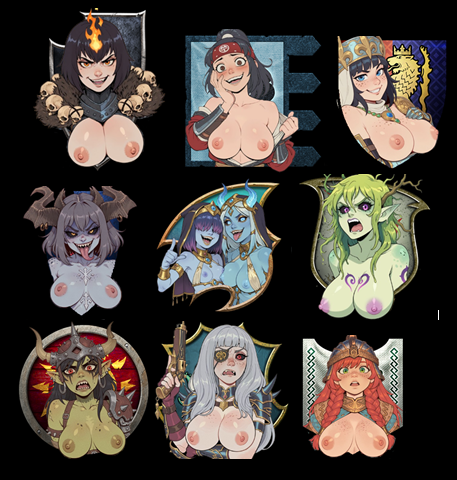
TardBannerPackBetter-V1.00.rar 1.0.0

   (2 reviews)

1 Screenshot


User Feedback

Recommended Comments

NaamForst

Posted

This is absolutely wonderful. Can you add more for modded factions such as the ones in the old world campaign, or release a paint / gimp / photoshop template for people to make their own?

ProvenRetard12734

Posted

I dont play mods and I am not an artist, I am using AI character loras trained by other people so what I can make is limited but I try to make them unique, the actual banner behind the characters are just the banners from the game lol. you can use rpfm if you want to get the actual banners in base game or extract the banners from my .pack.

Dziobak112

Posted

Question - can you upload the art itself to download? 

Gooey9121

Posted

On 8/4/2026 at 1:05 PM, Dziobak112 said:

Question - can you upload the art itself to download? 

If you use RPFM the original art is within the faction's files

Dziobak112

Posted

12 hours ago, Gooey9121 said:

If you use RPFM the original art is within the faction's files

Thanks for the help, I've managed to extract them

sdflksnjrpionr

Posted

Looks nice. I had also previously worked on a similar mod but didn't get very far because I didn't feel like making each individual banner so I took it down.


But I DID find out how to make the emblems on the map and diplomacy screen bigger because they're kind of hard to see. The UI elements are in ui > campaign ui > diplomacy_hud.twui.xml and settlement_panel.twui.xml. If you open the game developer mode you can see what each individual element is and it's pretty simple to resize them. Might need a lua script to make sure that they stay resized because it constantly updates them.


Just if you or anyone else was interested in making the flags bigger since they're kind of small.

NaamForst

Posted

On 8/12/2026 at 9:53 PM, sdflksnjrpionr said:

Looks nice. I had also previously worked on a similar mod but didn't get very far because I didn't feel like making each individual banner so I took it down.


But I DID find out how to make the emblems on the map and diplomacy screen bigger because they're kind of hard to see. The UI elements are in ui > campaign ui > diplomacy_hud.twui.xml and settlement_panel.twui.xml. If you open the game developer mode you can see what each individual element is and it's pretty simple to resize them. Might need a lua script to make sure that they stay resized because it constantly updates them.


Just if you or anyone else was interested in making the flags bigger since they're kind of small.

I've found these files using RPFM, and I've got them open there, but I'm stupid when it comes to code editing, can you help?

sdflksnjrpionr

Posted

On 8/19/2026 at 12:29 PM, NaamForst said:

I've found these files using RPFM, and I've got them open there, but I'm stupid when it comes to code editing, can you help?

I forget exactly but I'm pretty sure for instance the flags on the settlements on the campaign map are called dy_flag in settlement_panel.twui.xml, and then you just need to find the width and height values already there and adjust the value to make it bigger.


There are several different types of the banners used, it's all the same thing slightly bigger or smaller. The settlements use the one called "rotated", which is like 112 x 90 pixels so make sure to find the one that says rotated when editing for this example. I recommend doubling or tripling those values to make the flags a bit more readable.


After you make them bigger, you may want to edit the anchor point value as well because it can cut off the name of the settlement from being really big, and of course you need to make sure that the new resized flag image being referenced that you make is also sized up or it will be low quality, so doing this basically means you have to edit all the flags in the game individually to make them look good which is a pain and part of why I stopped, but it's definitely possible to change the flags persistently wherever they're displayed.


AI knows how to do all this if you need help.

×
×
  • Create New...