Jump to content

Night City - Gay Hub TV - Being Updated! 1.0.1

   (4 reviews)

5 Screenshots

About This File

Night City - Gay Hub TV 


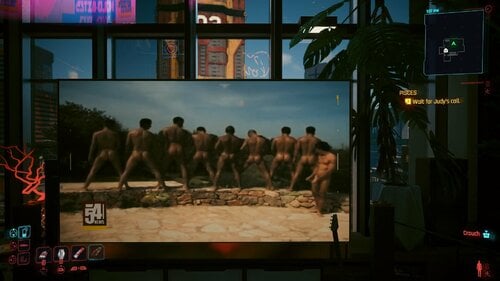
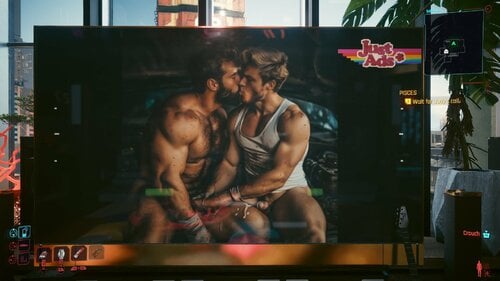
Introducing a mod made specifically for those who like gay content. Multiple videos have been added to the channels, along with some customized Advertisement to go with the unique movie channels. 


I do want to start off by saying thank you tocthe original maker of the mod that this one is based off. And too Sebifakto, I would not have released this if not for them.


It follows a bit of the same format with a few key differences. The first being that these videos are significantly longer, which means that the files are a lot bigger compared to the original mod the straight version of this. 

Because these videos are a bit longer and quite a bit of a higher quality with the way they were downloaded, you may be required to download two additional mods for this to work. Well on your PC depending on the graphics you have. 

So, I will list the requirements underneath and the settings that I personally have used. And if you cannot match these settings, do not be too alarmed as the mods mentioned that would be recommended to download should help. With this process.


________________________________________________________________________________________________________________________ 


Download List Details 


Everyone here is the download list order they cannot be named when they are linked to an external file.
So here is the order of the download starting from the first one to the last one in numbered order so you know what links to click on for each one.


On that note all you really need to make sure you download is #1 which is the main file in any of the channels that you want. The Bumpers channel Contains all of the commercial and channel logo videos edited if you want to see those in between your videos along with the clip in videos which is the second smallest file.


Download List:


1. Gay Tv Main.archive
2. Gay Tv Ads.archive
3. Gay Tv Bumper and Chip In.archive
4. Gay Tv Guns_n_Horses.archive
5. Gay Tv Infoflash.archive
6. Gay Tv N54_news.archive
7. Gay Tv Tune_in.archive
8. Gay Tv Wns_news.archive
9. Gay Tv Your_business.archive
10. Gay Tv Ziggy.archive
11. Gay Tv Safe N Sound.archive

________________________________________________________________________________________________________________________


Graphic Settings:


Below are the recommended settings that I have for my game, and this can vary depending on your graphic card and what your computer or laptop can do. I do recommend adding some of the mods recommended below. As they will help be able to allow you to play these videos without the Pixelization that keeps happening. If you are having problems with it, please let me know your graphic settings so I can change minds to them if I can and try to figure out a good resolution for the videos to match those settings. 
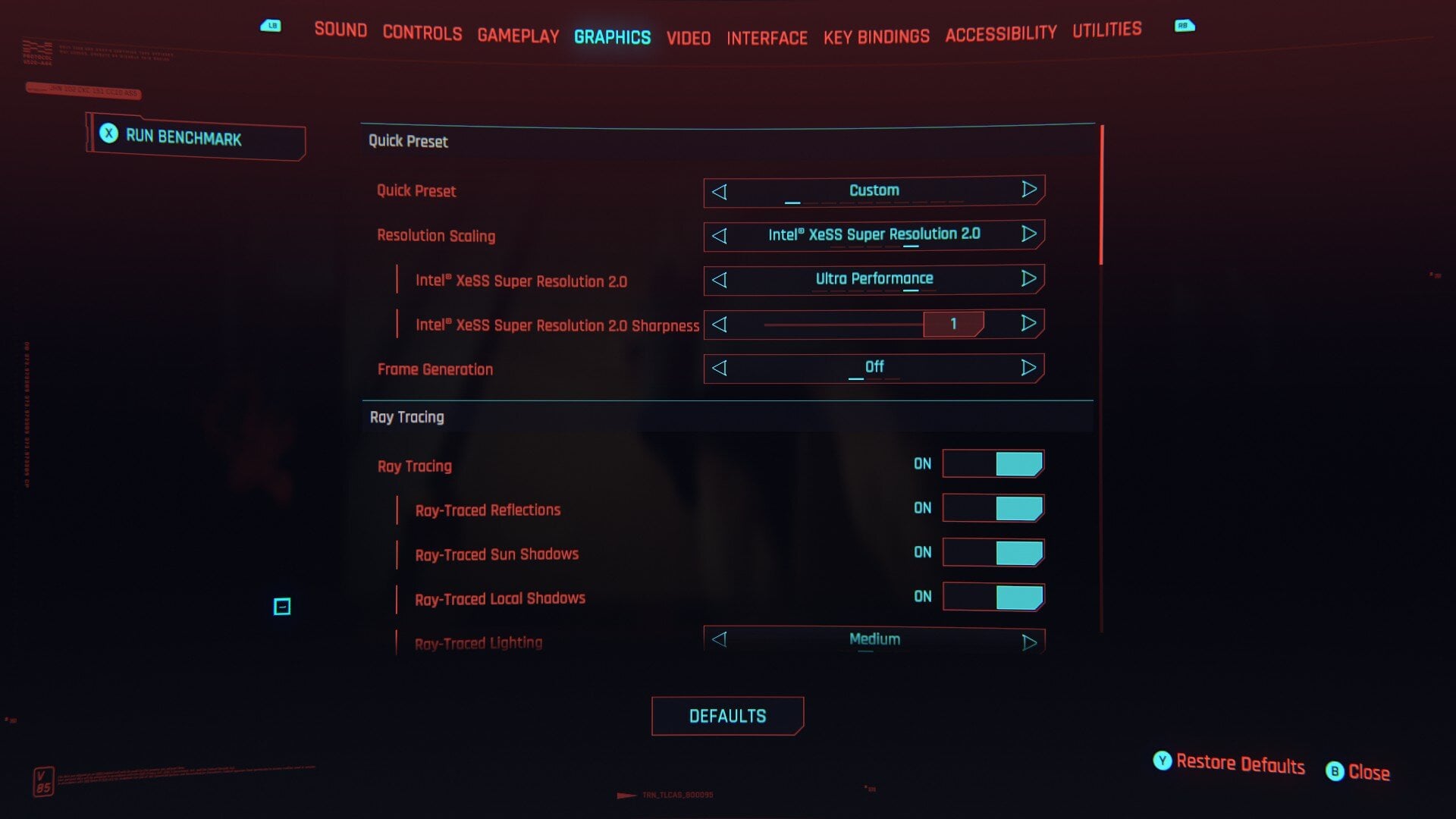
 

image.jpeg.9aa3a1ea1c7aad73179da049c1d450e4.jpeg


Recommended Mods: 


Always Best Quality _ Ads - Map - Hud - Photo Mode - Vending Machines and more- https://www.nexusmods.com/cyberpunk2077/mods/12700 

This is one of the most recommended, it's a crucial part for me to be able to play the videos on my specs with my PC graphics and I would advise you if you noticed any of the pixelation to download this to help fix that. 


Enable Advert Animations (Ads)- https://www.nexusmods.com/cyberpunk2077/mods/13014 

This is recommended because it enables all of the ads plus the videos to be used on different advertisements all around night cities. So if you want to see. Is in the videos. In different locations as you explore the city. I would advise you to download this. Also, if you want, I would also advise you to get the gay advertisement mod that are for the normal ads that's available here as well. 


Elite Screens (Ads - Holo)- https://www.nexusmods.com/cyberpunk2077/mods/22805   

Downloading this is to remove all the weird filters that are on the videos naturally from the way the TV streams and monitors around the cities and within the apartments are set up. So, you'll get the clearest pictures possible. 


TV Anywhere- https://www.nexusmods.com/cyberpunk2077/mods/8162 

To be able to bring up the video of anywhere and watch them at any time wherever you are. So, this is like a portable tablet, very good. For when you're on the go. 


No TV Subtitles- https://www.nexusmods.com/cyberpunk2077/mods/17111   

This is a highly recommended one. It removes all the subtexts and subtitles that you see play at the bottom of the screens. This completely disables them so you can watch the videos in peace. 


Adblocker - Audio Off For Ads- https://www.nexusmods.com/cyberpunk2077/mods/9612   

Because I have not figured out how to put the actual audio that is linked to the videos. This removes the audio that plays with the normal videos that these have replaced. 


SPC Open (Silver Pixel Cloud Drive-In Theater)- https://www.nexusmods.com/cyberpunk2077/mods/14339   

Highly recommended if you want to watch this on the big screen. This adds it and unlocks the theater so you can go and watch them. 


SPC TV Screen (Silver Pixel Cloud Drive-In Theater)- https://www.nexusmods.com/cyberpunk2077/mods/14927 

This allows you to watch multiple videos on the one big screen in the theater that the previous one unlocks. 


________________________________________________________________________________________________________________________


About this mod..


Now with those out the way, I want to clarify this was something I made personally for myself a while back. And something I improved on and wanted to release on here so people had the choice between having the straight one. With the originals in this one with the gay content. 


Now these videos are much longer. As mentioned earlier, they are broken up into channels following the original format from the original mod. But these are a lot bigger files and take up more space altogether combining into 50 gigabytes worth of videos. So, this is why they're broken up into parts. 


This is also in a beta format. This would be the first time I have done this game when it comes to money. So please if you find any mistakes or any type of freezes let me know and I'll look into it, especially if you can remember what video calls it or what. Videos may have glitched. 

As of right now, this is version 1.0. And I do plan on updating it. I have some other mods that I do want to release sometime soon. So, you can look forward to that, but as of right now, I do hope everyone enjoys it. 


If you have any questions just let me know in the comments I guess and I do not own or claim any of these videos. The channels descriptions are listed below. 


________________________________________________________________________________________________________________________


Channels: 


GT- Ad: All of these are a combination of basically multiple video types from jerking off, public sex, strippers and so on with different variants.  

GT Bumpers and Chip In: One of the smaller mods within this category. It has strippers and massages. With happy endings at the end guaranteed to get the blood pumping. 


GT-Guns N Horses: Solo compilations, rimming and toys. 


GT-InfoFlash: All Security/Officers/ Guards type videos. 


GT-N54 News: News videos and surveillance and cam feed videos. 


GT-Tune In: This contains jerk off scenes from movies and shows. 


GT-WnS News: TV videos, public jerk offs, TV series specials. 


GT-Your Business: These are gay anime. 


GT-Ziggy: Jerking off videos and public videos, with some ass shaking and threesomes. 


GT-Safe N Sound: This one has mostly cars and public transportation videos, so that's about it.


________________________________________________________________________________________________________________________


End Notes


So, all of these were talking purely off xvideos. Because that was the only place where I could find normal downloads without too much fuss. So once again, I do not own any of these videos. They are there. You can go and look them up yourselves or download them or whatever you want to if you make an account. 

This should go without me saying these are for 18 plus audiences. OK so hopefully you are adult if you download these.


I hope everyone enjoys these, as I said give me feedback, I'm always looking to improve and that's it. Enjoy your Friday everyone. 


Edited by BadieBoi


What's New in Version 1.0.1

Released

Safe n Sound has been added to the download list.


User Feedback

Recommended Comments

BadieBoi

Posted

Hey everyone I just wanted to update I'm looking to make a companion mod with this so you can actually skip the videos and go onto the next one via remote it might take me a bit but that's in the works. There is also a part 2 to this mind coming which is to allow you to have naked male in PC's who are fully erect in the game. There will be 2 versions of that mod one that only changes the males and another 1 that actually changes the female characters as well to males you want that.


 There will be 2 options though so you can have 14 a meal mode and cause if you want to use a female body mod that replaces those characters. Next is the Last month that I'll be working on in this series which is the hollow mill mode this is based off of hollow girl motts where you get nice little halograms that pop-up around night city. These are all very explicit adult mods which is why they're on this site so please look forward to that and let me know how some of you feel if you want to comment on the remote mod letting you be able to use this mod. Because some of the videos are longer this will give you the option to be able to skip them if I can do it even pause or fast forward  Or rewind.


云海海

Posted

非常感谢您制作并分享这个mod。但我不知道为什么,当游戏场景中有电视播放GV时,NPC的模型有时会看起来很奇怪,对话也没有声音,主菜单会卡住,而且我无法读取存档。我只能重新启动游戏。

BadieBoi

Posted (edited)

7 hours ago, 云海海 said:

非常感谢您制作并分享这个mod。但我不知道为什么,当游戏场景中有电视播放GV时,NPC的模型有时会看起来很奇怪,对话也没有声音,主菜单会卡住,而且我无法读取存档。我只能重新启动游戏。

感谢您完成上述任务。请问您是否启用了其他模组?这可能是兼容性问题。我会尽快查找原因,希望能在本周结束前修复。由此给您带来的不便,敬请谅解:classic_sad:


"Thank you for letting me know about this problem. Could you also please let me know if you have any other mods enabled? This might be a compatibility issue. I will try to find the cause and hopefully fix it before the end of this week. I apologize for any inconvenience caused:classic_sad:."


-B

Edited by BadieBoi
云海海

Posted

On 11/4/2025 at 5:47 PM, BadieBoi said:

感谢您完成上述任务。请问您是否启用了其他模组?这可能是兼容性问题。我会尽快查找原因,希望能在本周结束前修复。由此给您带来的不便,敬请谅解:classic_sad:


"Thank you for letting me know about this problem. Could you also please let me know if you have any other mods enabled? This might be a compatibility issue. I will try to find the cause and hopefully fix it before the end of this week. I apologize for any inconvenience caused:classic_sad:."


-B

Sorry, I only logged in to loverslab today and saw your reply. Yes, I have enabled many mods. This problem doesn't occur every time when playing with GV on the TV. Sometimes it can play normally, play the game normally, and there's no problem. But sometimes it will have issues. Because I have enabled many mods., I can't finish say them one by one. I don't know if it is incompatible with those Mods. I will try to troubleshoot by turning on and off each Mod one by one using Vortex. If I find Incompatible Mod,I will tell you.

BadieBoi

Posted

7 hours ago, 云海海 said:

Sorry, I only logged in to loverslab today and saw your reply. Yes, I have enabled many mods. This problem doesn't occur every time when playing with GV on the TV. Sometimes it can play normally, play the game normally, and there's no problem. But sometimes it will have issues. Because I have enabled many mods., I can't finish say them one by one. I don't know if it is incompatible with those Mods. I will try to troubleshoot by turning on and off each Mod one by one using Vortex. If I find Incompatible Mod,I will tell you.


Thank you, I will keep an eye out on my end as well. If I encounter this error I will let you know. Hopefully it is something that can be fixed easily.

Anonemis

Posted

How are these meant to be installed?

BadieBoi

Posted

1 hour ago, Anonemis said:

How are these meant to be installed?

 So install leaves mods you need to download them via Google Drive files. You need to download the main one which should be in the folder you'll actually see it when you click on the links and from there you can pick the different channels you want you'll drop them into your mod directory or folder it should be within your steam library you can actually just right click on it via steaming you and go to it via your computer.


 Typically is usually here it might be a little different if you set it up yourself but you should be able to find where to place your mods right here:


Steam\steamapps\common\Cyberpunk 2077\archive\pc\mods


 Please let me know that you have anymore questions or if there is a problem. Part 2 this series will be coming out hopefully next week. It will be a mod that affects all the NPC's for night city.

Anonemis

Posted

46 minutes ago, BadieBoi said:

 So install leaves mods you need to download them via Google Drive files. You need to download the main one which should be in the folder you'll actually see it when you click on the links and from there you can pick the different channels you want you'll drop them into your mod directory or folder it should be within your steam library you can actually just right click on it via steaming you and go to it via your computer.


 Typically is usually here it might be a little different if you set it up yourself but you should be able to find where to place your mods right here:


Steam\steamapps\common\Cyberpunk 2077\archive\pc\mods


 Please let me know that you have anymore questions or if there is a problem. Part 2 this series will be coming out hopefully next week. It will be a mod that affects all the NPC's for night city.

Thanks! I look forward to it. Also, would you be willing to make a list of the videos with the links?

BadieBoi

Posted

2 hours ago, Anonemis said:

Thanks! I look forward to it. Also, would you be willing to make a list of the videos with the links?

1. Gay Tv Main.archive
2. Gay Tv Ads.archive
3. Gay Tv Bumper and Chip In.archive
4. Gay Tv Guns_n_Horses.archive
5. Gay Tv Infoflash.archive
6. Gay Tv N54_news.archive
7. Gay Tv Tune_in.archive
8. Gay Tv Wns_news.archive
9. Gay Tv Your_business.archive
10. Gay Tv Ziggy.archive
11. Gay Tv Safe N Sound.archive
 
This is the order of the videos via the links starting at the first one, I tried to add names to the links but I couldn't get them to work:classic_sad:. Does anyone know how to do that?
 
Anonemis

Posted (edited)

16 hours ago, BadieBoi said:
1. Gay Tv Main.archive
2. Gay Tv Ads.archive
3. Gay Tv Bumper and Chip In.archive
4. Gay Tv Guns_n_Horses.archive
5. Gay Tv Infoflash.archive
6. Gay Tv N54_news.archive
7. Gay Tv Tune_in.archive
8. Gay Tv Wns_news.archive
9. Gay Tv Your_business.archive
10. Gay Tv Ziggy.archive
11. Gay Tv Safe N Sound.archive
 
This is the order of the videos via the links starting at the first one, I tried to add names to the links but I couldn't get them to work:classic_sad:. Does anyone know how to do that?
 

Oh, no, I meant the source videos from xvideos. No worries if not though.

Edited by Anonemis
BadieBoi

Posted

On 12/5/2025 at 10:35 PM, Anonemis said:

Oh, no, I meant the source videos from xvideos. No worries if not though.

 Sorry for the delay in the reply it's really hard to list them because some of them aren't even on the site anymore they refresh the videos and remove and upload so many videos. What I would tell you to do which is what I did was just type in the keywords that you see underneath the description of each of the categories you should be able to find the videos that are listed in the mod. But no worries eventually went on done the second part this project I'll make a list to see if I can sign them all so you guys and see them.

removeablekiss

Posted

I've been trying to add some of my own videos to some channels but i cannot find out how to import my bk2 files into wolvenkit. im very new to wolvenkit so if you dont mind helping me through the wolvenkit process a bit i would super appreciate it! 

BadieBoi

Posted

7 hours ago, removeablekiss said:

I've been trying to add some of my own videos to some channels but i cannot find out how to import my bk2 files into wolvenkit. im very new to wolvenkit so if you dont mind helping me through the wolvenkit process a bit i would super appreciate it! 


Hey, removable. So it's a whole process to actually adding the videos. The first thing that you're going to want to do when editing the videos and channels is make sure in. WolvenKit You locate the following. Folders and add them to your projects. You need to export these and edit them, and they need to be edited to match the time and the type of video file that the game uses. I will list those below but I also will link. Some of the tools that I use to do this as I do want to see more people be able to edit and add their own channels as well. And maybe people will be able to do it far better than me and even help with the remote mod eventually. To upgrade the remote, but here's the files that you want to look for. And add to your project in the tools needed to edit them, or at least the ones I used. 


First, you're going to want to make sure you go to archive base, media and download all of the scene folders, and that's the animated billboards, the fluff, the loading screens, quest and TV folders. 

This is essential if you're going to be editing the length of the videos that you're editing. Each one of these scenes  correspond to one of the video files within the movie folders. Which we'll cover next, but each of those are measured within seconds. What you need to do is go to Google and do a conversion from minutes to microseconds for each of the videos that you download and replace so you can change each of the Corresponding. Fails to match the videos. That you're adding. 

From here you will then make sure you download. All the files from the archive, base movies and that includes the ads, fluff, loading screens, misc and tv. If you want to change some of the ads that pop up around the world, you need to download the scenes folder from the open world. 

Once you have all of this added to your project, you're essentially ready to start editing them.  


From here you're going to need the following tool Rad . Which is essentially the whole tool you're going to be using to convert your files over to the proper format.  

https://www.radgametools.com/bnkdown.htm


Make sure you run a virus stand. That's what I did just to be sure it is an older program. Make sure that when you download it, you check to make sure it is safe to use on your computer. And that's to anybody looking at this quick Guide. 


Now there was a bit of a work around when I was doing it and I'm going to tell you, you would see that the file types usually are bk2. You're going to make sure you convert that file over to bk1 first and then manually change the extension to bk2. I'm going to see if I can paste the settings that I have for the compressor to change the format to what you need it to be. When converting them over and you can do this with multiple videos using the batch setting. You just need to make sure you have the proper output setting for the converter which will be listed below. 


Once you do this and you convert your videos over to the proper format, you're going to copy the name of the original videos and make sure when you paste the replacements you rename them the same exact name as the video, changing your extension once again from blank. 1-2 Blink 2. Via looking like this “Name_of_file_your_replacing”.bk1 to “Name_of_file_your_replacing”.bk2. Once you do that within the folder, you're not going to do it inside of the kit. You're going to physically go to that folder and replace it. You can do this by going into the kit itself and going to the movies. tab go into ads first or whatever Video you want to replace and you're going to hit that yellow folder right beside it when you highlight the video. For this example, if I can put paste it, I'm going to show you how it should look and how you're going to open it up. So you can replace it via. Folder. And it will update within the kit as soon as you do it. You just need to make sure you repack it or rebuild it when you're done adding everything. 

image.png

image.png

image.png

image.png

BadieBoi

Posted

Hopefully this helps😅, and if you have any further questions I would suggest going on to the original mod. I actually say a bit more in detail on the process of this and you can always ask the original mod creator. As they helped me quite a great deal with learning how to do this process. If you have any questions or need any further help, please let me know. I might be a little busy right now, but I usually can find time to reply. It might take me a day or so because I'm working, but please don't hesitate to ask. 

removeablekiss

Posted

53 minutes ago, BadieBoi said:

Hopefully this helps😅, and if you have any further questions I would suggest going on to the original mod. I actually say a bit more in detail on the process of this and you can always ask the original mod creator. As they helped me quite a great deal with learning how to do this process. If you have any questions or need any further help, please let me know. I might be a little busy right now, but I usually can find time to reply. It might take me a day or so because I'm working, but please don't hesitate to ask. 

You are insane!! I did not expect such a detailed response, I'll absolutely be giving this another shot. I really appreciate you going out of your way like that to help me out, thank you!!

BadieBoi

Posted

31 minutes ago, removeablekiss said:

You are insane!! I did not expect such a detailed response, I'll absolutely be giving this another shot. I really appreciate you going out of your way like that to help me out, thank you!!


It's no problem at all 😊

ShudRayzor

Posted

Hi. hoping i can find a response soon. I have the mod downloaded properly im sure but I dont see any option to change channels on the tv. Nothing is showing other than the normal cyberpunk tv with the talk show. I also have barely made it through the game. still at the beginning.

BadieBoi

Posted

3 minutes ago, ShudRayzor said:

Hi. hoping i can find a response soon. I have the mod downloaded properly im sure but I dont see any option to change channels on the tv. Nothing is showing other than the normal cyberpunk tv with the talk show. I also have barely made it through the game. still at 

  No worries, are you in the first apartment? And how far are you I don't want to spoil it for you but what I would do honestly is make sure you saving your apartment and look at the part of the game you're in some parts I know unlocks additional channels but I'm hoping this just works from the start it can either be you need to progress in the story bit more.  Which I'm hoping it's not because I haven't heard that problem or it might just be  installed correctly. but I would like to think everyone here knows how to do that so just tell me where you are in a story and I'll try to test it myself to see if it's  I can recreate that problem you're having.

 So no worries at all and thank you for telling let's see if we can fix this or find out what's wrong😁

Cyberponk

Posted

Hey! first of all thanks for the mod, great stuff!

Sadly I've been running into freezing issues. I've tried many graphics setting combinations, and toggled as many mods off as I can safely try, but no luck.

I can quite reliably cause it to happen with the "Your_business" channel, from V's flat:

I can play the video once without issue, but as soon as I stop watching and try to watch it a second time I am met with a black TV screen and a completely broken cyberpunk (UI wont load, even pause menu, and eventually it freezes entirely).

I've also encountered it in the wild, and probably with other channels (didnt have that one unlocked at the time.)


Hope this helps narrow it down a little, I'd love to play the game with this mod on. 

BadieBoi

Posted (edited)

1 hour ago, Cyberponk said:

Hey! first of all thanks for the mod, great stuff!

Sadly I've been running into freezing issues. I've tried many graphics setting combinations, and toggled as many mods off as I can safely try, but no luck.

I can quite reliably cause it to happen with the "Your_business" channel, from V's flat:

I can play the video once without issue, but as soon as I stop watching and try to watch it a second time I am met with a black TV screen and a completely broken cyberpunk (UI wont load, even pause menu, and eventually it freezes entirely).

I've also encountered it in the wild, and probably with other channels (didnt have that one unlocked at the time.)


Hope this helps narrow it down a little, I'd love to play the game with this mod on. 

  Thank you for hurting me now this last part is a common issue that I've seen 3 people have. The UI stops working I've seen this week over as well but people are fixed it so hopefully it's something small.  After some quick research it does look like it might just be caused by being outdated this is a common thing with a lot of outdated mods I'm not sure how to update it maybe something in the database change but I haven't seen any updates. But I will go back and check the files to see what could have been causing this to happen maybe I can find someone who actually knows more about the game to take a look at it as well.

Edited by BadieBoi
BadieBoi

Posted

Oka quick update I was able to get the glitch the trigger definitely see what you're talking about I'm going to see if I can fix it; fingers crossed it will be done soon.

BadieBoi

Posted

I just wanted to let everyone know I am updating this mod it's just gonna take a little bit of time let me make sure everything is up to par. And someone also found out how to finally edit the audio for the videos so later on in another update I might be able to put the audio clips in as well. So look forward to that thank you everyone for your patience and hopefully the update will roll out soon.

alreadytwice

Posted

I just want to say thank you for this mod!!
Its absolutely amazing and brilliant and feeding my horny gay ❤️

I cant wait for the ff/rw remote function and the possibility of proper porn audio!

Also i noticed in the description you said you could only find xvideos to download from

try ice-gay(.com)
just make sure your on the old version of the site
(theres a button to swap between new and old)

you can just right click and save as to download any video.

BadieBoi

Posted

On 3/28/2026 at 9:03 PM, alreadytwice said:

I just want to say thank you for this mod!!
Its absolutely amazing and brilliant and feeding my horny gay ❤️

I cant wait for the ff/rw remote function and the possibility of proper porn audio!

Also i noticed in the description you said you could only find xvideos to download from

try ice-gay(.com)
just make sure your on the old version of the site
(theres a button to swap between new and old)

you can just right click and save as to download any video.

🤩thank you! Definitely, try it.It's still a bit rough updating everything.I have to go through every file just to make sure it's okay but it will be posted soon.Hopefully with audio.

heronymous

Posted

Legit great taste in porn, a fine addition to my gay paradise

×
×
  • Create New...