

About This File
Lovense API
An API to easily control Lovense Toys via Papyrus calls.
*This version is identical to the Nexus upload
Usage Instructions
In order for other mods to control your Toys, you will first need to connect it to Skyrim. Interaction will then be handled by mods using this API. You don't need to do anything further.
- If you do not own a Lovense Toy, you can buy one here: Lovense.com
1. Enable LAN Mode
Ensure you have the Lovense Remote App installed on your phone. Open it, and navigate:
- Discover -> Game Mode -> Enable Lan
Toggle the Lan Switch and you should find a "Local IP" and "Port" field. We will need these in a moment.
When connecting via the Usb Dongle:
- Your IP will be 127.0.0.1
-
For Port,
- The default Port is 20010
- The default SSL Port is 30010
-
You can also manually search for the port by typing those two lines into the terminal:
-
tasklist | findstr Lovense
- This will give you an output of shape: Lovense_Remote.exe <process id> ...
-
netstat -ano | findstr 0.0.0.0 | findstr <process id>
- Ensure to replace <process id> with the value you obtained in the previous command
-
tasklist | findstr Lovense
- Ensure to enable Allow Control in your Lovense Remote App, under External Control in the App's Task Bar.
- If it does not work, ensure to check back into the App and confirm access permissions.
For either of those methods, LovenseAPI by default will prefer regular (non-SSL) Ports. If you want to connect via the SSL Port, ensure you go to Data/SKSE/Plugins/Lovense.ini and set bUseSSEL = 1.
2. Connecting the App
To connect to Lovense Remote, there are two options available:
- Via the Interface (Not available for VR)
- Via the Console (Requires Custom Console)
2.1 Connecting via Interface
Open the Connection Menu via Hotkey, by default this will use the F10 key. This will open the interface:
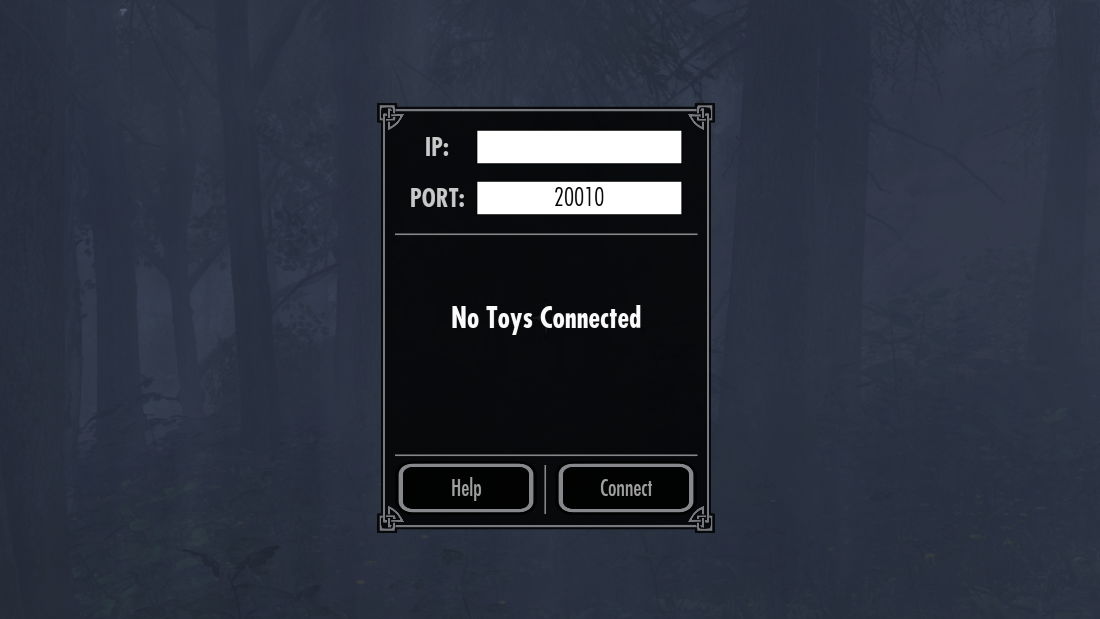
In the Menu:
- Enter the Local IP from Lovense Remote into the IP field.
- Enter the Port Number into Port field.
- Press the Connect button.
Afterwards, you'll see a list of all Toys that are now connected to your game.
2.2 Connecting via the Console
Alternatively, you can also establish a connection using the console. If you want to take this approach, ensure you have Custom Console installed. Type the following into your console line by line, replacing <*> with the respective requested information:
- lovense sa <Local IP>
- lovense sp <Port>
- lovense c
After typing out all three lines, you should be getting a message along the lines of:
- Connected to Lovense API. Connected Toys: [...]
3. Toy Categories
If you want to be extra-immersive and have access to the Interface, you can assign a category to each Toy that is currently connected by cycling through the list of categories using the arrow buttons next to each registered Toy. Categories are useful for letting mod authors know that you only want to active a specific Toy under certain.. stimulating conditions.
Let's consider a very plain example: Say we are using an adult animation framework utilizing this API and respecting the Category feature. Then, if you set the category of your Toy to Anal, the Toy will only be activated when the animation currently playing is somehow considered anally stimulating. Easy, right? And all the more immersive if you use more than 1 Toy at once. 
Please note however that this feature opt-in for both you and the author. If either of you decides not to use this feature, then any category requests/preferences will not be respected.
Information for Mod Authors
Interaction with Lovense is done entirely through the script Lovense.psc. Documentation is part of the source, located above each function individually.
You usually want to start every call to the API by requesting the IDs of currently loaded toys, either by using GetToyIDs() or, if you want to utilize the category feature, GetToysByCategory(). Note that the latter will also return any toy not assigned a category. This may become important if you manage multiple categories at once.
Requirements
- Address Library for SKSE Plugins (For SE Users)
- VR Address Library for SKSEVR (For VR Users)
- Custom Console (If you want Console Integration)
---------------------------------------------
Some links if you want to support me:
- Patreon: Scrab Joséline | Patreon
- Ko-fi: Scrab | Ko-fi
- Discord: Citadel
---------------------------------------------




.thumb.png.b3fcc647ce83e9de144ee3a86cd642a2.png)