

Reading Papyrus Logs

Entry posted by traison in Tech Support
1973 views
1. Foreword
This paper is intended to help with reading Papyrus logs, and solving issues reported in them.
Papyrus logs are not crash logs, unlike what has been claimed in the past. Papyrus logs are only useful in a crash, if an actual crash log hints at it. In the rare case that Papyrus is involved with a crash, it most likely shouldn’t be read literally, but rather be used to measure the general health of the Papyrus engine. See section 6 for more about this.
2. Setup
2.1 Enable Logging
The Skyrim.ini file is in Documents\My Games\Skyrim Special Edition. If you’re using MO2, depending on the current profile settings, the ini file might also be in the current profile directory. Vortex has a similar system.
Enable logging by opening your Skyrim.ini file and adding or setting the following values:
[Papyrus]
bEnableLogging=1
bEnableTrace=1
bLoadDebugInformation=1
Log files are written to Documents\My Games\Skyrim Special Edition\Logs\Script. Papyrus.0.log is the log file from the most recent Skyrim session. This is usually the one you’ll be looking at. The other logs are from previous sessions.
2.2 Disable Logging
Setting bEnableLogging to 0 is enough to disable logging. Whether to keep logging or not you'll have to decide for yourself. Having it on all the time has its benefits when you run into unexpected issues.
On 11/30/2025 at 6:02 AM, NymphoElf said:... papyrus logging should only be enabled if you are experiencing issues with your game ... If your game is performing as expected, turn off papyrus logging because you're only causing an unnecessary performance drain on the game ...
3. Definitions
Function declaration:
The function signature. Defines the return type and input arguments of a code function.
Function definition:
The actual implementation of a code function. The return type and arguments must match the declaration.
Stack:
The stack is a memory segment unique to each thread. It contains stack frames.
Stack frames:
Stack frames can contain function variables, return addresses and temporary storage for register values.
Callstack:
The callstack is the stack frames in chronological order, describing where code execution came from and where it ended up.
4. Utilities
- xEdit is going to be one of your most important tools, you’re expected to know how to navigate in it, and how to find and edit record fields.
- Your mod manager is used to find which mod a file came from.
- ReSaver for stack dumps and rescuing broken saves.
- Champollion, originally made for LE or pre-LE Skyrim, still works on SE/AE. It is used to decompile pex scripts back to psc sources. Useful in some rare occasions.
- Notepad++, or any other competent text editor capable of doing recursive text searches. Mainly useful for finding things in script sources.
4.1 Querying Mod Organizer 2 for file conflict winner
-
On the right side of the main view, select the Data -tab.
-
Type the file name in the filter box at the bottom.
-
View the Mod -column to find which mod is currently providing the file.
4.2 Querying Vortex for file conflict winner
See the comment by Talesien (5th comment in this blog post) for how to do this in Vortex.
Alternate approach (reference)
- Open Vortex_deployment.json in Notepad.
- Search for the file name.
4.3 Finding script references in plugins using xEdit
- Open xEdit, select the plugin(s) you suspect the script is referenced from. Do not change the load order if unsure.
- Right click a plugin.
- Apply script.
- Find “Skyrim – List used scripts”.
- OK.
- View the Messages -tab at the bottom for the result once the script has finished.
If you have a lot of plugins, and going through them is too slow then use Notepad++ to search for the script name in all plugins:
- Ctrl + F
- Find in Files -tab
- Find what: <script name>
- Filters: *.es*
- Use the xEdit method above to find the records, now that you know the plugin names.
5. Solving Papyrus Problems
Before starting the debug process for any Papyrus problem, make sure there isn't a mod conflict. As an example, a very common source of Papyrus errors is SLP+ which overwrites SexLab's scripts. It causes many mods depending on SL to stop working. If a problem appears to be in one of SL's scripts, start by checking for mods overwriting any of SL's files.
5.1 Missing scripts
Cannot open store for class "<file>", missing file?
Script <file> cannot be bound to <object> because the script does not exist or is not currently loaded
These are always reported at the top of the Papyrus log. Left behind by mods you’ve uninstalled mid-playthrough, or by mod authors who forgot or neglected to clean up after refactoring. Could also be you're missing a dependency, or the scripts of a mod are not provided by the same mod or mod version as the plugin.
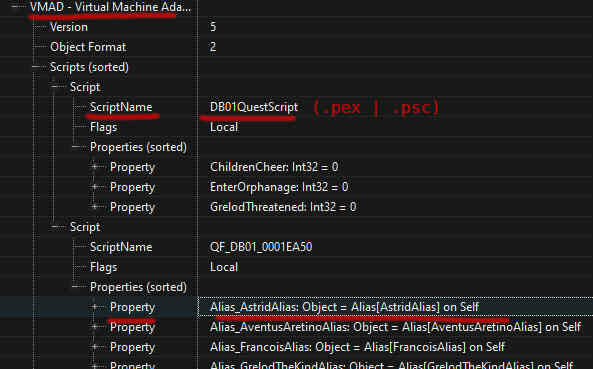
Use xEdit to find the plugin that is referencing this missing file (see section 4.3 above). Make sure you have all its dependencies. If the install was done correctly, determine the object type that the script was supposed to be attached to - is it a spell or a quest perhaps. Play the game and see if this aspect of the game is broken, or working as intended. If the mod is broken, despite the install being successful, you'll have to fix it yourself by providing the missing script and it's entire implementation. If the mod is working as it should, you can remove the script reference using xEdit - simply delete the entire Script field in the VMAD record.
5.2 Missing script properties
Property <property> on script <file> attached to <object> ... cannot be initialized because the script no longer contains that property
These are reported at the top of the Papyrus log along with the missing scripts. Usually the result of code refactoring and forgetting or neglecting to clean up script properties.
The approach to these is basically identical to how you deal with missing scripts. The error message will contain the object name, so you won't have to look it up. Once you've determined whether or not the mod works properly despite the missing property, either delete the property field from the plugin, or add the property to the script.
5.3 Base type missmatches
Unable to bind script <file> (...) to <object> because their base types do not match
Property <property> on script <file> ... <object> cannot be bound because <object> is not the right type
Also reported at the top of the Papyrus log. These are scripting errors. A script has been attached to an object for which it wasn’t made - like trying to attach a spell script to a quest. An object was assigned to a property with an incompatible type - like assigning an Actor to a short (data type).
You deal with these the same way you deal with missing scripts and script properties. Determine if something is broken in game, and either remove the reference or fix it. When it comes to properties, you may need the script source to determine what the default value should be, and how it is used.
5.4 Missing plugin reported by GetFormFromFile
File "<plugin>" does not exist or is not currently loaded.
Many mod authors do not check if a plugin exists before trying to fetch forms from them. These errors can be ignored, as usually they're part of some kind of optional dynamic mod dependency. PO3's Papyrus Tweaks has a toggle to silence this error.
The correct way to fix this would be to check that the plugin exists first:
bool Function ModIsInstalled(string mod) Global
	{Returns true if the specified mod is installed.}
	Return Game.GetModByName(mod) != 255
EndFunction
5.5 Stack dumps
Suspended stack count is over our warning threshold, dumping stacks:
...
These are always at the bottom of the Papyrus log. They're basically callstack dumps from Papyrus threads that had to be interrupted. To put that another way, it means you have at least one script that didn't stop when asked to. These are warning signs of Papyrus related CTDs and broken saves.
The stack frames in the dumped thread stacks are in chronological order from the bottom up. Newest at the top, oldest at the bottom. The place where it was interrupted is at the top, and where it came from is below that. Read it top to bottom, and not in chronological order.
The reason for why the Papyrus engine is dumping stacks may or may not be listed in the stack dumps. Personally I'd start by viewing this save file in ReSaver. Go through the Active Scripts list and make sure the scripts listed here have valid reasons to be active:
- If this save was made in Whiterun, you probably don't want a butterfly script to be running in Markarth.
- Utility.wait is a valid reason to be active, the script is most likely in a loop which contains a wait instruction.
- If there's excessive amounts of instances of the same script, it probably has a problem.
- In general, if scripts from a specific mod has a lot of active instances, consider whether this actually makes sense or not.
5.6 Unbound native functions
Native static function <function> could find no matching static function on linked type <script>. Function will not be bound.
Unbound native functions are most likely harmless. If they're not bound to anything, there's no reason for anyone to actually use them. This is however assuming the Papyrus script that provides the Papyrus declaration is provided by the same mod that provides the dll with the definition for that function - and that this is not a bug in the mod.
These exist in several mods right out of the box. NiOverride/RaceMenu perhaps being the one people are most likely to encounter due to its popularity.
Unbound native function "<function>" called
This error, showing up later in a Papyrus log, would indicate that something did actually try to call an unbound function. A missing dll would be the first thing I'd look for, but unfortunately there's no easy way to find the dll that's supposed to provide the missing definition. Thus, perhaps the best place to start is the dependencies of the mod to which the Papyrus script with the declaration belongs.
5.7 Missing Papyrus functions
Unable to obtain function call information
Most likely caused by a function getting removed from a script that another (already compiled) script was using. This is a scripting error that requires the script sources.
5.8 Assigning None
Assigning None to a non-object variable named "<var>"
This is Papyrus' roundabout way of saying the return value from something was "None", i.e. null or unsassigned. Look at the errors that came immediately before this. If there's nothing obvious in the Papyrus log, then the script sources are required.
6. Other
6.1 Measuring the health of Papyrus
- The number of missing scripts and script properties at the top of the log really shouldn't exceed 100 or so.
- If a short (~30 min) run in-game produced a several MiB sized log, you most likely have at least one mod that's spamming errors.
- If there's stack dumps from interrupted Papyrus threads at the end of the log, you're on the brink of getting a Papyrus induced CTD or a broken save.
Edited by traison
6 Comments
Recommended Comments