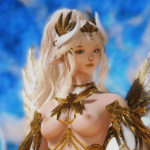
Seraki_kami Posted August 23 Posted August 23 View File CoA Textured Emblem Designer & Lewd Emblem pack Introduction Mod adds full editor for textured emblems in game. It's a separate editor for making the clipboard code that you can just paste directly in game adding textured emblems which are not affected by emblem color of normal editor. You can change position, scale, rotation, background with color picker. It creates the code necessary that you can just copy paste directly in game. Reason for this is that textured emblems are not affected by color of the normal editor so you get cripsier image on your emblem. Installation Extract the "Textured Emblem CoA designer mod with Lewd emblems.zip" into your mod folder like any other mod. New option will appear in the CoA designer in game Usage Creates clipboard code that you can copy. Can tweak position rotation scale and background with colors with the buttons Then just copy paste generated code. Curently there's preset for my first emblem pack and custom preset where you can add your own emblems under custom_1.dds etc. apparently CK3 doesn't really do writing inputs so any other preset I'll have to add manually, if someone creates more emblems I can add them probably. I am planning to do more at some point. Presets seraki_f_emblem_ - futanari themed pack 25 emblems to complement playing with Phaze's futanari mod (inspiration for this mod) custom_ - add your own emblems if you want How to make your own emblems Navigate to the mod folder where the textures are located "mods\Textured Emblem CoA designer\gfx\coat_of_arms\textured_emblems" Copy one of the existing emblems in the folder and rename it to custom_1.dds (custom_2 custom_3 etc.) Open it with image editor of your choice (Photoshop with nvidia DDS plugin or paint.net is what I use) Edit or replace the image Save as DDS - The file format should be "8.8.8.8 ARGB 32bpp / Unsigned"; this is also known as "B8G8R8A8 (Linear, A8R8G8B8)" in paint.net, and enable Mip Maps Compatibility Should be compatible with everything that doesn't edit the coat of arms editor gui I think This mod overrides gui/shared/coa_designer.gui. If another mod also replaces the Coat of Arms designer GUI window, place this mod below it and see if it works. Other old files: Don't need to use these if you use the main mod! Seraki Lewd Emblems V1.zip - extract as a mod to but doens't do anything on its own Textured Emblem Tool .exe version.zip - external app that uses the pack above Submitter Seraki_kami Submitted 08/23/26 Category Crusader Kings 3 Requirements
toynbeeidea Posted August 23 Posted August 23 I guess I don't quite understand the issue you are describing. Phaze Futanari already has CoAs like the ones you're showing, built in and usable without a special tool. So why do we need this extra weird step?
Seraki_kami Posted August 23 Author Posted August 23 52 minutes ago, toynbeeidea said: I guess I don't quite understand the issue you are describing. Phaze Futanari already has CoAs like the ones you're showing, built in and usable without a special tool. So why do we need this extra weird step? The issue is that those are colored emblems if you use them in the CoA editor a color from the picker gets applied to them so if you have non siluette image like these, it will make them look ugly/deep fried depending on the image (example darker skin will look really off). The game has two types of emblems: "colored" for the editor and "textured" for scripting and those don't have that extra layer
alphaomegamale Posted September 3 Posted September 3 Love this idea. Specific kink not for me but hopefully they do these with regular lewd emblem not only trans. Will keep an eye out 1
ErikTheRed47 Posted September 5 Posted September 5 i dont get how to get it to work unzip them put them in the mod folder none of them appear unsure what to do anyhelp thanks
Seraki_kami Posted September 8 Author Posted September 8 On 9/6/2026 at 12:44 AM, ErikTheRed47 said: i dont get how to get it to work unzip them put them in the mod folder none of them appear unsure what to do anyhelp thanks Uzip the "Textured Emblem CoA designer mod with Lewd emblems.zip" into mod folder like any other mod, then a new option to use them will appear on the right side of the CoA designer in game.
TinyLynx Posted September 23 Posted September 23 so would i be able to add lets say my profile pic to the CoA how would i go about and do that also your saying i take your files and unzip them it into the lewd emblems mod folder in my ck3 mods folder right
Seraki_kami Posted September 23 Author Posted September 23 1 hour ago, TinyLynx said: so would i be able to add lets say my profile pic to the CoA how would i go about and do that also your saying i take your files and unzip them it into the lewd emblems mod folder in my ck3 mods folder right Just unzip Textured Emblem CoA designer mod with Lewd emblems.zip like any other mod. and enable it in your load order, also I've added a small tutorial on how to make your own emblem in the description of the mod under How to make your own emblem section
TinyLynx Posted September 23 Posted September 23 hi im now getting invalid download of the mod when i try to select it in the add mod thing
TinyLynx Posted September 23 Posted September 23 (edited) 1 hour ago, TinyLynx said: hi im now getting invalid download of the mod when i try to select it in the add mod thing nevermind i fixed it but mow that a created my custom image where do i go to get it into my game i see the create custom emblem but it has the other image in the text column do i just type in custom_1 or do i have to download the other mod file from the mod page and while in there copy and paste the custom image into ck3 Edited September 23 by TinyLynx
Seraki_kami Posted September 24 Author Posted September 24 11 hours ago, TinyLynx said: nevermind i fixed it but mow that a created my custom image where do i go to get it into my game i see the create custom emblem but it has the other image in the text column do i just type in custom_1 or do i have to download the other mod file from the mod page and while in there copy and paste the custom image into ck3 Now if you created custom_1.dds, now you go in game, edit your CoA, open the editor, there you just select custom, set index 1 and copy paste the code at the bottom
TinyLynx Posted September 24 Posted September 24 6 hours ago, Seraki_kami said: Now if you created custom_1.dds, now you go in game, edit your CoA, open the editor, there you just select custom, set index 1 and copy paste the code at the bottom thank you

Recommended Posts
Create an account or sign in to comment
You need to be a member in order to leave a comment
Create an account
Sign up for a new account in our community. It's easy!
Register a new accountSign in
Already have an account? Sign in here.
Sign In Now