

About This File

WhimWatch
An always free, always open-source, always privacy-focused update checker and updater for the WickedWhims Sims 4 mod and its animation packs.
Who are you and what is this thing?
I'm forthewhimsy, and I'm a gamer and software dev who was sick of manually curating my WickedWhims animations.
Then I remembered that - unlike my Sims - I actually have agency and I finally did something about it.
Now I want to share that with the rest of the community so that we can all remove the chore of maintaining our library of WW packages, and focus on actually having fun.
As you probably know if you are here, WickedWhims has no built-in updater, and animation packs are spread across wicked.cc, LoversLab, Patreon, and other sites.
That's where WhimWatch comes in.
What does this thing do?
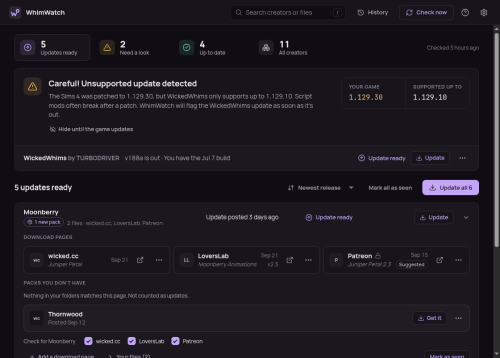
TL;DR: WhimWatch scans your Mods folder, works out which creators' packs you have, and tells you when any of them, or WickedWhims itself, has a newer release, then updates them for you (upon your request).
Key Features:
- Cross-platform support for Windows/Mac/Linux
- Finds your mod packs directory automatically
- Finds where each creator of your packages publishes and downloads directly from them (using a variety of standard sites, but you can add more!)
-
Updates in one click
- wicked[.]cc downloads are public, and for LoversLab or Patreon, you can sign in inside the app first (with plenty of privacy settings built-in; your credentials are NEVER saved in WhimWatch) to download updates
-
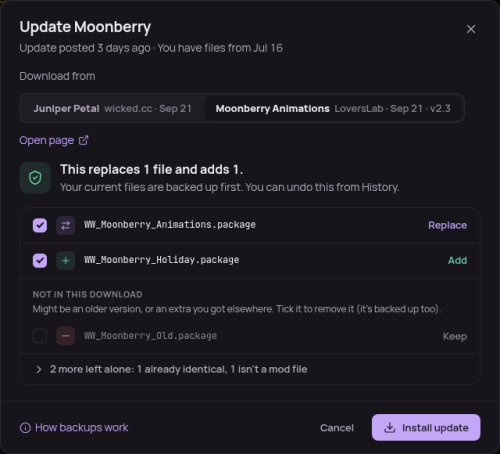
Before installing, you see exactly which files will be replaced or added, and can untick any.
- Old files are backed up, and every update can be undone from History
-
Answers “Will this version of WW work with my game?" before you boot
- It shows your game version next to the newest one WickedWhims supports, and warns when mods or script mods are switched off in the game's options so you don’t have to do the ol’ dance of booting up, finding out there’s a bug or conflict, and then having to change options, close out, update, and reboot again.
-
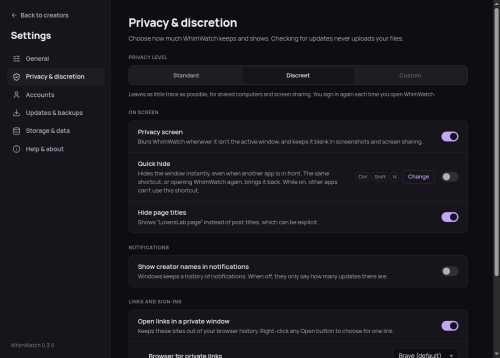
Stays discreet
- Has an optional privacy screen that blurs WhimWatch when it isn't the active window (and keeps it out of screenshots and screen sharing on Windows and macOS), a quick-hide shortcut, and hidden post titles.
What should I know about this project?
- WhimWatch is an independent project and is not affiliated with TURBODRIVER, Electronic Arts, wicked.cc, LoversLab or Patreon.
- WhimWatch is NOT and does NOT condone pirating; In fact, this project is meant to remove friction so you can more easily support the rich community of artists and creators who contribute to WickedWhims.
-
I also want to make this crystal clear, as there has apparently been an influx of vibe-coded projects and malicious EXEs submitted to LoversLab of late - While WhimWatch is maintained with LLM-assistance, I am a software engineer by trade who has worked in this industry for over a decade:
- I write some WhimWatch code by hand, some with LLM-assistance, but I review and understand every line regardless.
- I take the nuanced stance that using an LLM as one of many tools in the process does not make my software less genuinely mine when I am reviewing every single line, running manual tests, making edits, and making the architectural and engineering decisions for the project, and I own the responsibility of all those pieces.
- I really, really care about the quality of what I put out and have the experience and desire to maintain a good product. I am not a vibe-coder just slopping it up.
- I do understand AI/LLMs are very divisive in general, so I wanted to be as transparent as possible about this up front while also being adamant that I am not a slop-shoveler, and I put a ton of effort and passion into building and maintaining this project, and protecting my users, and I hope you see that come through in my code and the experience of the app.
-
With the above said, I also encourage ALL users to always scan anything you download (including WhimWatch!) through a trusted virus scanner
- I recommend VirusTotal because it is free and easy to upload and see results quickly. It sometimes flags things as false positives/negatives, but if you look at the results holistically, you should get a good read on whether a file is malicious or not.
- I also include a SHA256SUMS.txt file in my releases so that you can check this page and ensure the hashes match the file you download (see "Download" below, and if you still have no idea what any of that means, VirusTotal will also provide you the SHA256 hash of the file you upload to it, and you can just use that to compare the known-good hashes in that TXT file - if these hashes don't match, you may have a compromised file).
I designed WhimWatch to be respectful of privacy, secure, easy-to-use, customizable, and simple to submit improvements and bug reports to.
I do my best to test the application as far as possible, but am limited by the packages and subscriptions I have available to me, so feedback from those on other operating systems, package sites, and other circumstances is vital to ensuring the app handles as many scenarios as seamlessly as possible.
Share any feedback or questions here on LL, or send feedback or bug reports via the app, and you can also contact me on reddit at 4thewhimsy.
WhimWatch is free and open source, and always will be.
Stay Wicked.
GitHub with Source Code and Releases: https://github.com/forthewhimsy/whimwatch
Download
| System | File |
|---|---|
| Windows 10 and 11 |
Or |
| macOS on Apple silicon (M1 and later) |
WhimWatch-X.Y.Z-arm64.dmg
|
| macOS on Intel |
WhimWatch-X.Y.Z-x64.dmg
|
| Ubuntu, Debian, Linux Mint |
WhimWatch-X.Y.Z-amd64.deb
|
| Fedora, openSUSE |
WhimWatch-X.Y.Z-x86_64.rpm
|
| Other Linux |
WhimWatch-X.Y.Z-x86_64.AppImage (make it executable, then run it)
|
- Windows will likely show a "Windows protected your PC" pop-up because these files are unsigned (click More info → Run anyway).
- macOS says it can't check the app (open System Settings → Privacy & Security and click Open Anyway). This happens once.
-
To verify a download, compare its SHA-256 with
SHA256SUMS.txt-
You can run
sha256sum <file>on Linux -
shasum -a 256 <file>on macOS -
Get-FileHash <file>in PowerShell - Or upload the file to VirusTotal, which will spit out the SHA256 for you (see above)
-
You can run
Supported Languages
The following languages are supported by WhimWatch (feel free to request or submit a PR for a new one!)
- English
- Italian
- Spanish
- Traditional Chinese
What's New in Version 0.4.2
Released
WhimWatch 0.4.2
Fixed
- Small fix to make the "Downloading from..." banner update when a fallback source is chosen AFTER a download is already initiated