

.thumb.png.9e40fb7895061329151424931b051dbb.png)
.thumb.png.31e0ea7701a6659580b3996812fc7a99.png)
.thumb.png.89d00a33c2e65308a46183e7940a4485.png)
.thumb.png.6194ba90189cd2e45cf96c2f0cc8d944.png)
.thumb.png.e4f378d466a850008b11c59dad1b0574.png)
.thumb.png.33f89aec2cb46270efd2ec9f6af602e5.png)
About This File
ABOUT THIS MOD
This is a compatibility mod for PALMAGIC.
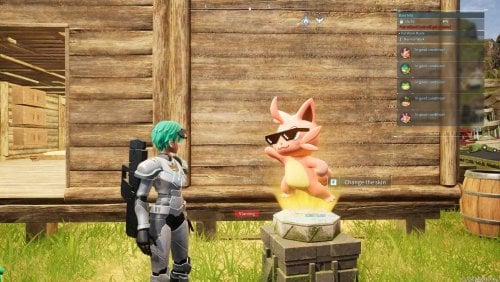
It allows PrimalPals to work alongside T-Box Pal Dressing Facility All-in-One
and supported official vanilla skins from the Dressing system. When a
compatible T-Box or official vanilla appearance is selected through Dressing,
the Guardian preserves it instead of allowing PalMagic to immediately replace
it with a Primal appearance.
PrimalPals remains the automatic/default appearance source. Removing a Dressing
appearance returns control normally to PrimalPals and PalMagic.
The Guardian provides a ready-to-install option for using compatible Dressing appearances alongside PrimalPals, without having to prepare specific JSON configurations for this compatibility.
Different Pals can simultaneously retain:
1. A Primal appearance applied automatically by PrimalPals.
2. A custom T-Box appearance selected through Dressing.
3. A supported official vanilla appearance selected through Dressing.
Each individual Pal still uses only one appearance at a time.
REQUIRED VERSIONS
- An experimental UE4SS build compatible with Palworld.
UE4SS build used in testing: 3.0.1 Beta / f6d5f942
https://github.com/UE4SS-RE/RE-UE4SS/releases
- T-Box Pal Dressing Facility All-in-One: version 0.0.698.22
T-Box Pal Dressing Facility Skin Swap at Palworld Nexus - Mods and community
- PrimalPals: version 1.4.4.1
- PalMagic - Runtime Model Replacer: version 0.2.4
IMPORTANT
This add-on is specifically a compatibility mod for PALMAGIC. It is not
standalone and does not replace any required mod listed above.
This version does not support DynamicPals.
VERSION HISTORY — 1.3.3 / 1.3.4
- V1.3.3: Improved protection against unwanted appearance changes, recognition of skin variants, and installation compatibility.
- V1.3.4: Updated support for T-Box 0.0.698.22, improved appearance restoration checks, and added a warning for catalog problems.
WHAT IS NEW IN VERSION 1.3.5
- Extends compatible Dressing appearance protection to necklace followers.
- Includes followers such as Dazzi and Dazzi Noct even when no Primal appearance is applied to them.
- Keeps the existing protection for party and base Pals and the same skin catalogs.
UPGRADING FROM PREVIOUS VERSIONS
1. Close Palworld completely.
2. REQUIRED: Remove all previous Guardian version folders from Pal\Binaries\Win64\ue4ss\Mods before installing V1.3.5, including V1.3.4, V1.3.3, V1.3.2 and any older release. Disabling them or removing enabled.txt is NOT sufficient. If you want backups, move them completely outside the Mods folder.
3. Remove only old Guardian folders. Leave other mods and their files intact.
4. Install V1.3.5 with the folder name PalMagicTBoxGuardianV135, without dots. Dotted version names can collide in UE4SS.
5. Only the new PalMagicTBoxGuardianV135 folder should remain in Mods among Guardian versions.
INSTALLATION
1. Install and verify every requirement separately using the versions above.
2. Close Palworld completely.
3. Extract this ZIP into the Palworld game root, normally:
...\SteamLibrary\steamapps\common\Palworld
4. Confirm the final path:
Pal\Binaries\Win64\ue4ss\Mods\PalMagicTBoxGuardianV135
5. REQUIRED: Confirm that all older Guardian version folders have been removed from Mods. Do not leave disabled copies there. Keep only PalMagicTBoxGuardianV135.
6. Start the game and enter a world normally.
7. Build and use a Pal Dressing Facility. Follow the instructions below for your Pal.
SKIN CHANGES: PARTY PALS AND BASE PALS
- Party/companion Pal: keep the Pal in your party. BEFORE changing its skin, use the recall command to return it to its sphere so it is no longer out in the world. Do NOT remove it from your party or place it in the Palbox for this step. Change the skin in the Dressing Facility, then send the Pal out again.
- If you already changed the skin while your companion Pal was out in the world, place it in the Palbox and return it to your party. Recalling it to its sphere after that attempt may not be enough to refresh the appearance.
- Base Pal: after changing its skin, move it from the base into the Palbox, then assign it back to the base to refresh its appearance.
- Necklace follower: supported followers can also use the selected Dressing appearance. If a skin change or removal is not reflected, place the Pal in the Palbox and return it to your party.
Do not extract this add-on into Paks\~mods.
HOW IT WORKS
- Preserves compatible T-Box and official Dressing appearances when PalMagic attempts to replace them with Primal appearances.
- Improves recognition of similarly named skin variants.
- Removing a Dressing appearance returns control to PrimalPals and PalMagic after refreshing the Pal as described above.
VALIDATED BEHAVIOR
The integrated follower protection was tested on the Windows/Steam host with multiplayer enabled, using PalMagic 0.2.4. The tester confirmed expected appearances for Flopie, Daedream, Dazzi and Dazzi Noct in the tested T-Box variants, including skin removal/reapplication. Automatic startup was confirmed across separate game sessions.
Earlier V1.3.4 tests covered returning to the menu, Palbox storage/retrieval, fast travel, dungeons, a tower encounter, base Pals, supported official skins and the Pals brought to the Bellanoir raid. Those scenarios have not all been repeated with V1.3.5.
Connected guests, dedicated servers, all Alpha/Boss variants and official skins on necklace followers have not been validated. This release does not claim a complete fix for every multiplayer skin-reversion report. Follow the party/base instructions above.
CATALOG AND LIMITS
- The T-Box catalog contains 1,407 unique exact mappings.
- The official vanilla catalog contains 51 exact class paths covering 26 skin
records.
- Not every Pal, skin, animation, skeleton, save state, or gameplay context
has been visually tested.
- PalMagic "Skin mismatch found" notices are outside this add-on's scope.
- Animation and skeleton compatibility are not modified. Incompatible assets
may still cause a T-pose or deformation.
- Future Palworld, UE4SS, PalMagic, PrimalPals, or T-Box updates may require
an add-on update.
- Xbox/Game Pass has not been validated.
UNINSTALLATION
Close Palworld completely and remove only:
Pal\Binaries\Win64\ue4ss\Mods\PalMagicTBoxGuardianV135
Leave other mods and their files intact.
DOWNLOAD CONTENTS
The download includes the compatibility add-on and installation guides.
Install the required mods separately; they are not included in this package.
CREDITS
Compatibility add-on by GhostWeedBR.
All original models, textures, frameworks, names and assets belong to their respective authors. This package contains only compatibility logic between PrimalPals, T-Box Pal Dressing Facility and PalMagic, using UE4SS.
.
.Thanks MonoDrago❤️
.png.a16821b095a5c65417e96d37b9cefa9b.png)
.png.942ff30300782904cc8125fd4f624feb.png)
.png.94fbd56579a7b076b9880a134009726a.png)
.png.c9dc3e1636a172d7e597847539712e26.png)
.png.a3817eac6e4ca1ae92333aa514093ade.png)
.png.31a3de68405beb95bc2d8d0d12e7cb9b.png)
What's New in Version 1.3.5
Released
VERSION HISTORY — 1.3.3 / 1.3.4
- V1.3.3: Improved protection against unwanted appearance changes, recognition of skin variants, and installation compatibility.
- V1.3.4: Updated support for T-Box 0.0.698.22, improved appearance restoration checks, and added a warning for catalog problems.
WHAT IS NEW IN VERSION 1.3.5
- Extends compatible Dressing appearance protection to necklace followers.
- Includes followers such as Dazzi and Dazzi Noct even when no Primal appearance is applied to them.
- Keeps the existing protection for party and base Pals and the same skin catalogs.