

About This File
Description:
As the name says it all. An upscaler done by a retro video nerd. But why tell you, when I can show you:
Usage Video.rar
Features:
- Upscale Anime Videos ( 1080p, 1440p, 4k )
- Upscale Anime Images by 2x or 4x
- Choose between the best two out-of-the-box anime upscaler models (RealESRgan / RealCUgan)
- Clean - No Adware / Bloat ( A little bit of linux rice )
- Sleek Navigation Menu - Only need the arrow keys to operate
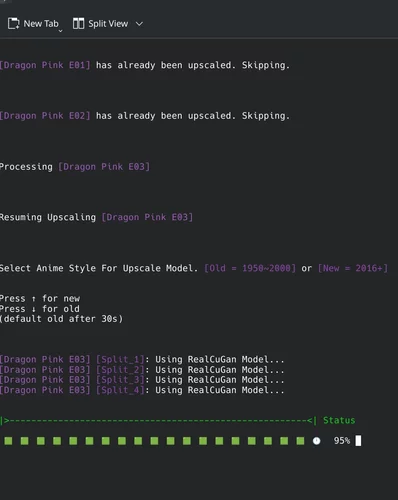
- Progress Bar for Videos
- Quit mid-way through videos, come back later, pick up where you left off
- Intelligent CPU Core Usage ( Encoding Videos ) (Checkered-board pattern for heat dispensation)
- Film Grain Amount Options
- FLAC 16 Audio (Non Destructive Audio Compression)
- Auto crops black bars, reformatting video into full 16:9 landscape
- Works on low VRAM GPU (4gb +)
- Parallel Process for GPUs with 12gb +
- Stable Build
Image Example:
Spoiler

Technical Description:
Spoiler
-
Video Upscaling:
* Extracts frames
* Upscales frames with Chosen Model
* Reencodes new video in SVTAV1
* Detects CUDA GPU, uses CUDA acceleration if available
* (Optional) Adds Synthetic Film Grain
* Skips videos that have already been upscaled (assuming you didn't rename the *_Upscaled.mkv)
* Skips completed upscaled frames
* Deletes completed extracted frames (Only on return)
Hardware Requirements:
Spoiler
-
4gb of VRAM ( GPU Memory )
* 12gb + Recommended
* CUDA Recommended for video encoding acceleration -
One of the following:
* RTX 30 Series +
* RX 6000 Series +
* Arc Series + -
One of the following:
* 5th Gen Intel (Broadwell) +
* Ryzen 1000 +
* Not sure about ARM + -
Montior With:
* 10bit Native Support +
* 10bit FSR +
Software Requirements:
Spoiler
- MPV or VLC
- FFMPEG (Specifically libsvtav1, libopus, nvidia propritary drivers, cuda)
- OR
- FFMPEG (libsvtav1, flac) - For non-NVidia Cards
- vulkan-headers (Needed for AI models)
- vulkan-icd-loader (Needed for AI models)
- zenity (GUI for folder selection, etc.. Comes with most distros)
-
mpg123 (Comes with most distros, not need, but plays the cool "ding" sound when complete)
- This script will detect your system settings and attempt to install the required software.
Installation:
Spoiler
- Unpack AI Anime Upscaler somewhere.
- Right click on the upscale.sh within the folder you extracted, go to 'properties', and set as executable, and run it (or chmod +x ./upscale.sh)
- Read the read-me
- Pick a folder that has videos or images you want to upscale
- Leave your computer baking that folder until it is done
Questions:
Spoiler
-
Why SVTAV1 Video?
* SVTAV1 at given encoding speed is best for efficiency.
* AV1 is the superior format for Anime.
* Edge Detection is what we are after, SVT has a specific tune for just that.
-
Why can't I adjust video quality?
* It's set to optimal video quality for process anime.
- I don't believe you!
* Okay, fine:
CTRL+F "-crf" & change the -crf 40 to a lower or higher number, lower = better / bigger file
-
Why linux?
* Windows sucks. Waifu2xGUI also sucks.
-
Supports Subtitles?
* As long as they are embedded and not .srt or .ass files.
-
Live action?
* Nope. Use batch SD1111 / ComfyUI - Flux with 4xUltraSharp for live action.
-
Destructive?
* Always keep your old videos, but I think you'll like the results. I do.
-
Viruses?
* You can delete the ./Tools/RealESRGAN ./Tools/RealCUGAN and ./Tools/NNEDI.bin
* It will redownload them from git and recompile them on your end
* Do this before running the script.
* Requires clang/cmake (Maybe more)
Permissions:
Spoiler
- Free to use as you wish. No credit necessary.
Edited by AhuwgaZ
What's New in Version 1.1
Released
1.1
- GUI Updates
- Small Tweaks
1.0
- Just watch the usage video
- New features
- Lots of Fixes
- Robust Additions
- Mod now considered complete - Unless a problem emerges
