

About This File
Alpha Preview Release
You are welcome to test it. It is quite stable but some timings still fail. Traveling will cause a bunch of exceptions, please ignore them.
S4CL and TS4-Lib are needed for this mod!
On Interaction Do
This is a script mod to run various commands whenever a sim is executing an action.
It supports many base game interactions, and support for some mods. It uses the appearance modifiers provided by Devious Desires / Core and it is not compatible with 'wicked' script mods.
This mod currently requires Devious Desires / Core to be able to use appearance modifiers.
Code and/or included Content
This mod only references object and/or tuning names of interactions etc. This mod does not
- add new interactions
- add new items
- include or override UGC created by other mod creators
Base Game
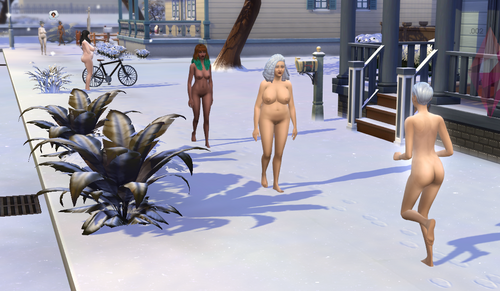
For the base game there are a few interactions. Some base game interactions may result in removed outfit parts for sims.
Shower
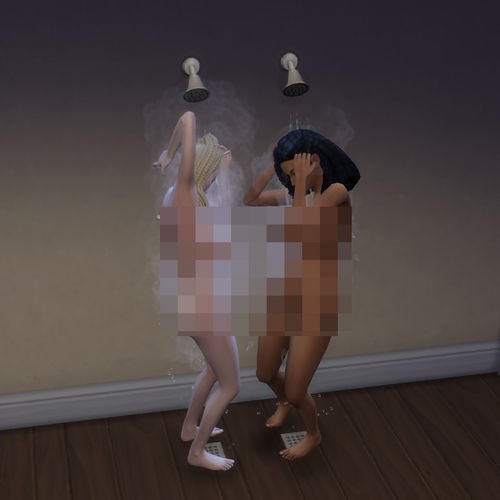
- Sims will turn around in shower instead of watching the wall.
Vanilla 'Pillow Fight ...'
- Sims will undress their shoes and might lose outfit parts.
Using Toilet
- Configuration removed. Handled and hard coded in DD.
Feeding Baby
- Configuration removed. Handled and hard coded in DD.
Play Sabbac
- Losers undress am outfit item.
3rd party mods and build items
HIU
HIU by Sacrificial is supported, while it is not required. If HIU is installed make sure to remove these script mods:
-
wicked*.ts4script
The actors support the basic un-/equip commands as used by HIU.
Build Items
Some devices by Kritical are supported, none of them is required. Just make sure to remove these script mods:
-
[Kritical]StyxUrinal1.ts4script# and/or similar versions -
[Kritical]PracticalSexArcade1.ts4script# and/or similar versions
The following devices are supported:
-
[Kritical]BlowjobArcade1d.package -
[Kritical]CeladonUrinal1a.package -
[Kritical]ExerciseBike1b.package -
[Kritical]FeedingMachine1d.package -
[Kritical]LetheUrinal1a.package -
[Kritical]MajesticHole1f.package -
[Kritical]MilkingMachine1d.package -
[Kritical]PracticalSexArcade1j.package -
[Kritical]SensoryDeprivationChamber1a.package -
[Kritical]StyxUrinal1h.package -
[Kritical]TanningRack1a.package -
[Kritical]Thighmaster1a.package -
[Kritical]WorkoutMachineFreya1a.package
This mod has been tested with the versions mentioned above.
The mod injects into the interactions to make them compatible with DD.
Issues
Commands may be executed shortly after an interaction starts and shortly before an interaction stops. It's not perfect but hopefully good enough for TS4. Some of the issues mentioned below may have been fixed so far.
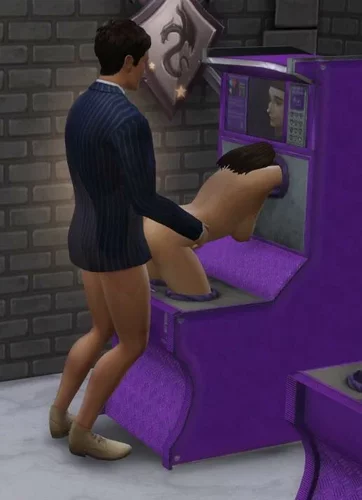
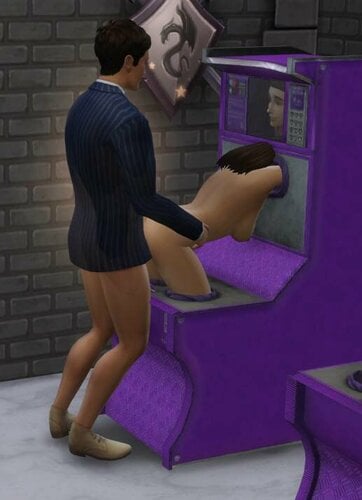
Sex and BJ Arcade
- Customers will undress the lower body and dress up afterwards properly, the initial state (nude, underwear, outfit) will be restored.
- The gender check has been removed, customers without a penis will use a strap-on.
- Customers with a penis will get a boner during animation. Flaccid afterwards, also the cum level will be reduced.
Styx Urinal
- Customers will undress the lower body and dress up afterwards properly, the initial state (nude, underwear, outfit) will be restored.
- Not modified: The game may rotate the sim or the effect 180° and it may look odd.
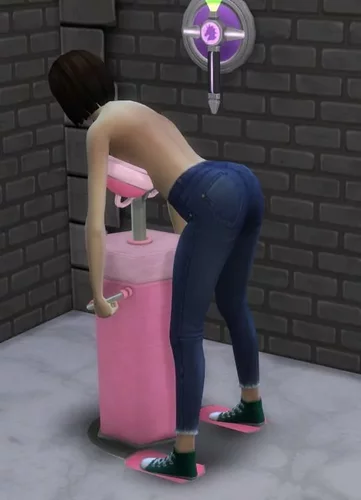
Milking Machine
- Sims with a Basic, Upgraded or Reward trait can use it.
- Sims will undress the upper body and dress up afterwards properly, the initial state (nude, underwear, outfit) will be restored.
- The milk level will be reduced after milking. This is not related to the amount of milk available in the machine.
- Sims will no longer fade-out and fade-in as it didn't work reliable for me.
- Pregnant sims can milk themselves.
Customized Custom User Customization
You read the title successfully, so you may start to adjust random vanilla and/or mod interactions as you like.
Gather the interaction IDs
There are two options to get interaction IDs
Log interaction IDs
- Press Shift+Ctrl+C to open the debug console
-
Enter
o19.oid.log_simto log the queued interactions of the active sim. -
Optionally, this is usually Not Needed, log the pre-run interactions with
o19.oid.log_sim_pre_run - Run the command again to disable logging.
Gather the interaction IDs with S4CL
- Pause the game and click on object X and select the interaction. It will be queued in the interaction Q.
- Sim+Shift-click > S4CL > Show running interactions to ge the IDs/Names or running and/or queued interactions.
- Un-pause the game and wait until the sim is using the object.
- Shift-click > S4CL > Show running interactions to ge the IDs/Names or running and/or queued interactions.
- The 'interact' and the 'interacting' interactions may be two different ones.
Create Configuration File
-
Use your name and replace
author(unless everyone calls you 'author' already). -
Replace
interaction_descriptionwith the intention of the modification. -
Replace the
tuningsvalue with the interaction name(s), e.g.celebrity_Self_PoseforPicture.-
Optionally use S4S to search for similar interactions (with
interaction/celebrity_Self_). There you'll find 3. -
You could add these 3 interactions or
celebrity_Self_- in case a new self interaction is added your customization will modify it without any update.
-
Optionally use S4S to search for similar interactions (with
-
Then we need an idea what to do. For now add
g_debug_alert(celeb)andg_info_alert(celeb). -
Save the file to
mod_data/on_interaction_do/cfg/and hope you didn't break it.- Optionally validate the contents with https://codebeautify.org/python-formatter-beautifier
-
Reload the data with
o19.oid.patchoro19.oid.patch_verbosewhich logs more data while patching to TS4-Library_*_Messages.txt.- In case the file is broken validate it with https://codebeautify.org/python-formatter-beautifier
{ "author_interaction_description*": { # TODO adjust "filter": { "tunings": ["TuningName_as_logged_by_S4CL", "TuningName_2_as_logged_by_S4CL", ], }, "actions": { "start_of_animation*": { # TODO adjust "parameters": ["g_debug_alert(111)", ], "timing": "at_beginning", }, "end_of_animation*": { # TODO adjust "parameters": ["g_info_alert(111)", ], }, }, }, }
-
The keywords 'filter, tunings, actions, parameters, timing' must not be modified.
-
Adjust the keywords ending with '*' to match your needs.
-
Unlike
jsoncomments are supported and,}and/or,]work fine. This allows to add new lines / statements without appending,` to the line above. -
Run again the interaction - with a random sim - and enjoy the modified configuration.
debug.txt
In case too much is going and/or patched save the file as 'debug.txt' or 'author_debug.txt'. In case one or more debug files exist it/they will be read and applied - the standard configuration is ignored. To 'undo' all applied modifications restart the game and then test the debug settings. Reload them with o19.oid.patch.
After testing copy the contents to a regular configuration file and delete the/all debug file(s). With o19.oid.patch the files will be read and applied again, without restarting the game.
Supported 'actions'
To modify how interactions start or end some commands are available. Some additional settings are also available and shown below.
{ "author_interaction_description*": { 'actions': { "start_of_animation*": { 'drop_all_basic_extras': True, # drop everything with <I><L n="basic_extras">[...]</L> 'drop_basic_extras': [ # or drop individual elements within <I><L n="basic_extras">, supported are 'TunableBroadcasterRequestWrapper.BroadcasterRequest', 'TunableBuffElementWrapper.factory', 'TunableChangeOutfitElementWrapper.ChangeOutfitElement', 'TunableDoCommandWrapper.DoCommand', 'TunableLootElementWrapper.LootElement', 'TunableNotificationElementWrapper.NotificationElement', 'TunablePlayVisualEffectElementWrapper.PlayVisualEffectElement', 'TunablePregnancyElementWrapper.PregnancyElement', 'TunableStateChangeWrapper._factory', 'TunableTunableAudioStingWrapper.TunableAudioSting', ], 'timing': 'at_beginning', # or 'at_end' or 'on_xevt' 'offset_time': 5, # optionally, only valid for 'at_beginning' 'xevt_id': 123, # only valid for 'on_xevt' 'include_target_sim': True, # can be set to False 'include_target_object': False, # setting this to True sets include_target_sim=False 'parameters': ['...', ], }, }, }, }
For parameters these commands are available:
-
g_repeat(tunings_ref, 900, 30)- Repeat the following commands for max. 900 seconds, every 30 seconds, while the sim is running one of the interactions in "filter.tunings". -
g_random(10)- 10% change to continue with the next command (range 1-99) -
g_rotate_abs(340)- Rotate the sim slowly to -20° (range 1-359) -
g_rotate_rnd(180, 10)- Rotate the sim slowly to a position between -170° - 190° (180° ± 10°) - range(1-359, 1-179) -
g_rotate_end- Stop the rotation before it completed. -
g_opacity(0.8, 10)- Fade the sim to 80%% opacity within 10 seconds. range(0.0-1.0, 0-30) -
g_debug_info(Message)- Show a blue popup for debug purposes. -
g_debug_alert(Message)- Show an orange popup for debug purposes. -
bg_impregnate- Impregnate the target sim (target sim must be set !) -
s_undo_outfit- Undo outfit changes created by one of the following parameters at the end of the interaction. -
s_undo_outfit(200)- In case the interaction is still running after 200s undo the outfit change. (range 1-999) -
s_undo_outfit(200, 30)- As above, but wait 30 seconds before undo. -
s_undress_cas_parts(5, 6, 7)- Remove CAS / body types from the sim. 5=FULL_BODY, 6=TOP, 7=BOTTOM (range 1-200, not every part is supported) -
s_equip_cas_parts- Equip CAS / body types -
s_undress_all,s_undress_full,s_undress_top,s_undress_bottom,s_undress_shoes- Remove CAS parts -
s_equip_all,s_equip_full,s_equip_top,s_equip_bottom- Add CAS parts -
s_undress_next- Remove one CAS part. The types and order is pre-defined. Might be called in a loop. -
s_undress_next(7, 6)- Remove one CAS part in the specified order. Might be called in a loop.
Supported 'filters'
Usually it is fine just to specify tunings.
The default tuning manager is 'INTERACTION', this can be modified if needed. The configuration files of this mod always call their own cheat command 'o19.oid.do_command' (default) which can also be modified. One call can call cheat commands of random mods while the supplied command parameters will usually not match. A list of buffs and traits can also be generated to be used by 'commands'. The 'tunings' can be specified as strings starting and or ending with '*' for wildcards. Use wildcards with care, *a* matches almost all tunings and may cause out of memory issues and take less than eternity to complete.
{ "author_interaction_description*": { "filter": { 'traits': ['...', ], 'buffs': ['...', ], 'manager': 'INTERACTION', # or 'SNIPPET' to modify a snippet tuning 'tunings': ['...', ], 'command': 'o19.oid.do_command', }, ...
Supported 'commands'
Within 'commands' a few special commands are supported. It contains a list of 1-n commands.
{ "author_interaction_description*": { "filter": { 'traits': ['...' ], 'buffs': ['...' ], ... }, "commands": [ ... ] } }
-
remove_privacyRemove privacy checks (<I>[<V n="privacy" ...</V>]) -
no_gender_checkRemove gender checks (<I><L n="test_globals">[<E n="gender">...</E>]) -
drop_tg_TESTwith TEST=BuffTest, CareerGigTest, CommodityAdvertisedTest, SimInfoTest, SkillRangeTest, TraitTest-
drop_tg_BuffTestremoves all Buff tests from 'test_globals'. This might cause issues for further tests.
-
-
ACTION_LIST_TYPEEight commands with ACTION=add or remove, LIST=whitelist or blacklist and TYPE=buffs or traits from test_globals-
add_whitelist_buffsadd_blacklist_buffsadd_whitelist_traitsadd_blacklist_traits -
remove_whitelist_buffsremove_whitelist_buffsremove_blacklist_traitsremove_blacklist_traits - All six other variations work like these two samples:
-
add_whitelist_traitsAdd the 'filter.traits' to the allow list -
remove_blacklist_buffsRemove the 'filter.buffs' from the deny list. Set 'filter.buffs' to 'True' to remove everything. -
To add buffs and two remove other buffs two
author_interaction_descriptionsections are needed as only onebuffsandtraitssection exist.
-
-
ACTION_LIST_TYPE_testEight commands with ACTION=add or remove, LIST=whitelist or blacklist and TYPE=buffs or traits fromn="testSet..."tunings ().-
add_whitelist_buffs_test, ... see above for details.
-
Addendum
Game compatibility
This mod has been tested with The Sims 4 1.112.481, S4CL 3.10, TS4Lib 0.3.36. It is expected to be compatible with many upcoming releases of TS4, S4CL and TS4Lib.
Dependencies
Download the ZIP file, not the sources.
If not installed download and install TS4 and these mods. All are available for free.
Removal of the mod
The mod installation with unzip writes to a few directories. To remove this mod and all related files locate the files and folders and remove them:
-
The Sims 4/Mods/_o19_/$mod_name.* -
The Sims 4/mod_data/_o19_/$mod_name/ -
The Sims 4/mod_documentation/_o19_/$mod_name/ -
The Sims 4/mod_sources/_o19_/$mod_name/
To remove all of my mods locate these folders and remove them:
-
The Sims 4/Mods/_o19_/ -
The Sims 4/mod_data/_o19_/ -
The Sims 4/mod_documentation/_o19_/ -
The Sims 4/mod_sources/_o19_/
Installation
-
Locate the localized
The Sims 4folder which contains theModsfolder. -
Extract the ZIP file into this
The Sims 4folder. -
It will create the directories/files
Mods/_o19_/$mod_name.ts4script,Mods/_o19_/$mod_name.package,mod_data/$mod_name/*and/ormod_documentation/$mod_name/*and/ormod_sources/$mod_name/* -
CAS and build-buy UGC without scripts will create
Mods/o19/$mod_name.package. -
mod_logs/$mod_name.txtwill be created as soon as data is logged. -
mod_documentation/$mod_name/and/ormod_sources/$mod_name/are not required and can be deleted.
Manual Installation
If you don't want to extract the ZIP file into The Sims 4 folder you might want to read this. You can extract the ZIP file to a temporary directory and copy the folders manually.
-
The files in
ZIP-File/mod_dataare usually required and should be extracted toThe Sims 4/mod_data. -
The files in
ZIP-File/mod_documentationare for you to read it. They are not needed to use this mod. -
The files in
ZIP-File/mod_sourcesare not needed to use this mod. -
The
Mods/_o19_/*.ts4scriptfiles can be stored in a random folder withinModsor directly inMods. I highly recommend to store it in_o19_so you know who created it.
Troubleshooting
When installed properly this is not necessary at all. For manual installations check these things and make sure each question can be answered with 'yes'.
-
Does 'The Sims 4' (localized to Die Sims 4, Les Sims 4, Los Sims 4, The Sims 4, ...) exist?
-
Does
The Sims 4contain the folderMods?-
Does
Modscontain the folder_o19_?-
Does
_19_containts4lib.ts4scriptandts4lib.packagefiles? -
Does
_19_contain{mod_name}.ts4scriptand/or{mod_name}.packagefiles?
-
Does
-
Does
-
Does
The Sims 4contain the foldermod_data?-
Does
mod_datacontain the folder{mod_name}?-
Does
{mod_name}contain files or folders?
-
Does
-
Does
-
Does
The Sims 4contain themod_logs?-
Does
mod_logscontain the fileSims4CommunityLib_*_Messages.txt? -
Does
mod_logscontain the fileTS4-Library_*_Messages.txt?- Is this the most recent version or can it be updated?
-
Does
mod_logscontain the file{mod_name}_*_Messages.txt?- Is this the most recent version or can it be updated?
-
Does
-
Doesn't
The Sims 4contain the file(s)last_exception.txtand/orlast_exception*.txt?
-
Does
-
Share the
The Sims 4/mod_logs/Sims4CommunityLib_*_Messages.txtandThe Sims 4/mod_logs/{mod_name}_*_Messages.txtfile.
Usage Tracking / Privacy
This mod does not send any data to tracking servers. The code is open source, not obfuscated, and can be reviewed.
Some log entries in the log file ('mod_logs' folder) may contain the local username, especially if files are not found (WARN, ERROR).
External Links
Copyright and License
- © 2024 Oops19
- License for '.package' files: Electronic Arts TOS for UGC
- License for other media unless specified differently: CC BY 4.0 unless the Electronic Arts TOS for UGC overrides it. This allows you to use this mod and re-use the code even if you don't own The Sims 4. Have fun extending this mod and/or integrating it with your mods.
Oops19 / o19 is not endorsed by or affiliated with Electronic Arts or its licensors. Game content and materials copyright Electronic Arts Inc. and its licensors. Trademarks are the property of their respective owners.
TOS
- Please don't put it behind a paywall.
- Please don't create mods which break with every TS4 update.
- For simple tuning modifications use Patch-XML
- or LiveXML.
- To check the XML structure of custom tunings use VanillaLogs.

![More information about "? High Heels & Boots ? - Auto Slider Adjustment [Beta]"](https://static.loverslab.com/screenshots/monthly_2020_09/Oops19_High_Heels_v0.1.thumb.png.9228f8f2c0b98683be5a4eb1f654a44b.png)