


About This File
ShortStack_NG - 2.4
New Version 2024-11-27. Requires new game.(probably)
This mod requires, in my opinion, an intermediate level of modding experience, and familiarity with how files and mods are organized. If you have manipulated BodySlide files, or created your own mods and patches, then you will be able to get through this guide. For others, it might take a bit, but almost everything you need is here and on google.
I have and can only test this on the GOG version of SkyrimAE and SE. It should work with everything that AddressLibrary supports.
What is this?
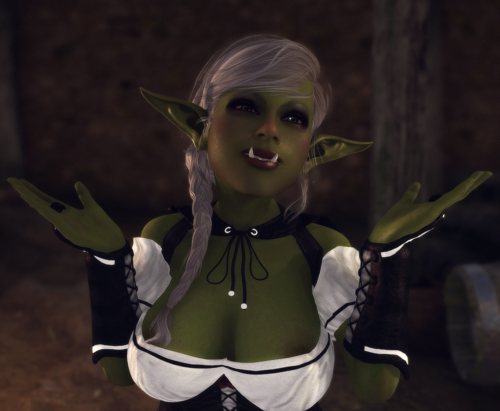
A while back, I found a mod by MorePrinniesDood (and others), which allowed for new races of the short variety including Goblins. I wanted to play Skyrim with a very Gobliny playthrough this mod is an effort towards that. Not only does the original (and this mod) include Goblins, but 4 other short races:
-
Goblin
-
Gnome
-
Deep Gnomes
-
Nixies
-
Kobolds
In addition to the new races (see below for more information on each) it includes new features to enhance and expand playthroughs using the short races. Briefly these are:
-
Custom body type support
-
Custom bodyslide meshes (armor swapping)
-
Game mechanics to restrict armor until it is resized
In the future there will be more features and flavor content to improve the short stack experience and make the gameplay more interested or different.
This mod is still a beta, and might break your game. It requires a new game.
This mod does require manipulation of files in mods and has a high degree of customization.
How the Mod works
Basics
The esp included contains the races, keywords, and powers for the races. The SKSE plugin works by watching equip events on the player, and then at the time of equipping, switches the mesh of an armor for different one at a prefixed path. For example, if you equip an armor that refers to the mesh at meshes/armor/cool_hat.nif, this mod checks for an alternate mesh at meshes/shortstack/armor/cool_hat.nif. If the replacement exists, then we add a new ARMA (ArmorAddon) record to the armor that contains the rewritten path and the race the player is playing. This change happens at runtime, and is not persisted or saved, so it should not corrupt or break any save files.
Refitted Armor
When an armor is equipped, the skse plugin looks for the existence of a keyword called SSP_ModifiedArmor, which denotes that this armor has been created by the player to work for the short races and should not incur any penalties. If the armor does not have this keyword, then a corresponding penalty for “Ill Fitting Armor” is applied. These debuffs correspond to the armor parts of boots, gloves, and body armor. Clothing does not incur any additional penalties.
How to Refit Armor
To refit an armor, the player has a lesser power called “Access Sewing Kit”. This will open a limited crafting window that shows the currently equipped armor that can be refitted. To refit the armor you will need to have “Sewing Supplies” in your inventory. These can be crafted at a forge for the cost of 1 Iron Ingot, 1 Leather Strip, and 1 Linen. They are consumed in the process of refitting. The old armor is consumed by this process, and the player is given a new refitted armor as a replacement. This new armor will no longer incur penalties from wear, and is denoted by “Resized” in the name.
See the Technical Details section below for information on how this works
Installation
Hard Dependencies
-
Only tested on SkyrimAE (GoG) and SE 1.5.97 – will probably work with other SE/AE
-
SKSE (https://skse.silverlock.org/)
-
Address Library (https://www.nexusmods.com/skyrimspecialedition/mods/32444)
-
RaceCompatibility (https://www.nexusmods.com/skyrimspecialedition/mods/2853)
-
USMP (https://www.nexusmods.com/skyrimspecialedition/mods/49616)
-
NL_MCM (https://www.nexusmods.com/skyrimspecialedition/mods/49127)
-
Goam’s Elven Ears (https://www.nexusmods.com/skyrimspecialedition/mods/99528)
-
A Mod organizer, I use MO2. If you are using something else, you will need to deal with it on your own. I will write instructions for MO2.
Soft Dependencies
-
Bodyslide (https://www.nexusmods.com/skyrimspecialedition/mods/201) – Required for ArmorReworker
-
OBody Next Generation (https://www.nexusmods.com/skyrimspecialedition/mods/77016) – Please read the section below
-
A bunch of BodySlide enabled clothes and armors, vanilla replacers, whatever.
-
A patch for FertilityMode is included (baby goblins!), its rough and probably needs some improvement, but it does work.
-
A patch for The New Gentleman is also included, for those that need schlongs.
About OBody Next Generation
So when I created the first version of this mod, OBody Next Generation (https://www.nexusmods.com/skyrimspecialedition/mods/77016) didn’t exist, and wasn’t a thing. At the time I was using ImmersiveArmorSwapper to accomplish the mesh swapping to get the right looking armor for short races. This was a cumbersome and annoying process, and included some not great dependencies for the player.
OBody-NG allows for dynamic swapping of body presets for players and NPCs. This means you can have a preset for your shortstack and only apply it to yourself, which (if you built the bodyslides) will show correct armor of the correct size on your character, without having to create new meshes for short stacks in bodyslide.
So you might ask the question: “If it already lets me have correct armor shapes on my shortstack, then why do I need this mod?”
The answer is, unless you really want to get precise, you probably don’t need to do anything in this guide with ArmorReworker or Bodyslide. However, if you want to have the NPCs wear basic looking vanilla stuff, and your short races to have something more wild or different, then you will definitely want to proceed with the ArmorReworker steps below.
In closing, it is completely compatible, and actually does a good portion of what this mod does, unless you want more immersion. I personally use it alongside this mod, and can recommend it.
Personalization
-
The mod comes with prebuilt body meshes. You should probably copy your preferred ones over those.
-
The mod comes with BHUNP Meshes and Textures, if you want to use something else, you will need to replace some files with your own.
-
These are found inside the mod at meshes\shortstack\actors\character\character assets
-
The mod comes with a BodySlide preset, but you might want to use your own
-
These are found inside the mod at CalienteTools\BodySlide\SliderPresets
-
High Poly Heads are included, but you can switch these out for your own meshes
-
These are found inside the mod at meshes\shortstack\KL\High Poly Head
-
The mod uses XPMSE skeletons that have slight customizations to the node sizes, you can always replace these with your own.
-
These are found inside the mod at meshes\shortstack
-
The mod uses Demoniac skins for BHUNP, you can switch these to your liking
-
These are found inside the mod at textures\shortstack
Installation Process
-
Install the fomod, please read each section, this is a tempermental process that needs care
-
Optionally Personalize the installed meshes, presets, textures (see above).
-
If you have decided to use ArmorReworker see that section below
-
Start a new game
Configuration
The configuration file for the plugin is at skse/plugin/ShortStack-NG.toml. Here are the available options:
ESPName This is the name of the mod’s esp file where the keywords are found
RaceKeywordEditorId This is the keyword that is used to identify a short race
ModifiedArmorKeywordEditorId This is the keyword that determines if an armor is refitted for shortraces (only used if EnableRefitPenalty is true)
SewingSuppliesEditorId The editor id of the sewing supplies
CraftingBenchKeywordEditorId The crafting keyword used in armor refitting
CheatSewingSupplies Sewing supplies are automatically added (used for debug)
Additionally, there are now new configs on a per-race basis. These config files must have the ssp_conf suffix.
RaceEditorId EditorId of the Race
NegativeArmorSpellEditorId EditorId of the Effect to apply when body armor doesn’t fit
NegativeBootsSpellEditorId EditorId of the Effect to apply when boots do not fit
NegativeGlovesSpellEditorId EditorId of the Effect to apply when gloves do not fit
ApplyInequality Should the SLS_Inequality keyword be applied (if available)
EnableSwap Should ARMA records be swapped to show different NIFs when this race wears something
EnableRefit Should penalties be applied when wearing ill fitting attire, and should we make crafting recipes for them
ModelPrefix This is the prefix to use when looking for nifs for this race
ModelPrefixResized This is the prefix to use when looking for nifs of resized armor of this race.
Armor Reworker
See this post for more info:
ArmorReworker has been rewritten from the ground up. Its primary function is to find all BodySlide files, and then make a copy of them with a new name, and a new output location, specified by the prefix. This prefix MUST be the same in the plugin’s ini file, and I honestly would recommend not changing it, since that is untested.
This process can take a LONG time depending on the speed of your computer, the amount of bodyslide files you have, and other factors.
If you need to run it again, be sure to watch out for files from previous runs, as they will get double prefixed.
Once you start ArmorReworker
-
If using MO2, then you will need to add an executable for the “ArmorReworker” application. This executable is found in the mod at
ArmorReworker/armor_reworker.Desktop.exe -
Open armor reworker from MO2
-
Click the icon next to “Search Path” and choose the directory where your bodyslide files are located. This can be your top level “mods” directory in MO2, or an individual directory.
If you are using OBodyNG, I would stick to individual mods and overwrites as needed, ymmv.
- Next Click the icon next to “Output Path” and choose the directory where you want to write the output files.
I highly suggest that this is a newly created empty mod directory, or an empty directory somewhere else.
- Select your prefix and slider group name accordingly. The default prefix of “shortstack” is pre-configured.
The slider group is how BodySlide will show the group in its filters.
-
Then click “Gather Files”. This can take a LONG time depending on how many mods and how deep the folder structure is, be patient.
-
Once that is done click “Process Files”. This will populate the selection tabs below, be patient.
-
You can now expand selections and enable the slider sets you want to make conversions of. The three buttons here are for “Selecting All”, “Selecting By Filter”, and “Reset All Selections”
-
The first tab will show all possible NIFs that can be created from the found BodySlide files.
-
The second tab will show only those NIFs that are referenced in multiple files, i.e. HighHeel boots versus normal
-
The final tab is for reviewing before clicking “Write New Files”
-
Move to the last tab and click the write files button, be patient.
-
Open BodySlide and build the meshes!
BodySlide Extra Info
You will definitely want to have ArmorReworker create BodySlide files for your preferred body. This happens mostly automatically if you point ArmorReworker at your Data/ directory.
How to have short race specific armor meshes
The normal mesh for the armor is located in some directory like this meshes/neat_outfit/sweet_shirt.nif. With this mod, you can have an alternate mesh in meshes/shortstack/neat_outfit/sweet_shirt.nif. The mod will automatically switch to using the new nif instead of the old, when worn by a short player.
A new feature is the resized prefix. Now you can have a different model when wearing the above sweet_shirt.nif, but a secondary prefix can also be used once that Sweet Shirt has been cropped to fit. See ModelPrefixResized in the config. This does require a second run of ArmorReworker to create outputs for this other prefix.
This can be further customized by semi-automatically using different vanilla replacers and ensuring you only build them from the shortstack prefixed bodyslides.
TODO: put more info here
Potential Bugs
The persistence of dynamically created armor (when using resize) requires saving a cache of that data. This is saved in a .bin file. Sometimes, this file needs to get rebuilt in the OnLoad hook of SKSE. The quick and dirty work around for this right now is to immediately kill your character after a Load to force a re-load. This should only happen when loading an old save when formIDs of armors have changed – This should ONLY happen if you are adding/removing mods during a playthrough.
Adding races to this mod
It probably works something like this (ymmv):
-
Make this mod’s ESP a master of your new race
-
Add the
SSP_ShortRacekeyword to your race -
Make a .ssp_conf file for your race
-
Done?
Credits and Sources
MorePrinniesDood - For the original
goampuja - For the ears https://www.nexusmods.com/skyrimspecialedition/mods/99528
Authors of Demoniac Textures https://www.nexusmods.com/skyrimspecialedition/mods/19355
factoryclose - For BHUNP https://www.nexusmods.com/skyrimspecialedition/mods/31126
Ousnius and Caliente - For BodySlide https://www.nexusmods.com/skyrimspecialedition/mods/201
CharmedByron - For CommonLibSSE https://github.com/CharmedBaryon/CommonLibSSE-NG
PowerofThree - For papyrus extender and other stuff https://www.nexusmods.com/skyrimspecialedition/mods/22854
gottyduke - For a better template to start plugins from: https://github.com/gottyduke/SKSEPlugins
Thiago099 - For examples of making form persistence work (I was missing a few steps from my implementation): https://github.com/Thiago099/DPF-Dynamic-Persistent-Forms
Everyone in the modding community for their efforts
Known Bugs (for now)
- Some armors from TAWOBA and TEWOBA are not showing correctly.
- skse log is super spammy
- small memory leak on long play
Edited by TerribleUserName
New version
What's New in Version 2.4.3-20250101
Released
- Support for NPCs using the short races included here. They follow the same rules about overrides and mesh swaps, however they do not get the same penalties for ill fitting the way the player does.
- A few ESP fixes and race menu changes provided by "Dicktaco 34" in the thread (thanks!)
- Fix for a potential crash in SKSE DLL