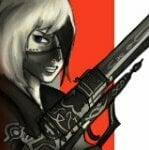
Randall Steele Posted May 11, 2023 Posted May 11, 2023 View File White Mantle Set Vanilla Male HDT-SMP White Mantle armor + weapons ported from Guild Wars: Prophecies. Ported for Male Vanilla body shape but be worn by Females with no issues. No plan for female bodyslide for now. Chest piece has HDT-SMP. Let me know if there are issues. The Set consists in: Headpiece Top (HDT-SMP) (best cape ever btw) Gloves Boots White Mantle Sword (1h sword) White mantle Crude Sword (1h sword) White Mantle Tower Shield Textures were what they were, i tried my best to augment them. Let me know if something looks weird. SMP should move good, at least on my end. Install and use AddItemMenu to get the Set ingame. Ebony stats. If problems arise please let me know. If problems arise please let me know. Credits: Guild Wars: Prophecies, ArenaNet, NCsoft Submitter Randall Steele Submitted 05/11/2023 Category Regular Mods Requires HDT-SMP Regular Edition Compatible 1
ssskn Posted May 13, 2023 Posted May 13, 2023 Nice, been a GW fan/player for a long time. Port some GW2 outfits if you can, but I think it might be too complicated from what I understand of that .dat file.
Randall Steele Posted May 13, 2023 Author Posted May 13, 2023 4 hours ago, ssskn said: Nice, been a GW fan/player for a long time. Port some GW2 outfits if you can, but I think it might be too complicated from what I understand of that .dat file. I have Joko in very early WIP but I need first to port some commissioned stuff. I want to port Xera clothing one day
KKMod777 Posted May 13, 2023 Posted May 13, 2023 Nice work, I'm getting nostalgia for GW1. May I ask what tool did you use to extract the assets? Thanks!
Randall Steele Posted May 13, 2023 Author Posted May 13, 2023 1 hour ago, KoboBear said: Nice work, I'm getting nostalgia for GW1. May I ask what tool did you use to extract the assets? Thanks! Thank you I used ninja ripper 1.7, i had to put back the model in one piece and in t-pose myself, lots of pain. These weeks a new tool has been released, Guild Wars Map Browser, but you can't export from it yet. 1
KKMod777 Posted May 20, 2023 Posted May 20, 2023 On 5/14/2023 at 3:05 AM, Randall Steele said: Thank you I used ninja ripper 1.7, i had to put back the model in one piece and in t-pose myself, lots of pain. These weeks a new tool has been released, Guild Wars Map Browser, but you can't export from it yet. Thank you! Does this method also work on GW2?
Randall Steele Posted May 20, 2023 Author Posted May 20, 2023 35 minutes ago, KoboBear said: Thank you! Does this method also work on GW2? Should work, for GW2 there's GW2 browser but takes hours to load and search for the correct npcs
ssskn Posted May 21, 2023 Posted May 21, 2023 Very nice. I remember reading long time ago that gw2 dat is a mess. Files are all over the place, hard to find and piece together. There's that other GW2 armor port, but those are from vanilla GW2 game. The tier 3 human set, they are not bad tbh, I need to convert them to 3ba. Oh wow, the new tool looks promising.
Randall Steele Posted May 21, 2023 Author Posted May 21, 2023 16 minutes ago, ssskn said: Very nice. I remember reading long time ago that gw2 dat is a mess. Files are all over the place, hard to find and piece together. There's that other GW2 armor port, but those are from vanilla GW2 game. The tier 3 human set, they are not bad tbh, I need to convert them to 3ba. Oh wow, the new tool looks promising. it's only hard when you need to recreate your character because the meshes are scattered everyehere. The npcs instead have their own mesh file and number. There's a long .txt list containing some npcs and their number. 1
ssskn Posted May 22, 2023 Posted May 22, 2023 Oh boy good to know. I'll try to convert some outfits when I get some free time. I've tried blender before to convert, but that was a mess and headache inducing. Hopefully obj import into bodyslide is enough... So use ninja ripper > gw2dat? Or is there anything better?
Randall Steele Posted May 22, 2023 Author Posted May 22, 2023 (edited) 6 hours ago, ssskn said: Oh boy good to know. I'll try to convert some outfits when I get some free time. I've tried blender before to convert, but that was a mess and headache inducing. Hopefully obj import into bodyslide is enough... So use ninja ripper > gw2dat? Or is there anything better? Won't be enough, the mesh is in t-pose and you need to make it fit to your target body. In those matters blender is better than outfit studio I'm afraid. My rule is: is there a dedicated program for X game that is easy to use and can extract meshes in t-pose? I'll use it. If there is not or is too hard, ninjaripper Edited May 22, 2023 by Randall Steele
KKMod777 Posted May 24, 2023 Posted May 24, 2023 On 5/22/2023 at 5:56 AM, Randall Steele said: it's only hard when you need to recreate your character because the meshes are scattered everyehere. The npcs instead have their own mesh file and number. There's a long .txt list containing some npcs and their number. Is the list complete, or does it only contain parts of meshes/textures? I tried to port the Apprentice Robe with NinjaRipper, but the texture was getting some noise. I’m still looking for a better method.
Randall Steele Posted May 24, 2023 Author Posted May 24, 2023 (edited) 5 hours ago, KoboBear said: Is the list complete, or does it only contain parts of meshes/textures? I tried to port the Apprentice Robe with NinjaRipper, but the texture was getting some noise. I’m still looking for a better method. oh nice work in the porting! was the mesh in t-pose after the rip? provided you have the diffuse and normal maps, you need to fiddle in nisfkope with the BSlightingproperties settings to remove some gloss and specular power the list has models of npcs in armor and all Edited May 24, 2023 by Randall Steele
KKMod777 Posted May 26, 2023 Posted May 26, 2023 On 5/25/2023 at 6:47 AM, Randall Steele said: oh nice work in the porting! was the mesh in t-pose after the rip? provided you have the diffuse and normal maps, you need to fiddle in nisfkope with the BSlightingproperties settings to remove some gloss and specular power the list has models of npcs in armor and all I’m not quite sure if it was an A-pose or a T-pose… I did it last year, so I guess this outfit doesn’t cause much trouble even if it’s a T-pose. I see… I’ll check the gloss and specular. The texture quality still troubles me, it’s only 512x512, even if I upscaled it with Cupscale, there’s still some noise that can be seen. May I ask where I could find the list? Thank you!
Randall Steele Posted May 26, 2023 Author Posted May 26, 2023 1 hour ago, KoboBear said: I’m not quite sure if it was an A-pose or a T-pose… I did it last year, so I guess this outfit doesn’t cause much trouble even if it’s a T-pose. I see… I’ll check the gloss and specular. The texture quality still troubles me, it’s only 512x512, even if I upscaled it with Cupscale, there’s still some noise that can be seen. May I ask where I could find the list? Thank you! as long as is not the captured pose but A or T is fine for me then, i can rip from gw2 too with ninjaripper then ^^ for gw1 and other low res textures i use an AI upscaler, each has some differences. gw2brower folder, doc, stuff. 1
ssskn Posted May 27, 2023 Posted May 27, 2023 thanks for the tips and wow nice job with that apprentice armor. its hard going back to gw2 after being spoiled with 2k/4k textures. Even the gw2 skill effects look bad nowadays. Let us mod anet.
Randall Steele Posted May 27, 2023 Author Posted May 27, 2023 18 hours ago, KoboBear said: I’m not quite sure if it was an A-pose or a T-pose… I did it last year, so I guess this outfit doesn’t cause much trouble even if it’s a T-pose. I see… I’ll check the gloss and specular. The texture quality still troubles me, it’s only 512x512, even if I upscaled it with Cupscale, there’s still some noise that can be seen. May I ask where I could find the list? Thank you! I ripped the Xera white mantle outfit and I had to modify the texture file itself, it had some alpha I had to let it be opaque, maybe the apprentice set is washed out because of that, also I swapped color channels on the Normal map since it was yellow for me. Still need to put it in outfit studio, I'll fit to the body first 1

Recommended Posts
Create an account or sign in to comment
You need to be a member in order to leave a comment
Create an account
Sign up for a new account in our community. It's easy!
Register a new accountSign in
Already have an account? Sign in here.
Sign In Now